Every laptop in this guide weighs 1.50 kg (3.31 lb) or less on its own. For a day of client visits, count the charger and any adapter you’ll carry, too.
For walking between offices with USB-C displays, the 14-inch Lenovo Yoga Slim 7i Ultra Aura Edition pairs a touchscreen with a light travel kit. Two reviews measured the Core Ultra 7 355 model at 1,141 g and 1,155 g with its charger. An HDMI-only meeting room adds an adapter to the bag. the比較 · Notebookcheck
These are Notebookcheck’s weights in grams for the machines and chargers it reviewed. It didn’t give a charger weight for the Surface.
The Dell XPS 14 and ThinkPad E14 show how much the separate power kit can change a close comparison. Their reviewed laptops differ by 51g on their own (1,455g versus 1,404g). The reviewed pairs differ by 123g (1,836g versus 1,713g). That makes 72g of the packed difference attributable to the two power kits in these measurements. Someone who can leave an approved charger at both offices should cross out that 72g when comparing what goes back and forth.
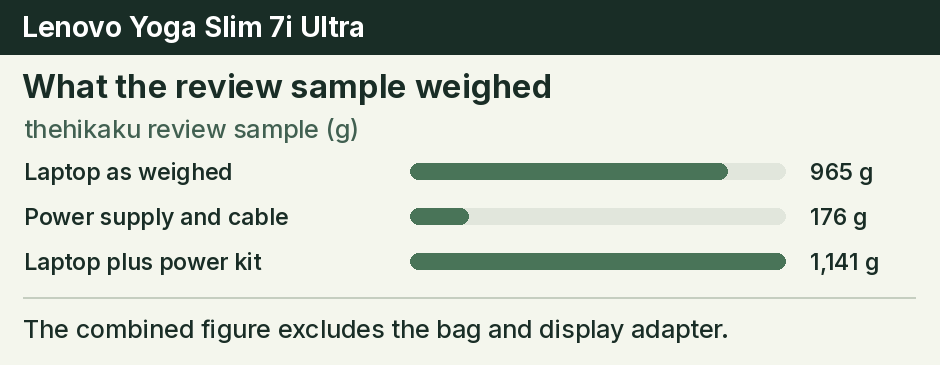
Lenovo says this Yoga starts at 975 g. Two reviewers weighed a configuration with a Core Ultra 7 355, 32 GB of memory and a 1 TB drive. Japan’s the比較 got 965 g for the laptop and 176 g for the power supply and cable. Notebookcheck got 978 g and 177 g. In Notebookcheck’s figures the Yoga and charger come in 77 g under the Dynabook and charger. A hub heavier than 77 g can reverse the order. See what goes in each bag. Lenovo · the比較 · Yoga measurements · Dynabook measurements
Which Yoga configuration fits client work?
The 32 GB version gives you room to keep a presentation, reference documents and a video call open together. The memory is soldered in, so make that choice when you buy. The 14-inch, 2880 × 1800 OLED touchscreen lets you reach over and enlarge a detail while someone’s looking at the slide. Tom’s Guide noticed reflections in bright light during its week with this configuration. If your usual desk faces a window, compare the matte Dell XPS 14. Tom’s Guide · Compare US prices
Best for walking between client offices
In a meeting room with a USB-C display, any of the Yoga’s three Thunderbolt 4 ports can carry video. If your clicker uses a USB-A receiver, pack the adapter. Windows Central needed one for its own USB-A receivers. For Ethernet and HDMI without a hub, the Dynabook has both ports. For signing drawings with an active pen, see the MSI Flip. Lenovo ports and pen support · Windows Central hands-on · WIRED on the Dynabook
Andrew Marc David weighs the Yoga and shows its ports.
The X1 Carbon weighed 1,139 g on its own and 1,414 g with the charger. Look for the Core Ultra 5 325 with 32 GB of memory, a 512 GB drive and the low-power 1920 × 1200 IPS touchscreen.
Best for a long train ride before a presentation. Notebookcheck got 23 hours and 13 minutes of web browsing from the 60 Hz IPS model, the longest of the three configurations in our train comparison. At the office, you can plug the projector into HDMI and your clicker into USB-A. RTINGS also liked the keyboard for long stretches of typing.
The keyboard and ports comments from RTINGS cover a Core Ultra 7 355 IPS unit. The 23h 13m browsing figure comes from Notebookcheck’s Core Ultra 5 325 test.
ASUS Zenbook A14 UX3407NA
The A14 slips under a kilo at 992 g, or 1,240 g with the charger. This is the UX3407NA with a Snapdragon X2 Elite, 32 GB, a 1 TB drive and a 14-inch 1920 × 1200 OLED screen.
Best for giving presentations on Windows on Arm. Say you walk into a room with an HDMI projector, your clicker has a USB-A receiver, and you’re low on battery. Plug in all three. TechRadar found that port layout on this X2 Elite model, with either USB4 port available for power. Before you buy it for work, ask IT about your company VPN and any devices that need their own drivers. The Intel Yoga is an alternative if your equipment needs an x86-only driver or you use touch to present.
The Portégé is 961 g on its own and 1,232 g with its charger. WIRED reviewed the Core Ultra 7 258V version. Here you get 32 GB, a 1 TB drive and a 14-inch IPS screen without touch.
Best for client sites where you plug into the network. When someone points to an Ethernet cable and there’s no guest Wi-Fi, you can get straight to work. You still have HDMI for the projector and two USB-A ports for equipment. WIRED found the little arrow and paging keys cramped. If most of your trip involves moving around a giant spreadsheet, I’d look at the 16-inch LG as well.
What kind of desk will you have when you get there?
MacBook Air 13 M5
The Air came in at 1,230 g alone and 1,397 g with the review charger. This is the M5 with an 8-core GPU, 16 GB of memory, a 512 GB drive, MagSafe and two Thunderbolt 4 ports.
Best for quiet interviews and a two-monitor Mac desk. Set it next to a microphone and there’s no laptop fan to spin up mid-interview. Back at your desk, you can keep the lid open and connect two external displays. MagSafe handles charging and leaves both Thunderbolt ports free. RTINGS tested this entry model and saw it slow down under a long, heavy workload, something to weigh if you render video after every shoot. For a client’s HDMI projector, put a USB-C adapter in your bag.
That packed weight includes the 30 W adapter the reviewer used. Apple lists a different adapter for the U.S. model.
Surface Laptop 13 (2nd Edition)
The 13-inch Surface weighed 1,230 g. The second-edition model here has a Snapdragon X2 Plus, 16 GB, 512 GB of UFS storage and a 1920 × 1280 touchscreen.
Best for reading documents at a small train or airplane table. The short chassis leaves you some room, and the 3:2 screen shows more of a portrait page than a 1920 × 1200 screen at the same scaling. I’d appreciate that when checking the paragraph above a contract clause. Your USB-A mouse plugs straight in. For HDMI you’ll need an adapter, and for a company VPN or scanner that uses its own driver, check that it supports Arm64 before you buy.
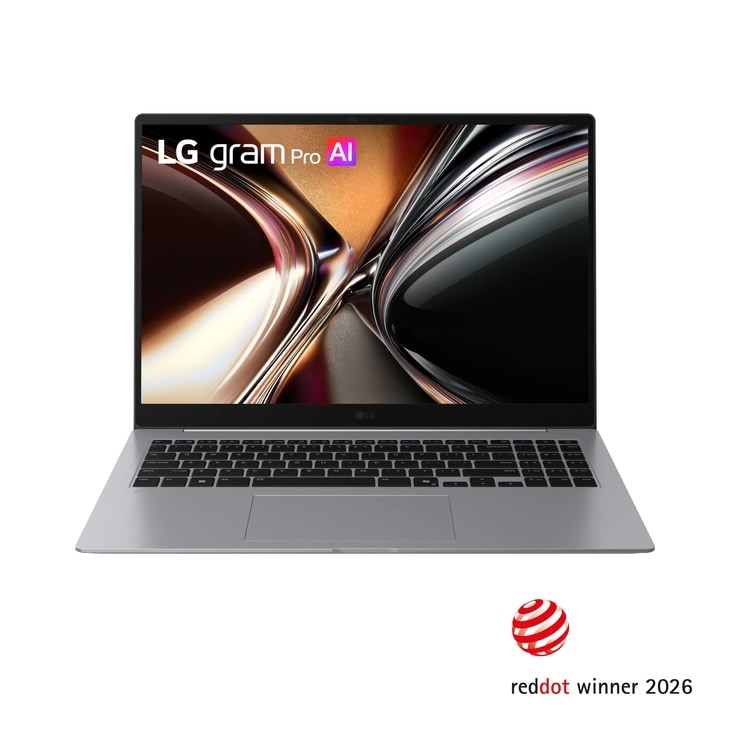
Sixteen inches sounds like a lot to carry, but this gram weighed 1,229 g alone and 1,383 g with its charger. The 2025 configuration here pairs a Core Ultra 7 256V, 16 GB and a 1 TB drive with a matte 2560 × 1600 IPS screen.
Best for a hotel room where the laptop is your only screen. Open the expense workbook on one side and the invoice on the other. The matte finish also helps when the hotel desk faces the window. COMPUTER BILD measured 443 cd/m² on this German configuration. I’d take a smaller laptop if most of the work happened on a train table.
The Flip weighed 1,377 g on its own and 1,573 g with the charger. It has a Core Ultra X7 358H, 32 GB and a 1 TB drive. The parts that matter across a client’s desk are the 360-degree hinge and the Nano Pen that slides into the laptop.
Best for marking up a plan with a client. Fold the keyboard underneath, turn the floor plan toward them and hand over the pen. Tom’s Guide used the pen for writing and drawing and found the slim barrel fiddly to pull out. If clients mostly look at slides and pinch to zoom, I’d save the weight and take the Yoga.
The XPS makes our cutoff at 1,455 g, though the charger takes the pair to 1,836 g, the heaviest reported combination here. This one has a Core Ultra 7 355, 16 GB, a 512 GB drive and the matte 1920 × 1200 IPS display.
Best for the desk that always faces a bright window. Its refresh rate can drop to 1 Hz while you read a schedule and rise to 120 Hz as you scroll. Tom’s Hardware tested this LCD version alongside an OLED machine with a different processor, so the screen alone doesn’t explain the gap. If you’d use touch every day or spend more time carrying the laptop than sitting at it, I’d go for the Yoga.
The E14 weighed 1,404 g on its own and 1,713 g with the charger. Look for the H-series machine with a Core Ultra 7 255H, 16 GB and a 1 TB drive. This version has two memory sockets and space for two M.2 drives.
Best for field teams that keep and upgrade their laptops. Say you start with 16 GB and a year later everyone’s carrying a bigger local archive. You can add memory or fit a second SSD, and there’s built-in Ethernet for work at a client site. Japan’s the比較 installed and tested a second drive in the same H-series chassis. The V-series E14 has a different memory design. If your team never opens the case, the Dynabook is easier to carry.
Two client visits. What’s on the conference table?
I’d take the Lenovo Yoga Slim 7i Ultra if both clients use USB-C displays. You can walk in, plug in the screen and show someone a detail with your finger. Say the first client comes back with a different answer: “There’s an HDMI cable on the table.” I’d keep the Yoga and tuck a small adapter into the bag. It’s the second visit, where you also need a wired network and a USB-A receiver for the clicker, that would make me reconsider. Lenovo’s port and display specifications.
What the two bags weigh with the room’s cables supplied
The laptop-and-charger weights come from Notebookcheck’s Yoga review and Portégé review. We added the accessory makers’ listed weights. That last row is effectively a tie. In Japan, the比較 weighed a Yoga and power supply at 1,141 g. Add the same hub and you get 1,223 g, which puts the Yoga just ahead again. I’d pick the Dynabook for recurring wired-site visits because I could leave the hub at home and still plug everything in. Dynabook’s connector list · How to weigh your own travel kit.
A six-hour train ride, then a presentation
The train socket is dead, you’ve got a proposal to finish, and the client expects a demo when you arrive. I’d pack the ThinkPad X1 Carbon Gen 14 with the low-power IPS touchscreen. Its tested kit adds 259 g over the Yoga.
Wi-Fi browsing with the screen set to about 150 nits
At maximum brightness, the lab tested the same ThinkPad again. It ran for 14 h 14 min, almost nine hours less. That’s the number I’d want to know when the sun comes through the train window. Notebookcheck’s browsing test loads a different page every 30 seconds. A morning spent sharing your screen on a video call is a different workload. I’d keep the charger in the bag for that trip.
If the train takes you straight to a client’s wired network, I’d consider the Dynabook. It managed 19 hours in the same test and has Ethernet built in. Buying the X1? Here’s how to spot the tested IPS configuration. How to read laptop battery claims.
Three nights in a hotel, with the laptop as your only screen
You’ve got the supplier’s PDF quote open on the left and your costing sheet on the right. You’re looking for the freight charge that explains why the totals don’t match. Here I’d choose the 16-inch LG gram Pro, specifically the matte IPS version 16Z90TS-G.AU89G. Both it and the 14-inch Yoga have 16:10 displays, so you can work out how much space each document gets before you buy. LG’s 16-inch configuration · Lenovo’s 14-inch display.
14″ Lenovo Yoga
QuoteCosts
15.1 cm per half
16″ LG gram Pro
QuoteCosts
17.2 cm per half
Approximate physical widths for an even split, before window borders. Screen outlines are drawn to the same scale.
That’s roughly two extra centimetres for each document, or 31% more total screen area. You can use the extra room to make the text bigger while keeping the same figures side by side. The number of spreadsheet columns you actually see depends on Windows scaling and the zoom setting in your workbook.
Would I carry it? The reviewed LG and its charger come to 1,383 g, just 228 g more than the Yoga kit. What would stop me is my bag. LG lists the chassis at 357.7 mm wide, a full 45.1 mm wider than the Yoga. I’d measure the sleeve opening, especially around the zip. For three evenings reconciling quotes, I’d happily make room for the LG. If there’s a monitor waiting at the desk and I only open the laptop for email at the hotel, I’d take the lighter Yoga. Planning around a hotel desk and meeting-room ports.
Found your travel laptop? Here’s what I’d check before buying
A shop can put the same laptop name on two machines with different screens, memory or battery results. The Yoga listing is from the US and the ThinkPad and LG listings are from Germany. If you buy elsewhere, match the components on your local quote.
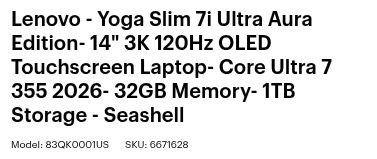
Lenovo Yoga Slim 7i Ultra Aura Edition — read the small line under the title
For the client-visit pick, use Lenovo’s model number, 83QK0001US, when asking another seller for a quote. Best Buy’s SKU identifies the listing in its own catalog.
Lenovo model 83QK0001US · Best Buy SKU 6671628. Excerpt from the Best Buy US product page. Checked November 12, 2026.
Is “3K” a better screen than “2.8K” here? I’d skip straight to the pixel count. Best Buy lists 2880 × 1800 under Screen Resolution. Lenovo calls that same resolution 2.8K and lists a maximum 120 Hz refresh rate. The Yoga accepts finger touch. For annotating a floor plan with an active pen, see the MSI Prestige 14 Flip. Lenovo’s display and pen specifications.
Would a cheaper 16 GB listing do? This US listing pairs 32 GB of memory with a 1 TB SSD. Lenovo solders the memory to the board and provides no spare slot. Lenovo’s memory specification.
ThinkPad X1 Carbon Gen 14 — which screen earned 23 hours?
On the German listing, look for Herstellernummer, the manufacturer’s number. 21V70075GE identifies the Core Ultra 5 325, 32 GB RAM, 512 GB SSD and 14-inch, 1920 × 1200 low-power IPS touchscreen. The shorter number 52860 is the shop’s own item number. Notebookcampus listing · Lenovo’s sheet for this exact model.
In Notebookcheck’s Wi-Fi test at 150 nits, that IPS configuration ran for 23 hours 13 minutes. The same review compares an X1 Carbon Gen 14 with OLED and a Core Ultra 7 355 at about 13½ hours. Both have a 58 Wh battery, but the processor changes along with the screen. Notebookcheck’s test and comparison.
LG gram Pro 16 — one character changes what you’re buying
Both versions below have the same 16-inch, 2560 × 1600 matte IPS screen for side-by-side documents. The model suffix tells you how much memory and storage you get.
If my trip is mostly spreadsheets and proposals and those already run comfortably in 16 GB, I’d stick with AU89G. That’s the one Notebookcheck measured at 19 hours 36 minutes of Wi-Fi browsing. If I also need a large offline sample library or my current projects already push past 16 GB, I’d ask for the price of AU8CG. Notebookcheck’s tested LG configuration.
How much does each configuration cost?
The first $450 upgrade doubles the Zenbook A14’s memory and storage. The next $450, from the 32 GB A14 to the Yoga, buys a touchscreen and a different processor at the same capacity.
US prices for new laptops at Best Buy, November 12, 2026. USD before tax, accessories and shipping.
If I already use a Mac for client calls, spreadsheets and presentations, I’d take the $1,149 MacBook Air and use my own work files to judge whether 512 GB is enough. If the team uses Windows and IT has cleared our VPN and peripherals for Arm, I’d pick the $1,349.99 A14 for the same trip. Its built-in HDMI port takes the cable in the meeting room, and a USB-A presentation clicker can stay plugged in at the same time. ASUS port specifications.
Before spending the first $450, I’d open a typical client project on my current laptop. Can I keep the video call, costing workbook and presentation open comfortably? How much space is left after I download everything I need for the trip? If 16 GB has been tight or the offline folder routinely fills a 512 GB drive, I’d buy the 32 GB / 1 TB A14. If both fit comfortably, the cheaper A14 already has the ports I came for.
What does the second $450 buy?
For someone who regularly sits beside a client to mark out a detail with a finger, the screen is the main difference. The Yoga has a 2880 × 1800, 120 Hz OLED touchscreen. The two A14s listed here have 1920 × 1200, 60 Hz OLED screens without touch. The independent reviews put the 32 GB A14 at 992 g and the Yoga at 978 g before chargers. There’s just 14 g between them. The other practical difference is whether your company’s equipment works on Windows on Arm. Lenovo display specifications · ASUS display specifications · A14 test unit · Yoga test unit.
What if the room only has HDMI? Suppose there’s already an HDMI cable on the table and I don’t own an adapter. Best Buy’s Insignia USB-C to HDMI adapter was $19.99. The 32 GB A14 plugs straight in at $1,799.99. The Yoga and adapter come to $2,269.98, a $469.99 difference before tax. With a USB-C display or an adapter already in my bag, the difference goes back to $450.
Would I order the same laptop for five people on the road?
Four colleagues return on Friday and one flies out for six weeks. Put two names on the pilot order: the person who can approve the corporate setup at home and the traveler who will need help abroad. Have the first person enroll the exact configuration, then give the enrolled machine to the second for a day. A test made with an administrator’s sign-in can miss restrictions that appear in an ordinary employee account.
Can the first employee sign in the way IT expects?
At Best Buy, the US Yoga 83QK0001US ships with Windows 11 Home. Look under Compatibility in the full specifications. Lenovo’s sheet for the US ThinkPad E14 Gen 7, 21SX0039US, lists Windows 11 Pro. That detail matters if IT expects the employee to sign in to Windows with a company account on a device joined to Microsoft Entra. Home doesn’t support that kind of join. Yoga retail specifications · E14 model sheet · Microsoft’s Entra join requirements.
If a salesperson wants the Yoga touchscreen for demonstrations, I’d ask for a Pro-equipped quote or have IT price the Home-to-Pro upgrade. If Pro and a built-in Ethernet port cover the brief, I’d start with the less expensive E14. If IT uses Windows Autopilot, ask who will register the machines to your organization before shipping. I’d have the new starter try the first sign-in on the pilot unit before sending another box directly to a hotel. Microsoft’s edition upgrade guide · Autopilot registration for resellers.
What would I try on that first working day?
I’d give the traveler their usual VPN, presentation remote and a copy of the deck they’re taking. Have them connect from a mobile hotspot, open the shared proposal, then unplug from the network and present the downloaded copy on the meeting-room display. If the Snapdragon Zenbook A14 is on the shortlist, this is when I’d try the exact USB device and VPN the team uses. Microsoft explains that hardware and apps that need a driver depend on an Arm-compatible driver. Microsoft’s guidance on Windows on Arm.
Sharing one hotel socket with a phone? The Yoga needs at least 20 V at 2.25 A (45 W) to operate and start charging. Its fastest charging profile is 20 V at 3.25 A (65 W). Yoga user guide, under Specifications.
Belkin WCH013. It supplies 20 V when the Yoga is plugged in alone. With a phone connected too, neither port lists the 20 V the Yoga needs. Belkin’s output chart.
Insignia NS-PW31XC2W22. USB-C2 still offers 20 V at 3.25 A while USB-C1 powers a phone. Use C2 for the Yoga with a cable rated for at least 65 W. Insignia’s two-port specifications.
If the laptop fails in week two abroad, who takes it in?
Take the German X1 Carbon, 21V70075GE. Its model sheet lists three years of base courier or carry-in service and a Premier Support upgrade. The US E14 above lists one year of courier or carry-in service. Now picture the traveler in Singapore with a machine that won’t start. Neither figure tells them where to take it that afternoon. X1 service terms for the German model · E14 service terms for the US model.
Before the flight, I’d enter the machine type or serial number in Lenovo’s international warranty lookup, select the destination, and check what service is offered there. Lenovo says the delivery method can vary by country. I’d save the serial number, the local authorized service contact and our IT help-desk number on the traveler’s phone. If a repair means mailing the machine away, I’d agree with IT on a loaner before departure. Lenovo’s international warranty terms.
Which laptop fits your next business trip?
For client visits on foot, the Lenovo Yoga Slim 7i Ultra Aura Edition with 32 GB works well when the meeting rooms have USB-C displays. The laptop and charger weighed 1,155 g in Notebookcheck’s test. For a long train ride without a reliable outlet, the low-power IPS ThinkPad X1 Carbon Gen 14 has the longer tested runtime. For sites with HDMI projectors and wired networks, the Dynabook Portégé Z40L-N takes both cables directly. For evenings comparing invoices with a spreadsheet and no external monitor, the 16-inch LG gram Pro gives each document more room.
Sources for weights, battery life, ports and screens
For R or Python work, take the project’s environment file to the laptop demonstration. An Intel Windows installation on the Yoga Slim 7i Ultra is a sensible starting point when the lab maintains that platform. An Apple-silicon MacBook Air makes more sense when the group can point to an environment that runs there. If the calculation lives on a university server, spend the trial checking the VPN, package versions and downloaded output before buying a faster local processor.
The most revealing part of a research demo often comes after the graph appears. Could a colleague start from the raw rows and produce it again? A library of packages on a lab desktop can hide an installer, a local file path or a font that the new laptop will never see. One small project with a known answer is worth bringing to every demonstration.
Five lightweight laptops and the research role for each
Copy the exact platform and operating system from the prospective order into the first line of your project notes. A lab that supports Intel Windows has given a useful clue about the Yoga. A lab with a maintained Apple-silicon environment has given an equally useful clue about the Air.
Approved Windows Arm client with remote analysis available
Native package builds, drivers and actual remote access
The table is intentionally conditional. It does not award a universal winner to the computer with the highest memory figure or the newest processor label. A successful purchase leaves the student with a working, recoverable research project. Our broader graduate-student laptop guide covers additional study situations beyond computational research.
Write a research acceptance brief before choosing the chassis
Ask a supervisor or research technician for a small representative project. Include the source scripts, a permitted sample dataset, the dependency record, one expected table and one expected figure. Choose an example that crosses the difficult boundary: a package with native code, a geographic transformation, a reference database connection or a laboratory export format. A demonstration limited to opening a notebook cannot test those dependencies.
Write down where each stage is supposed to run. Data collection might happen on an instrument workstation, cleaning locally, estimation on a university cluster and manuscript rendering back on the laptop. Record the operating system and permissions required at each stage. This keeps a genuinely useful remote service separate from the vague promise that something could be moved to the cloud later.
Give each essential task an owner and a pass condition. For example, the student owns recreating the local environment, the laboratory owns the instrument export, and the computing service owns server access. Agree which outputs must match exactly and where an explained numerical tolerance is appropriate. This becomes a purchase acceptance brief rather than an artificial product score.
Lenovo Yoga Slim 7i Ultra — Best for a low-mass Intel Windows research setup
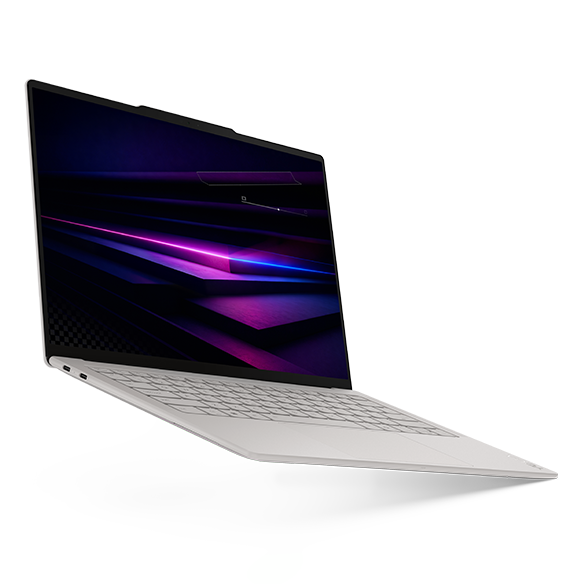
Manufacturer product illustration of Lenovo Yoga Slim 7i Ultra Gen 11; appearance does not identify a specific memory or storage order. Official model documentation
The 14IPH11 platform combines a published starting weight of 975g with Intel processors, soldered memory and three Thunderbolt 4 ports. The comparison here targets Core Ultra 7 355, 32GB and 1TB; it does not treat 32GB as the platform maximum. Lenovo’s current reference also identifies other memory offerings. Starting weight describes the device and can vary with the actual configuration. Lenovo PSREF specifications.
Its strongest role is a student carrying an already validated Windows environment between the library, a supervisor meeting and home. Make the purchase conditional on the representative project running correctly, then add the actual power supply and any necessary display or USB-A adapter to the bag. The small published device mass does not remove those accessories.
Choose another candidate if the research group’s support arrangement or required local workload points elsewhere. In particular, an attractive chassis is not evidence that a specialized package, license service or instrument connection has been approved. Ask for that evidence before comparing optional screen and finish choices.
MacBook Air 13-inch M5 — Best for a supported Apple-silicon project
Apple lists configurable 32GB unified memory and 1TB storage for the 13-inch M5, a 1.23kg device weight, two Thunderbolt 4 ports and separate MagSafe charging. This article uses that 13-inch configuration, not the larger model. Apple technical specifications.
The Air becomes a convincing research choice when the group already maintains a successful Apple-silicon installation and can reproduce it for the student. Ask a colleague to restore the environment from its recorded inputs, run the representative analysis and render the final document. Existing familiarity can reduce setup friction, but it should be demonstrated through the project rather than inferred from a shared brand.
Check every non-Python component too. A script may call a command-line utility, a commercial statistics program or a vendor library. Put those calls in the acceptance brief. If a required Windows application is available only through an approved remote service, test that service from the places where the student will actually study.
ASUS Zenbook S14 UX5406AA — Best for analysis moving between connected workspaces
The selected AA platform offers Core Ultra 7 356H, 32GB onboard memory and 1TB storage. ASUS lists HDMI, USB-A and two Thunderbolt 4 connections, with a published device weight of 1.20kg. Use the AA column of the manufacturer page rather than importing a processor or battery figure from UX5406SA. ASUS model-specific technical specifications.
This connection arrangement is worth considering when a student alternates between an analysis desk, a shared display and seminars using USB-A equipment. It can make the physical plan simpler, although it cannot certify a particular dock, monitor or instrument. Test those items as a chain with power connected.
Compare the final offer against the Yoga using the same research project and accessory list. Select the ASUS because its actual setup fits the work, rather than expecting its processor name to establish a measured advantage. For teaching-heavy schedules, use the separate graduate teaching-assistant laptop comparison.
ThinkPad X1 Carbon Gen 14 — Best when university support defines the configuration
Lenovo’s Gen 14 reference lists the Core Ultra 7 365 vPro platform considered here and a port layout including HDMI, USB-A and Thunderbolt 4. The 32GB, 1TB Windows 11 Pro arrangement is a configuration to request through the institution; screen, wireless options and services must be tied to its actual order code. ThinkPad X1 Carbon Gen 14 PSREF.
Its practical attraction is the possibility of using an institution’s approved computer and support process. That possibility needs confirmation: being a ThinkPad does not automatically make a personal purchase eligible for university management or on-site repair. Ask who installs the required software, who handles a failed machine and whether a loan computer can use the same project environment.
If that support is available, evaluate the complete arrangement alongside consumer alternatives. A student approaching an important deadline may reasonably prioritize a documented recovery route over a smaller device-only weight. The choice remains specific to the university rather than a universal reliability ranking.
Surface Laptop 13-inch, 2nd Edition — Best for a verified Windows Arm and remote-compute arrangement
The business model uses a six-core Snapdragon X2 Plus and offers 16GB or 24GB memory. Microsoft distinguishes 256GB or 512GB UFS storage from the removable 1TB SSD option. Our target is 24GB with the 1TB SSD, Windows 11 Pro and the 13-inch 3:2 screen. Microsoft lists a 1.23kg device weight. Microsoft’s exact second-edition business specifications.
It is a candidate for a student whose analysis already runs on an approved server and whose local packages have passed their checks. Do not classify it simply as an Intel Windows computer in a smaller case. Native software, emulated applications and drivers are separate compatibility questions.
In particular, Microsoft says drivers on Arm devices require native Arm64 support; ordinary application emulation does not settle that issue. Windows on Arm compatibility FAQ. A required instrument driver can therefore decide the purchase even if the editor, browser and basic Python example all work. Obtain an explicit answer for the real equipment.
Compiled dependencies can decide the platform before memory does
A research environment is more than the language name. List packages that compile C, C++ or Fortran code, plus external libraries and utilities they expect. A colleague’s successful installation is useful evidence only when the operating system, processor architecture, package versions and installation route match the proposed computer closely enough to reproduce.
CRAN currently describes the Arm64 version of Rtools45 as experimental, notes that some packages do not work, and explains that native Windows Arm package compilation needs its toolchain. Rtools is relevant when compiling packages from source; installing compatible CRAN binary packages does not require it. Match the compiler toolchain to the R version used by the project. This does not establish that every R project fails on Arm; it identifies a dependency question that must be answered for the actual project. CRAN Rtools45 guidance.
Prepare three outcomes for each critical dependency: confirmed native installation, an approved alternative execution route, or unresolved. Treat an unresolved essential package as a reason to delay that platform decision. Conversely, do not reject a platform solely because an unrelated package has a problem. The aim is to establish the student’s complete chain of work, not repeat a general argument about processor architectures.
Restore the R project instead of collecting package names by memory
For an R-based dissertation, keep the project’s dependency record beside its analysis scripts. The renv documentation explains how restore uses a lockfile to rebuild a project library. That gives a more useful acceptance action than manually installing whatever happens to be the newest version of each package. renv restore reference.
A three-line CSV makes a good control before introducing a full project. Use the rows (oak, 8), (oak, 12) and (ash, 9). Grouping by species and averaging gives oak 10 and ash 9. Save the result as a table and render the figure named in the manuscript. Matching those means verifies the simple arithmetic. A missing figure or a report with yesterday’s date points to a different step in the build.
The lockfile should be treated as one part of the research record, not a guarantee that every external service and operating-system component is preserved. Explain how restricted data, credentials, local utilities and unavailable package sources are handled. A successful recreation on the candidate computer is stronger purchase evidence than a screenshot showing the same list of package names.
Python and document rendering need a shared environment plan
Python’s own venv documentation treats virtual environments as disposable and recreatable, rather than folders to copy between computers. Keep the project’s code and an installation specification under the group’s normal version-management process; recreate the environment using a suitable interpreter on the new machine. Python virtual environment documentation.
Next, verify which interpreter the notebook or document tool actually uses. Quarto’s environment guidance describes Python and R environment arrangements and notes that mixed-language documents can involve Knitr and reticulate. An editor running the expected interpreter does not prove that the final document uses the same one. Quarto virtual environment guidance.
Make the final export part of the acceptance check. Ask the candidate machine to generate the intended HTML, Word or PDF output through the real toolchain, including citations and figures. Record any extra fonts or document components required by the department. This is especially useful when a project looks correct interactively but fails on the command used to create its submission copy.
Worked example: separate the working subset from the research archive
Consider an illustrative social-science project with 18GB of raw exports, a 6GB cleaned working subset and 8GB of generated results. Keeping one local copy of each totals 32GB before software, environment caches, temporary files, earlier versions and personal documents. These numbers describe a planning exercise, not the observed storage use of any laptop.
For the train, take the permitted 6 GB working subset and the 8 GB of results if both are needed offline. That makes 14 GB of project data. The 18 GB raw archive can stay on institutional storage when policy requires it. Allow space separately for the interpreter, packages, scratch files and the rest of the drive’s contents.
Memory requires its own observation. A 6GB file on disk is not a reliable statement of the RAM needed to read, transform, join and model it. Ask the group to inspect the representative pipeline and its peak demand on an existing system. Use that observation to choose between available memory configurations. The research software and memory guide develops that capacity decision in more detail.
Remote compute is an operating arrangement, not a promise attached to a laptop
A university server can change the balance between local portability and local computing resources, but only after access is established. Confirm the account, approved connection route, available software, storage location and person responsible for support. Ask how work is submitted, how results are retrieved and what happens when an interactive connection ends.
For groups using VS Code Remote SSH, Microsoft documents editing and working on a remote machine through an SSH connection. That describes a supported development mechanism; it does not grant access to a university host or guarantee that its system satisfies the required setup. VS Code Remote SSH documentation. Follow the institution’s approved instructions and avoid changing server configuration simply to make a personal laptop demonstration succeed.
Test both ordinary and inconvenient situations. Can the student reconnect from home, obtain authentication without a missing device and find the results of a previous job? What useful work remains possible during a network outage? Keep a permitted offline task, such as writing methods or reviewing already exported figures, in the plan. That makes a portable client a deliberate choice rather than an accidental dependence on constant connectivity.
Use an acceptance matrix that ends with a purchase decision
Checkpoint
Evidence to keep
What a failure changes
Restore the environment
Interpreter version, dependency record and installation log
Fix the procedure or reconsider the platform
Run the representative analysis
Expected outputs and explained numerical tolerances
Investigate dependencies before ordering
Render the submission document
Completed export with citations, tables and figures
Resolve the document toolchain
Connect required equipment
Exact peripheral, cable, driver and successful task
Change the connection plan or computer
Recover from a fresh project copy
A second successful run from recorded inputs
Improve recovery before moving the main project
Give unresolved essential checks more weight than optional conveniences. A candidate that fails the instrument requirement cannot become suitable because its body is lighter. A candidate that passes the project but requires one approved adapter can still be a sensible purchase when the complete arrangement remains convenient.
Then compare the actual offers on equal terms. Include required adapters, the correct operating-system edition, institutional software access and the support arrangement. Do not count a temporary software trial as a permanent research entitlement. If a more expensive configuration adds no demonstrated benefit to the accepted workflow, keep that money available for the equipment or service the project actually needs.
Common questions
Which lightweight laptop should an R and Python graduate student shortlist first?
Begin with the platform the research group can support and recreate. Lenovo Yoga Slim 7i Ultra, ASUS Zenbook S14 and ThinkPad X1 Carbon are Intel Windows candidates in this comparison; MacBook Air M5 is an Apple-silicon candidate. Choose among them after the representative project and its final document export pass, rather than relying on the language names alone.
Is 32GB memory necessary for every graduate student?
No. It is a useful configuration to investigate for the mixed research work described here, not a minimum for every degree. Observe the actual pipeline, simultaneous applications and planned data subset. A writing-led project can have different needs from a pipeline that creates large intermediate objects or runs several processes.
Can a Windows Arm laptop run my R packages?
Check the exact packages and their installation routes. CRAN currently identifies limitations in the native Arm64 R toolchain, especially where compiled dependencies are involved. A successful simple script is insufficient evidence for a complete dissertation project. An approved remote environment can be an alternative when its access and recovery procedures have been tested.
Does a dependency lockfile guarantee identical results on any laptop?
No. A dependency record improves reconstruction, but the project can still depend on the interpreter, operating system, external libraries, data versions, document tools and numerical behavior. Preserve those details and define the expected comparison of outputs. Test recreation on the intended platform rather than treating a saved file as a universal guarantee.
Should I buy a lightweight laptop if my university provides a computing cluster?
It can be a good arrangement when the cluster account, permitted connection route and research software are already available. Decide what remains local, what remains remote and what work is possible offline. Compare the complete portable kit and support plan after those responsibilities are clear.
Official sources & verification
Manufacturer documentation checked 11 November 2026. Availability, bundles and specifications vary by region and configuration.
Lenovo PSREF — Yoga Slim 7 Ultra 14IPH11 Primary manufacturer or software-maintainer documentation checked 11 November 2026. Product configuration targets are distinct from regional retail offers.
Apple — MacBook Air M5 technical specifications Primary manufacturer or software-maintainer documentation checked 11 November 2026. Product configuration targets are distinct from regional retail offers.
ASUS — Zenbook S14 UX5406AA technical specifications Primary manufacturer or software-maintainer documentation checked 11 November 2026. Product configuration targets are distinct from regional retail offers.
CRAN — Rtools45 for Windows Primary manufacturer or software-maintainer documentation checked 11 November 2026. Product configuration targets are distinct from regional retail offers.
Microsoft Learn — Windows on Arm FAQ Primary manufacturer or software-maintainer documentation checked 11 November 2026. Product configuration targets are distinct from regional retail offers.
Python documentation — venv Primary manufacturer or software-maintainer documentation checked 11 November 2026. Product configuration targets are distinct from regional retail offers.
renv — Restore project library from a lockfile Primary manufacturer or software-maintainer documentation checked 11 November 2026. Product configuration targets are distinct from regional retail offers.
Quarto — Virtual Environments Primary manufacturer or software-maintainer documentation checked 11 November 2026. Product configuration targets are distinct from regional retail offers.
Microsoft — VS Code Remote Development using SSH Primary manufacturer or software-maintainer documentation checked 11 November 2026. Product configuration targets are distinct from regional retail offers.
For a day of client presentations, begin with the ASUS Zenbook S14 or an approved ThinkPad X1 Carbon configuration because their native connections simplify the equipment plan. For a short trip built around writing and carrying, compare the Lenovo Yoga Slim 7i Ultra with a MacBook Air in a supported Mac environment. For a longer stay, decide how the laptop will work with the destination desk before choosing between a conventional Windows system, the Air and an approved Surface Laptop configuration.
A sales presenter may need HDMI for 20 minutes yet have no way to do the job without it. A writer on a two-night trip may go days without connecting a display. A colleague away for a week has a different nuisance: reading a wide workbook every evening on the same small screen. Those are the three trips behind the shortlist.
LightweightTablet Guide’s business-travel laptop comparison provides a broader configuration-based shortlist. Here, the comparison follows three journeys from preparation to the finished deliverable. Manufacturer documents establish hardware facts; the packing choices, acceptance actions and conditional recommendations below are editorial analysis.
Trip one: a morning train, a client presentation and a return journey
Imagine taking a morning train, revising a proposal at the destination and presenting it before returning home that evening. The client confirms an HDMI display, and your presentation receiver uses USB-A. You also want the laptop charging while the presentation runs. That is a specific connection problem, rather than a general request for the best business computer.
The ASUS Zenbook S14 UX5406AA is the first consumer Windows candidate to investigate for this example. ASUS documents HDMI, USB-A and two Thunderbolt 4 ports for the AA platform. These give the display, receiver and power supply separate routes. Its suitability still depends on the selected configuration and on the actual display accepting the intended output; a port inventory is useful preparation, rather than a rehearsal of the finished meeting. ASUS — Zenbook S14 specifications
An employer-approved ThinkPad X1 Carbon Gen 14 is the alternative when the purchase must fit a company hardware standard. Its documented HDMI, USB-A and three Thunderbolt 4 connections address the same physical task. Selected business features can also matter to procurement, but those should appear on the order specification. Buying a ThinkPad does not automatically establish the service entitlement, management configuration or cellular equipment your employer requires. Lenovo PSREF — ThinkPad X1 Carbon Gen 14 Aura Edition
The Yoga Slim 7i Ultra remains eligible when a known adapter is already part of the working equipment. Its three Thunderbolt 4 ports can support an appropriate expansion arrangement, while the absence of native HDMI and USB-A makes that arrangement a required purchase decision. For someone using the same tested hub in familiar rooms, this may be manageable. For someone borrowing unfamiliar equipment repeatedly, direct connections may justify choosing the ASUS or ThinkPad instead. Lenovo PSREF — Yoga Slim 7 Ultra 14IPH11
Best presentation setup: select the connection route before the laptop
Work to complete
Equipment or condition required
Check before departure
Alternative to prepare
Show the saved proposal
A compatible display path at the required resolution
Present the actual file through the selected cable or adapter
An approved exported copy that the host can display
Advance slides remotely
A supported receiver and an available connection
Use the receiver while the display and charger are connected
The laptop’s own controls, if workable in the room
Remain powered during discussion
A suitable charger and cable plus a usable power route
Run the complete connected arrangement together
A planned charging opportunity before the meeting
Retain an editable result
The required application, fonts and document components
Save, reopen and hand over a representative file
A separately identified fixed-layout version for viewing
Count the connections that overlap. With HDMI carrying the picture, a USB-A receiver advancing the deck and a USB-C supply powering the computer, all three must work at once. The S14’s separate sockets provide a direct route. On the Yoga Slim, choose a hub whose video, USB-A and charging functions can operate together, then take it to the presentation rehearsal.
Ask the meeting organizer one useful question early: what connection will actually be available at the presenter’s position? A room can contain an HDMI-equipped screen while the accessible connection is somewhere else. Knowing the route lets you prepare the cable length, adapter and power arrangement without guessing from a venue photograph. The goal is an ordinary, repeatable start to the presentation.
Our guide to meeting-room and hotel-work connections develops this part of the trip. Use it alongside the equipment inventory, rather than as another source of laboratory results. Once the complete route works, consider the keyboard, screen and carrying comfort that distinguish the remaining eligible choices.
For this itinerary, the conditional recommendation is straightforward: investigate the S14 when buying a personal Windows work computer around frequent presentations; use the X1 Carbon when a specific company configuration earns its place; retain the Yoga when an approved USB-C accessory arrangement already covers the job. The presentation itself determines whether direct ports are a convenience or a decisive requirement.
One final detail can change the equipment choice: who will control the displayed document? If you are presenting from your own laptop, the screen connection and receiver are central. If the client will open the file on its own computer, a successful handoff may matter more than your laptop’s HDMI socket. Agree which arrangement the meeting will use, then prepare that arrangement. Keep an identifiable viewing copy apart from the editable working file when both are needed. This separates two different purchases: equipment for driving a room display and equipment for producing a deliverable someone else will present. A buyer should not pay for one route while the actual appointment depends on the other.
Trip two: two nights away with several periods of work between appointments
A two-night visit creates a different problem. You may edit a document before the first appointment, read reference material during a connection, and prepare the next day’s work in accommodation. There is no guarantee that every useful working period coincides with a reliable network or a convenient desk. Begin by deciding which tasks must remain possible using the laptop and the equipment in your bag.
The Yoga Slim 7i Ultra 14IPH11 is worth investigating for an Intel Windows, keyboard-led routine that uses its OLED touchscreen and selected capacity. Lenovo documents a 14-inch 2880 × 1800 panel, a 75Wh battery and a family starting weight of 975g. That starting value is not a measurement of the specific 83QK0001US retail unit. Keep the exact weight unresolved until suitable model-specific information or the actual machine is available. Lenovo PSREF — Yoga Slim 7 Ultra 14IPH11
A MacBook Air 13-inch M5 becomes a useful alternative when the organization and required applications already support macOS. Apple’s documented design includes a 13.6-inch display, MagSafe charging, two Thunderbolt 4 ports and a headphone connection. Its fanless construction can be attractive for writing in a quiet space. Neither that design nor the laptop’s published 1.23kg weight establishes whether it will complete a Windows-dependent client workflow. Apple — MacBook Air technical specificationsApple — MacBook Air with M5
For both machines, compare the work that survives without connectivity. Downloading the main document may be insufficient if it depends on reference files, images, fonts, licensed functions or an approved remote service. Make a short list of the pieces required for the next deliverable. Where a task genuinely needs a network, identify that dependency rather than treating it as an offline capability of the computer.
Best short-trip setup: pack for the work between appointments
Part of the working set
What to prepare
Useful acceptance action
Main document
A permitted local copy in the required format
Open it without a network, make an ordinary revision and save it
Reference material
The files needed to explain or verify the revision
Open the relevant pages or assets during the same offline session
Presentation equipment
The exact required cable, receiver and conversion equipment
Connect the complete set before packing
Charging equipment
A compatible supply, cable and destination plug arrangement
Confirm the equipment used for the trip powers the laptop
Return handoff
An agreed location and version-identification method
Reopen the saved result and confirm which copy will be shared
The acceptance action matters more than a promise that a laptop is suitable for productivity. Use an ordinary sample of the files you expect to handle, including a spreadsheet dependency or presentation component if the trip relies on it. Completing that limited sequence provides useful evidence about your setup; it does not establish the machine’s behavior under every application or future workload.
Memory should be chosen at this point, alongside the working set. An Air with 16GB and 512GB storage and one with 32GB and 1TB are different capacity purchases. The larger configuration deserves consideration when the actual concurrent applications or local projects need it. Moving between hotels does not, by itself, create a 32GB requirement. Observe the work you already do before paying for an upgrade whose purpose is undefined.
Windows purchasers need the same discipline. The Yoga configuration in the buying record below has 32GB and 1TB, while the S14 offers a comparable stated capacity in the selected configuration. These are useful order details, not proof that the two processors or cooling designs perform identically. A task dominated by local computation may lead to a different class of machine from a task dominated by writing and calls.
Our travel-kit weight guide helps turn the shortlisted computer into a consistent packing boundary. Record the laptop, protection, charger, cable and necessary adapters. Count an item because the trip requires it, and record an unknown component as unknown. A comparison becomes less useful when a required adapter silently disappears from one candidate’s equipment list.
For this journey, investigate the Yoga when Intel Windows and its display arrangement fit the work; investigate the Air when a supported Mac workflow and its keyboard-led design fit the same deliverables. Bring the S14 back into the comparison if native presentation connections remove a recurring difficulty during the visit. The meaningful result is a complete, usable short-trip setup, rather than a winner inferred from a family weight headline.
Repeat the packing exercise for the return journey. A charger left beside a hotel bed and a receiver left in the meeting room have different places in the departure routine. Arrange the kit so the items can be checked against the inventory after the last appointment, including any cable borrowed from another part of the bag. This is also a useful way to evaluate protection and access: can you remove the computer for a brief document check without unpacking everything else? Laptop dimensions and the sleeve you intend to use matter here. An advertised screen diagonal alone does not tell you whether the working kit fits the compartment you already carry.
Trip three: a week working from a temporary base
During a week away, the laptop may spend much more time on a desk than on your shoulder. A temporary base can involve long writing sessions, regular calls and repeated use of an external display. Investigate the destination equipment before deciding how small the laptop should be. A compact computer at an equipped desk and the same computer working alone in a bedroom create different experiences.
Ask what is actually supplied: the monitor model and inputs, desk surface, seating, accessible power and permitted network route. A television in the room is not automatically a suitable daily monitor. Establish which parts of the arrangement you can bring or arrange locally, and which remain uncertain. That information gives the screen and port comparison a practical purpose.
For an established Mac environment, the Air’s external-display support may be useful at an equipped base. Apple documents two external displays within its specified resolution and refresh limits. Check the complete cable and display route for your intended arrangement; the existence of two Thunderbolt ports does not identify every capability of a chosen dock. Apple — MacBook Air technical specifications Our two-workspace laptop comparison explains how to inventory the equipment at both ends of a journey.
A Surface Laptop 13.8-inch, 8th Edition is another candidate when its Snapdragon X2 configuration and required software have been approved. The selected consumer Store page documents a 3:2 touchscreen format, USB-A, two USB-C/USB4 connections, audio and Surface Connect. A taller display can be worth trying with the documents used during a long workday, but its usefulness should be assessed with those documents rather than translated into an automatic productivity score. Microsoft Store — Surface Laptop 13.8-inch, 8th Edition
The important condition is the whole Windows-on-Arm environment. Check required applications and the devices that depend on drivers, including the employer’s remote-access and security arrangements. Microsoft explains relevant compatibility boundaries in its Windows Arm guidance. A familiar application opening successfully is useful, but it does not verify the specialist peripheral needed later in the week. Microsoft — Windows Arm-based PCs FAQ
For a company-managed temporary office, the X1 Carbon remains a relevant conventional Windows option. Its usefulness depends on the approved image, accessories and service package recorded for the exact order. Keep this question distinct from the lowest purchase price: a supported corporate arrangement can be valuable when it resolves a real requirement, while the same expenditure may bring little benefit to an independent buyer doing uncomplicated browser work.
Best temporary-office setup: plan how work continues after an interruption
Possible interruption
Preparation that addresses it
What to establish beforehand
The external display is unavailable
A workable laptop-only document layout
Whether the actual screen remains comfortable for the required tasks
A conference call becomes difficult
An approved headset and a permitted alternative connection or rescheduling route
The organization’s options for continuing the meeting
A working file is damaged or lost
A separate recoverable copy with clear version information
How to retrieve the right document through the approved process
The laptop needs service
A named support route and a permitted handoff arrangement
Eligibility, destination coverage and the work another device can take over
This is a continuity plan, not a prediction that any particular laptop will fail. A short rehearsal can reveal whether the plan is usable: retrieve a representative saved document through the approved recovery route, then check that it opens with the information needed to continue editing. Keep the exercise separate from the only working copy of an important file.
International service should also be checked at model level. Lenovo’s International Warranty Service depends on eligibility and destination support, and delivery arrangements can vary by country. A globally familiar brand name cannot supply those order-specific answers. Lenovo — International Warranty Service Ask the employer or seller how the actual purchase is supported where the work will take place.
For a week at a base, give preference to the setup that supports sustained ordinary work in that location. An Air can fit an approved Mac desk; a Surface can fit a validated Arm workflow and a preferred touchscreen format; an X1 Carbon can fit a defined company standard. If the work instead involves prolonged heavy local calculations or graphics processing, investigate relevant application testing and a suitable cooling design before making portability the deciding factor.
Distinguish inconvenience you can resolve at the destination from a limitation that follows the computer throughout the week. A missing external keyboard may be easy to arrange at a known office. An unsupported essential application requires a different decision before departure. Make the same distinction when budgeting: equipment that stays at the base changes cost and desk usability, while equipment packed every morning changes the carrying comparison as well. This prevents a stationary monitor from being counted as a travel burden in one setup but ignored in another. It also lets a compact laptop compete fairly when the temporary office already supplies the working surface the traveler needs.
Set a power plan for the hours that really matter
Battery capacity, advertised maximum runtime and a reviewer’s browsing result describe different things. This article does not combine them into one endurance ranking. Make a schedule of the periods when charging will be inconvenient, and identify the work needed during those periods. A short document check, a lengthy call and local processing impose different demands on the same computer.
Use normal working brightness and the applications expected on the trip when observing your existing or newly purchased machine. Leave room for uncertain working conditions. The purpose is a personal planning range, not a published laboratory result. The guide to interpreting battery claims distinguishes the evidence behind manufacturer statements and identified reviews.
Charging deserves a separate check. Lenovo’s Yoga platform document specifies USB Power Delivery support in the 45–65W range for its Thunderbolt connections. Lenovo PSREF — Yoga Slim 7 Ultra 14IPH11 That does not make every USB-C supply or multiport arrangement equivalent. Verify the manufacturer’s requirements for the exact laptop, the chosen cable and the power available when other devices are connected. Test the travel arrangement before relying on it away from the office.
Do the same check with the presentation equipment attached. A single successful charging session does not demonstrate that the charger, hub, display and receiver work together. Once the equipment is selected, the complete assembly becomes the useful object to test and pack. It also becomes a more informative comparison than the weight of an unspecified charger omitted from the calculation.
Keep one purchase record for the setup you chose
Match the part number on the quote with the retailer or manufacturer listing below. Two listings headed “Zenbook S14” can refer to different generations. Record the suffix before comparing price, warranty or what comes in the box.
Candidate
Configuration identifier to match
Best reason to inspect this selection
Buying page
Lenovo Yoga Slim 7i Ultra Aura Edition
83QK0001US; Core Ultra 7 355, 32GB/1TB
Intel Windows, OLED touch and a planned USB-C equipment set; exact weight and Windows edition need confirmation
Before placing an order, write down the trip that justified the choice and the condition that could change it. Frequent unfamiliar presentations may favor direct ports; a supported Mac workflow may favor the Air; a company standard may determine the ThinkPad configuration. For a Yoga purchase, confirm the selected unit and accessory set rather than treating the family’s minimum weight as the answer.
For the next trip, write the one thing the purchase saved you from carrying. If the answer is still “nothing” after packing the charger, display cable and receiver, reconsider whether a second machine is worth buying.
Editorial context
The trip plans are illustrative editorial analysis based on linked documentation and selected purchase configurations. This is not a report of original comparative testing. The linked LightweightTablet Guide article provides related reading.
Official sources & verification
Manufacturer documentation checked 11 November 2026. Availability, bundles and specifications vary by region and configuration.
business-travel laptop comparison Source associated with the linked specification, purchase configuration or related editorial framework.
ASUS specifications Manufacturer documentation, identified purchase offer or original review, as attributed alongside the relevant claim.
Lenovo specifications Manufacturer documentation, identified purchase offer or original review, as attributed alongside the relevant claim.
Lenovo specifications Manufacturer documentation, identified purchase offer or original review, as attributed alongside the relevant claim.
Lenovo configuration Manufacturer documentation, identified purchase offer or original review, as attributed alongside the relevant claim.
Apple specifications Manufacturer documentation, identified purchase offer or original review, as attributed alongside the relevant claim.
At one desk the screen supplies both the picture and the laptop’s power. At the other, an HDMI cable hangs from the wall and the remote control occupies a USB-A socket. ASUS lists both HDMI and USB-A on the Zenbook S14 UX5406AA. That gives staff visiting the second desk a concrete reason to carry it. If neither desk supplies a monitor, look at the 16-inch LG gram Pro instead and check that its wider body fits the bag.
Think of a typical week: two days at a home desk with a monitor and keyboard, a client visit with an unfamiliar display, then several evenings working from accommodation. The laptop is only one part of that arrangement. A purchase becomes useful when its screen, connections, charging and software make the transitions straightforward. Our business travel and remote-work guide provides the broader shortlist; this comparison concentrates on how one computer serves two workspaces.
Describe the two desks before choosing the laptop
Start with a simple equipment inventory. At the primary desk, record the monitor inputs, intended resolution and refresh rate, keyboard connection, webcam, headset, wired network and available charging equipment. At the destination, list what has actually been confirmed rather than what a hotel photograph appears to promise. A television with an accessible HDMI input and a business monitor with USB-C charging create different requirements.
Separate equipment you use every day from equipment needed occasionally. Someone who presents once a month may reasonably carry a small adapter. Someone who connects to a room display four times a day has a stronger reason to choose native HDMI. The same distinction applies to a USB-A security key or wired headset. A connection that saves a few seconds once is a convenience; one that removes an interruption throughout the week can influence the laptop choice.
Then describe the work done between the desks. Reading a proposal on a train, editing spreadsheets in accommodation and participating in a call while looking at reference material place different demands on the built-in screen. A laptop that is excellent when docked can still be awkward during those intervening hours. The dimensions and panel deserve attention even when a large monitor normally handles the work.
Keep a separate note for access and permission. A client desk may provide a useful monitor while restricting which peripherals or network connections visitors can use. Ask what is permitted before planning around that equipment. Likewise, decide whether a charger or keyboard can remain at the destination between visits. Those answers can change the travelling kit without changing the laptop. A small written record shared with the workplace contact is often enough to make the next visit repeatable and prevent buying accessories for an arrangement that is unavailable.
Use a common comparison record for every candidate: exact model, installed memory, screen, required outputs, charger and support arrangement. Our comparison methodology explains the distinction between published specifications, measurements from identified review samples and practical buying judgments.
Six candidates for different desk arrangements
Candidate
Relevant workspace arrangement
Documented screen or connections
Decision to settle
Apple MacBook Air 13 M5
A Mac-supported home desk and quiet temporary workspace
13.6-inch IPS display; two Thunderbolt 4 ports; MagSafe charging
Required Mac applications and complete external-display connection
ASUS Zenbook S14 UX5406AA
Intel Windows work with frequent direct peripheral changes
14-inch OLED touch; HDMI, USB-A, two Thunderbolt 4 ports and audio
Exact CPU, panel, Windows edition and chosen dock
Dell Pro 14 Premium PA14250
An employer-managed desk with an approved purchase configuration
Business configuration choices; connections documented in the model manual
The ordered hardware, image and service package
Lenovo ThinkPad X1 Carbon Gen 14
A business desk whose panel and management needs shape the order
IPS/OLED choices; HDMI, USB-A and three Thunderbolt 4 ports
Panel, processor and optional business features
Lenovo Yoga Slim 7i Ultra Aura Edition Gen 11
Repeated carrying with an Intel OLED-touch preference
14-inch 2880×1800 OLED touch; three Thunderbolt 4 ports
Adapter needs for HDMI, USB-A and wired audio
LG gram Pro 16Z90U
A temporary desk where the laptop supplies the larger viewing surface
16-inch display family and conventional peripheral connections
Local panel, desk space and the complete carrying kit
A useful dividing line in this shortlist is who controls the second desk. If it belongs to you, the Yoga’s hub can stay plugged in there. If the desk changes with each booking, the Zenbook S14’s HDMI and USB-A ports go with you. A 16-inch gram solves a different problem on days when the desk has no monitor at all.
Apple MacBook Air 13 M5 — Best for an established Mac desk
The Air is a natural candidate when the applications, account access and peripherals already work well on macOS. Its 13.6-inch screen and 1.23kg published weight make it manageable between desks, while separate MagSafe charging preserves the two Thunderbolt ports for other uses. Apple’s specifications also identify support for two external displays, with the supported resolutions and refresh rates depending on the arrangement.
Choose it for a home desk that has a confirmed Mac-compatible display path and for travel where the built-in screen handles ordinary documents. A fanless design can be attractive in shared accommodation or a quiet room. Notebookcheck’s entry-model review supplies a useful independent look at that design and its particular 16GB/512GB sample.
Before ordering, rehearse the employer’s complete workflow, including required VPN and security components. Also confirm the external display chain: a dock with two monitor sockets needs the appropriate Mac compatibility, not merely two cables. Where macOS is already supported, the Air can simplify the daily transition without asking the user to rebuild their work environment.
ASUS Zenbook S14 UX5406AA — Best for direct connections at changing desks
The S14 suits someone who frequently encounters different desk equipment. ASUS documents HDMI, USB-A, two Thunderbolt 4 ports and an audio socket alongside its 14-inch OLED touchscreen and listed 1.20kg mass. Those connections create a practical route to a conventional monitor, keyboard or headset without making every task depend on the same travel hub. The official AA specification column should be kept separate from the older SA model.
For a remote worker using a home monitor through Thunderbolt, native HDMI can remain a separate route for a client presentation. USB-A can accommodate a familiar peripheral while the charger occupies a USB-C connection. This flexibility is useful when workspaces change more often than the software workload.
The processor and Windows edition still need to match the order. Notebookcheck reviewed an Ultra 9 configuration; a US offer using Ultra 7 is a different purchase. Compare those identities before assigning a measurement to a retail machine. The S14’s appeal here is its connection arrangement and built-in workspace, with performance assessed for the actual configuration.
Dell Pro 14 Premium PA14250 — Best for an approved company desk
The Dell Pro is worth considering when the employer already has a defined hardware image, approved peripherals and an order process. In that situation, matching the company’s working environment can matter more than selecting a laptop solely by its minimum advertised weight. Dell’s external-port documentation identifies the connections for the PA14250; use it alongside the exact purchase configuration.
At the primary desk, identify the approved dock and display layout. At the second desk, decide which of those functions must travel and which can stay behind. An employee who can use the same managed setup in two offices has different needs from a freelancer assembling temporary equipment independently.
Include the service entitlement and recovery arrangement in the purchase discussion. A family name alone does not identify a particular repair method. Dell’s international-travel guidance makes destination and entitlement checks relevant for overseas assignments. The Pro is most persuasive when the full order fits an operational process that already supports the work.
ThinkPad X1 Carbon Gen 14 — Best for specifying the whole business configuration
The X1 Carbon gives buyers several decisions that should remain visible in the quotation. Lenovo documents low-power IPS and OLED choices, plus HDMI, USB-A and three Thunderbolt connections. Consult the Gen 14 PSREF for the actual options instead of treating every X1 as the same machine.
This flexibility suits a worker whose home desk uses an external monitor but whose remote days rely on the built-in panel. Screen preference, expected unplugged periods and company requirements can then determine the order together. The useful question is which configuration supports the recurring week, rather than which family has the most impressive single specification.
The independent X1 review illustrates the importance of panel identity: its identified low-power IPS unit differs from the OLED configuration discussed in a later update. Keep the quoted screen and its evidence together. For a two-desk buyer, that discipline also helps ensure that a demonstration unit and the delivered computer have the same working characteristics.
Yoga Slim 7i Ultra Aura Edition Gen 11 — Best for repeated carrying between equipped desks
The Yoga is a candidate when both destinations already provide useful equipment and the laptop spends substantial time being carried between them. Its 14IPH11 specification documents a 14-inch OLED touchscreen and three Thunderbolt 4 ports. That combination offers a built-in working surface with an Intel Windows environment and a low published starting mass.
Its connection plan deserves the same attention as its weight. A buyer using HDMI, USB-A or wired analogue audio needs the appropriate additional connection. Include that equipment in the bag and cost calculation. A light computer can remain a good choice with an adapter, provided the complete arrangement is convenient for the user’s real routine.
Notebookcheck’s identified review unit weighed 978g. Use that measurement for the reviewed configuration, then compare the actual charger and accessories you would carry. The Yoga fits this shortlist through a specific balance of carrying load and screen; the selection should still follow the same software, display and connection checks applied to the other candidates.
LG gram Pro 16Z90U — Best for a larger workspace without a destination monitor
The gram Pro 16 addresses a different problem: spending several evenings at an accommodation desk with no larger monitor. Its 16-inch format deserves consideration when reference material, spreadsheets or side-by-side documents occupy most working hours. Use LG’s model documentation to establish the regional panel and connections before ordering.
A larger screen changes the work surface as well as the bag. Measure the desk depth and the space needed for a mouse, notebook and cables. Also check the bag compartment rather than inferring fit from a low weight figure. A light 16-inch computer still has a larger outline than a compact 13-inch model.
Choose this route when the extra display area is used repeatedly. If both desks already have good monitors and the laptop mainly travels closed, a smaller model may answer the week more directly. The gram earns consideration through the work it enables on its own screen, with the final panel and carrying arrangement confirmed locally.
Treat the display connection as a complete chain
A useful monitor plan names every link: laptop port, cable, hub or dock, monitor input, resolution and refresh rate. Connector shape alone does not settle what the combination supports. Record the intended mode before buying an accessory, then compare the relevant documentation for the computer, intermediary and display.
At the primary desk, convenience may justify one cable that connects the monitor and peripherals while supplying power. At a temporary desk, a direct video cable and the laptop’s own charger may be easier to troubleshoot. These arrangements can coexist. There is little benefit in transporting a large desk dock when a small, verified connection completes the work at the destination.
Write one line for each destination. An example for the home office might read “dock to monitor, 2560 × 1440 at 60 Hz, webcam on the dock.” A client-room line might read “HDMI to projector, duplicate slides, sound on the room speakers.” During the move, check that private presenter notes stay on the laptop and that the webcam switches back to the built-in camera once the dock is gone. These two failures call for different fixes even when both displays light up.
The M5 Air provides a useful example of why model-specific instructions matter. Apple’s external-display guide explains the supported number of displays and connection arrangements. A previous Mac generation, a different dock or an incompatible cable can change the outcome. Keep the exact computer in the setup record rather than copying a generic “MacBook” recommendation.
For a Windows purchase, identify whether the work needs one external screen or several. Then ask the seller or IT team to confirm the complete topology. A demonstration with a similar laptop is helpful only when the relevant port, display mode and software path match the order. Our hub, dock and direct-connection guide develops these choices for a travelling kit.
Decide what stays at each desk
The most convenient two-workspace setup often duplicates inexpensive stationary equipment. A keyboard, mouse or power supply that stays at a dependable second desk can reduce daily packing. The decision depends on how frequently the desk is used, whether the equipment can be stored securely and whether somebody else needs it between visits.
Make a complete cost comparison. Include the laptop configuration, necessary display connection, charger, headset, protective transport and support. If one model needs an adapter and another does not, compare the actual accessories you would buy. Avoid assigning an invented cash value to a port or assuming that the least expensive computer produces the least expensive useful setup.
For example, a worker attending one established coworking location each week might leave a charger and keyboard there. Someone visiting several clients cannot rely on that arrangement and needs a portable connection plan. The first person can prioritize desk convenience; the second may prioritize fewer separate items in the bag.
Our business-travel working kits cover the packing question in more detail. For days dominated by transport rather than a second desk, use the separate flight-day laptop comparison. The same computer can suit both patterns, but the accessory decision need not be identical.
Rehearse the transition with ordinary work
Before committing to a repeatable setup, perform a short transition rehearsal. Start at the main desk with the applications and windows normally used together. Disconnect, move to battery power, open an important local document and join a test call. Then connect the destination display and peripherals in the order you would use after arrival.
Observe ordinary friction: text scaling, window placement, charging indication, microphone selection and whether the essential device is available without searching for another cable. These checks turn an abstract specification list into a working arrangement. They are especially useful when the same laptop serves both personal and employer-managed equipment.
Prepare a compact fallback for the second desk. Keep an approved way to work on the built-in screen, a known charging route and access to the necessary files. The companion battery, calls and recovery guide explains how those arrangements help when the planned workspace changes.
If the destination is mainly a meeting room, our meetings, ports and hotel-work comparison follows that narrower routine. Pick the repeated task first; let the hardware and accessories follow it.
A worked choice: two equipped desks and one client visit
Consider a consultant who spends Monday and Friday at a home monitor, Tuesday and Wednesday at an established client office, and Thursday visiting a second customer. Both regular desks provide a keyboard and display, but the Thursday room has only HDMI. Most local work consists of documents, browser research and calls.
First confirm the organization’s software requirements. If they specify Intel Windows, the Mac option leaves this particular comparison. Then compare the S14’s direct HDMI route with the Yoga’s lighter carrying proposition plus an appropriate adapter. Keep the X1 in consideration if its selected business configuration and support are useful to the contract. The decision has now become a comparison of three complete arrangements, rather than three brand names.
Next ask where equipment can stay. A charger left at the client office may simplify two commuting days, while a compact charger still travels on Thursday. Record those costs and weights separately. Finally, complete the room-display rehearsal with the exact HDMI path. If the adapter works reliably and carrying dominates the week, the lighter arrangement may appeal. If frequent room changes make direct connections more convenient, the S14 may fit better. The pattern of work supplies the deciding evidence.
Frequently asked questions
Is a lighter laptop always better for two workspaces?
The benefit grows with the amount of carrying. A computer that remains at a desk for most of the week should also be judged on its built-in display, input comfort and connections. Compare the complete travelling kit, including the charger and accessories, then decide whether reducing that load addresses a recurring inconvenience.
Should I buy a dock before choosing the computer?
Begin with the equipment and display modes required at the desk. If an existing employer dock is compulsory, its compatibility becomes a laptop requirement. For a new personal setup, compare the laptop and dock as a combination. Obtain confirmation for the intended external displays, power delivery and peripherals instead of choosing by socket count alone.
Is 32GB memory necessary for ordinary remote work?
Choose capacity for the applications and files used together. A browser-and-document routine differs from local virtual machines or large creative projects. Observe the existing workload and allow for the working life of the purchase. Where memory is fixed, settle the required capacity before ordering; a larger number is useful when the work benefits from it.
Can a larger screen replace a portable monitor?
It can simplify the bag when the built-in display provides enough room for the work. A 16-inch computer may be convenient for recurring evening document work, while a smaller laptop plus a stationary destination monitor can suit equipped desks. Measure both the bag and the actual working surface before choosing between those arrangements.
What should I confirm immediately before paying?
Ask for one complete configuration: model and part number, processor, memory, storage, panel, operating system, supplied charger and service. Verify that the display and accessory plan applies to that configuration. A clear order record makes the two-workspace routine easier to reproduce when the laptop arrives.
Official sources & verification
Manufacturer documentation checked 10 November 2026. Availability, bundles and specifications vary by region and configuration.
Apple specifications Manufacturer documentation, identified purchase offer or original review, as attributed alongside the relevant claim.
Notebookcheck review Manufacturer documentation, identified purchase offer or original review, as attributed alongside the relevant claim.
ASUS specifications Manufacturer documentation, identified purchase offer or original review, as attributed alongside the relevant claim.
Notebookcheck review Manufacturer documentation, identified purchase offer or original review, as attributed alongside the relevant claim.
Dell documentation Manufacturer documentation, identified purchase offer or original review, as attributed alongside the relevant claim.
PA14250 manual Source matched to the cited hardware, software guidance or original review sample.
For business travelers who spend much of a trip carrying a computer, start with the ASUS Zenbook A14 and Lenovo Yoga Slim 7i Ultra when low device mass matters, the Dell XPS 13 when limited working space matters, and an identified ThinkPad X1 Carbon IPS configuration when long browsing sessions away from charging matter. The MacBook Air and Zenbook S14 become stronger choices when a supported Mac workflow or familiar presentation connections matters more than the smallest weight figure.
The useful answer to “Which lightweight laptops would you recommend for business travelers?” begins with the entire flight day. A computer can be light in a showroom and awkward inside the actual bag. A longer battery result can be valuable while waiting for a connection, yet irrelevant if essential software fails after arrival. Choose the platform first, then compare the computer, charger, adapters and tasks that will travel together.
Start with the hours between desks
Put a deliverable beside each stop on the itinerary. An approval at the gate may need one signature and a short online session. Reviewing two versions of a contract on board needs both files downloaded and enough tabletop depth to open the screen at a readable angle. If the contract can wait until the hotel, the flight computer only needs to handle the gate task. Two people on the same flight can reasonably choose different screen sizes.
A useful planning sheet has three columns: work that must happen without a connection, work that can wait for a reliable network, and work that needs destination equipment. Put actual files and applications in those columns. A remote desktop may remove a local computing requirement but introduce a network requirement; that trade belongs in the purchase discussion.
Next, identify how often the computer will leave its sleeve. Repeated short sessions favor an arrangement that is easy to unpack and reconnect. A machine that remains on one desk for hours may justify a larger screen or additional ports. Our main business-traveler laptop guide provides the wider shortlist; this article concentrates on the movement between workspaces.
Six candidates and the reason to compare each
These roles describe this selection rather than an overall ranking. Manufacturer starting weights and measured review weights are separate evidence. The table deliberately identifies which kind is being used, because they can represent different screens and configurations.
Candidate
Flight-day role
Weight evidence used here
Connection consideration
Apple MacBook Air 13-inch M5
Quiet work in an established Mac environment
1,230g, reviewed entry sample
Two Thunderbolt 4 ports; separate MagSafe charging
ASUS Zenbook A14 UX3407NA
Low carrying mass with direct presentation ports
990g, manufacturer specification
HDMI and USB-A alongside USB4
ASUS Zenbook S14 UX5406AA
A portable Intel computer that also serves the destination desk
1,205g, reviewed sample
HDMI, USB-A and Thunderbolt 4
Dell XPS 13 DX13260
A compact enclosure for restricted table space
1,062g, reviewed Core 5 sample
Ports depend on Core versus Core Ultra
Lenovo ThinkPad X1 Carbon Gen 14 IPS
Longer browsing sessions between charging opportunities
1,139g, identified IPS review sample
HDMI, USB-A and Thunderbolt 4
Lenovo Yoga Slim 7i Ultra Aura Edition Gen 11
A low-mass Intel OLED-touch arrangement
978g, reviewed Ultra 7 355 sample
Three Thunderbolt 4 ports; pack necessary adapters
Apple MacBook Air 13-inch M5 — Best for a quiet, already-supported Mac workflow
The Air belongs on a travel shortlist when the necessary applications, accounts and peripherals already work on macOS. Its 13.6-inch IPS display, fanless cooling and separate MagSafe charging create an arrangement suited to quiet writing and ordinary document work. The Apple specification page documents the hardware.
Its practical advantage is continuity: opening the same files in the same supported environment after leaving the office. An attractive weight figure should not persuade a Windows-dependent team to change platforms without checking the complete workflow. Confirm installed capacity when ordering, and compare the exact configuration rather than treating every Air as the entry review sample.
ASUS Zenbook A14 UX3407NA — Best for low carrying mass after Windows Arm approval
ASUS lists the NA version with Snapdragon X2 Elite, a 14-inch 1920×1200 non-touch OLED display and a 0.99kg weight. HDMI and USB-A reduce dependence on separate connections for familiar equipment. The full suffix matters because the A14 specifications cover several generations and configurations.
For a traveler moving repeatedly between stations, gates and client rooms, that combination is worth comparing. First approve the organization’s applications and devices on Windows Arm. A working word processor does not validate a security utility or specialist driver. Settle those dependencies, then decide whether the non-touch display and actual charger suit the journey.
ASUS Zenbook S14 UX5406AA — Best for a destination desk that still has to travel
The S14 combines an Intel platform and OLED touchscreen with HDMI, USB-A and two Thunderbolt 4 connections. That makes it interesting when the flight is only the first stage of several days using a monitor and existing accessories. Check the AA column in ASUS’s specifications, rather than combining it with an earlier SA model.
Its additional carrying mass needs a purpose. A traveler who regularly uses those connections may value the arrangement more than a smaller numerical weight saving. Settle onboard memory and the processor before ordering. The reviewed Ultra 9 configuration and a retailer’s Ultra 7 configuration remain different purchases, even when the enclosure looks the same.
Dell XPS 13 DX13260 — Best for a small working rectangle
The XPS addresses width and depth as much as weight. Its documented 296.9×200.66mm body gives a concrete reason to investigate it for a narrow bag compartment or crowded temporary workspace. The 13.4-inch display is the corresponding workspace decision: smaller dimensions help only if the screen remains comfortable for the work.
Dell’s port documentation distinguishes Core and Core Ultra versions. Do not buy a Thunderbolt accessory based on the family name alone. The original Notebookcheck review used an 8GB Core 5 sample; its measurements do not establish the behavior of every higher-capacity offer.
ThinkPad X1 Carbon Gen 14 IPS — Best for specifying endurance around the actual panel
The X1 is useful when a company purchase needs a particular screen, connection set and software arrangement. Its Lenovo specification document describes a family with materially different builds.
The named IPS review sample is relevant to long browsing sessions between sockets. It is not the same configuration as a lighter OLED model. Ask the seller to identify panel, processor and capacity on one quote. Enterprise purchasing can also require a defined service package; a familiar business name should start that discussion rather than replace it.
Lenovo Yoga Slim 7i Ultra Aura Edition Gen 11 — Best for low-mass Intel OLED touch
The reviewed Yoga provides a 14-inch OLED touchscreen in a measured 978g device. Its official hardware document lists three Thunderbolt 4 connections, so travel equipment must answer any HDMI, USB-A or analogue-audio requirement.
Consider it when repeated carrying and Intel Windows are central to the trip. The original measured review supports the weight claim for its Ultra 7 355, 32GB/1TB sample. It does not establish a universal winner. Charging opportunities and the packed adapter remain part of choosing this configuration.
Compare the bag that leaves home
A computer-only weight can obscure the decision the traveler actually makes. Use a kitchen scale or luggage scale on the packed items you own, then compare that practical figure with any proposed replacement. Include the sleeve, charging equipment, required display adapter and essential input device. Leave clothing and unrelated items outside both versions of the comparison.
Published review bundles give a useful illustration. The following sums use the original review’s laptop and power-supply figures. They are arithmetic, not measurements performed for this article, and cable treatment and regional plugs are not fully standardized.
Reviewed sample
Device
Reviewed power supply
Calculated subtotal
Air M5 entry
1,230g
167g
1,397g
S14 UX5406AA
1,205g
Not supplied with the German review unit
Not calculated
XPS 13 Core 5
1,062g
166g
1,228g
X1 Carbon IPS
1,139g
275g
1,414g
Yoga 14IPH11
978g
177g
1,155g
The X1 device is lighter than the Air device in these samples, but its reviewed power supply produces the higher subtotal. That reversal is a reminder to compare complete arrangements. A compatible shared charger may change the answer again. The Air review and S14 review identify their own hardware and supplied-equipment circumstances. The travel-kit weight guide develops the packing exercise; it is related editorial guidance, not another laboratory measurement.
Turn a battery result into a workable schedule
Notebookcheck’s general WLAN method targets about 150cd/m² and cycles webpages under a balanced-like profile. That provides a clearer basis than mixing unrelated maximum-runtime advertisements. It still does not reproduce continuous conferencing, an organization’s background software or the brightness required in every waiting area. Read the publisher’s test method before treating the number as a schedule.
For orientation, its identified X1 IPS sample reached 23h13m, the Core 5 XPS sample 18h26m, the Air entry and S14 review samples 16h11m each, and the Yoga sample 10h36m. The X1 review also separates an OLED version from the IPS machine. Hardware and publication dates differ across this group.
A practical plan therefore uses your own representative session. Open the expected files, join a normal call, use comfortable brightness and observe the decline over a meaningful work period. Repeat on another day before relying on the result. That establishes a personal planning range without pretending a single short observation predicts every hour. Our guide to reading laptop battery claims explains how advertised, reviewed and personally observed figures answer different questions.
Three flight-day decisions that lead to different purchases
Consider a sales representative whose computer is carried all morning but used for only short edits before arrival. If supported software and charging are straightforward, a low-mass candidate may remove the most repeated inconvenience. It would be unreasonable to pay mainly for an endurance record that this itinerary seldom uses.
Now consider an analyst with a long connection and several hours of local spreadsheet work. The longer session changes the balance. Display comfort, capacity and measured endurance become more important than the smallest possible chassis. A larger file should be opened during the buying trial rather than inferred from a processor label.
Finally, consider a consultant who flies once and then presents daily for a week. This purchase may resemble the S14 or an appropriate business configuration more than a minimal travel computer. The computer is carried through the airport once but connected at the destination many times. The meetings, ports and hotel-work guide examines that second half of the itinerary.
A worked example: three work windows, one bag
Imagine an account manager with three planned sessions: 35 minutes revising a proposal before departure, 75 minutes working on a longer document during a connection and 50 minutes preparing the next day’s discussion after arrival. That is 160 minutes, or two hours and forty minutes, of planned work. It is an illustrative itinerary, not an endurance test of any candidate.
The first session needs fast access to one local file and a usable keyboard. The second needs a screen on which a long document remains comfortable, with enough space for the computer to open properly. The final session may need a display connection or a call. The same person therefore has three requirements that a single laptop-only weight cannot express.
Suppose the current bag contains a computer, its charger, a sleeve, a mouse and two adapters. Put every item on the worksheet before comparing a replacement. If one proposed laptop removes a display adapter but requires a different audio connection, count both changes. If another allows an existing compatible charger to remain in use, verify that arrangement rather than adding its boxed charger automatically.
Then mark which work can be completed offline. The proposal may already be available locally, while the later discussion material may depend on access to an organizational service. An uncharged battery and an unavailable document interrupt work for different reasons. Buying more advertised battery hours solves only one of those possibilities.
On this itinerary, a compact XPS can be worth a trial when the long-document session must fit a restricted surface. An approved A14 or a low-mass Yoga arrangement can be worth comparing when walking and carrying dominate. An identified X1 IPS configuration becomes more relevant if the planned sessions regularly expand and charging remains uncertain. These are different conclusions from the same worksheet, depending on which inconvenience actually recurs.
Finally, repeat the exercise for a typical return journey. Travelers often plan the outward day carefully but return with unfinished work, extra files or a different meeting schedule. A purchase should remain useful on that ordinary second half of the trip, rather than being optimized for one unusually convenient departure.
Trial the exact configuration before relying on it
Use the smallest table on the itinerary as a physical constraint. As a worked example, a 245 mm-deep surface and a 205 mm-deep laptop leave 40 mm before the rear hinge, a cable or the front edge uses any of it. A rear obstruction taking 30 mm leaves 10 mm of placement margin. Cut a paper footprint to the dimensions of the specific candidate and open a similarly hinged laptop in that space. Verify that the display angle lets you read the row you need while typing. This is a fit check you can perform at home with your own measurements.
A useful buying trial uses your document and your working habits. Set the screen to a comfortable brightness, open the applications normally used together and place the computer at the distance you expect to work. Read several pages, edit a table and move between the windows that must remain visible. A display that looks impressive in isolation may still create unnecessary rearrangement for that particular file.
Check the selected memory, storage, screen and operating-system edition against the written order. Similar product names can conceal meaningful changes. Confirm that a quotation for a Core Ultra XPS is not being assessed using the complete behavior of the reviewed Core 5 version, or that an X1’s lighter screen choice has not inherited another sample’s endurance figure.
Use the same task sequence for both finalists. Record the inconvenience that remains after each trial and the equipment needed to remove it. This produces a personal comparison that another member of the team can understand. The aim is a computer that completes the real travel routine with a manageable bag, not a collection of unrelated specification wins.
Buy capacity for the work that remains local
Memory decisions are most useful when they begin with simultaneous tasks. Record the browser tabs, communication software and local files that must remain open together. Someone using a remote application has a different local requirement from someone preparing large material offline. An employer’s minimum configuration can settle part of the decision before any personal preference enters.
Fixed memory makes an unnecessarily small order difficult to correct later, but additional capacity is not automatically useful. Compare two complete configurations and identify the work the more expensive one enables. If the answer is only that the number is larger, investigate further. A written requirement is a stronger reason to spend than a speculative future workload.
For combined travel and working-from-accommodation routines, the battery, calls and recovery guide adds continuity planning. That is especially relevant when the laptop is the only working computer available throughout the assignment.
Price the complete arrangement before choosing the cheaper laptop
Obtain quotes on the same day and record memory, SSD, screen, operating-system edition and included support. A lower device quote can be accompanied by an adapter or service purchase that the other quote already covers. Conversely, a price premium for an unused feature remains a premium even if the model has a prestigious family name.
Use transparent arithmetic. Suppose two illustrative quotes are $180 apart, and the cheaper arrangement needs $35 of additional connection equipment. The remaining upfront difference is $145. That example is not a current product offer or a claim about lifetime cost; it shows which costs belong on the same worksheet.
The working-kit accessories guide helps identify what should be priced. A portable monitor, for example, should answer a recurring document-layout need. Buying one automatically can defeat the reason for selecting a compact flight-day system.
A practical selection and packing rehearsal
Start by removing candidates that cannot run a compulsory application or connect an essential device. Microsoft’s Windows Arm guidance is useful for separating application support from driver support. Apply the same seriousness to macOS and Intel Windows: compatibility is a complete-workflow question.
Then narrow the remaining candidates using the most repeated physical inconvenience. Measure the compartment if fit is the problem. Compare the complete packed arrangement if carrying is the problem. Open your own document at the intended viewing distance if screen comfort is the problem. Those observations usually produce a shorter and more defensible shortlist than comparing every specification at once.
Before departing, perform the routine once with the exact equipment. Open the required offline files, confirm access to the accounts you will use, connect the planned display adapter and pack the charger you actually tested. A successful rehearsal should reduce surprises without requiring the bag to contain a spare for every hypothetical event.
Frequently asked questions
Is a computer below one kilogram always the best travel purchase?
No. It can be an excellent fit for repeated carrying, but the purchase still needs sufficient capacity, suitable software and a comfortable screen. Compare it with the accessories that must accompany it. A slightly heavier computer with the right built-in connection may produce a simpler complete arrangement.
Can I use published browsing hours to plan video meetings?
Use them as a starting reference, not a conferencing guarantee. Calls introduce a different workload, and brightness and background software also matter. Run a representative call on the selected configuration and build a planning margin from your observations. Keep review numbers attached to their named samples.
Is a 13-inch screen better for working during travel?
Its smaller enclosure can help in restricted space, but screen size alone does not establish comfort. Open the real document, use the text size you need and check the keyboard position. If the work requires frequent rearrangement of windows, the compact enclosure may be solving the wrong problem.
Should the laptop and phone share one charger?
That can simplify the bag if the charger, cable, power allocation and devices are compatible. Test the complete arrangement under the expected load. A multiport charger’s headline power may not describe what each connected device receives simultaneously. Keep a necessary proprietary cable in the comparison.
Which candidate should a Windows-dependent company investigate first?
Begin with its approved configurations and actual deployment requirements. Among those, compare the XPS for physical compactness, S14 for connections, X1 for a carefully specified business build and Yoga for low-mass OLED touch. A14 remains an option when the complete Windows Arm environment is supported.
How should I compare these recommendations with other articles?
Check whether the article identifies the exact model, separates manufacturer facts from measurements and explains the use case. Our methodology describes that distinction for this site. Related Portable Laptop Guide articles expand our editorial analysis; original manufacturer and review links carry the hardware and measurement evidence.
Turn the shortlist into a working trip
If the choice still turns on the heaviest day, take the item list for the week-long itinerary in Three Trips, Five Practical Setups and remove everything that stays at the destination. Weigh that shorter list with the candidate laptop. It gives the flight-day comparison a kit you could actually pack.
Official sources & verification
Manufacturer documentation checked 10 November 2026. Availability, bundles and specifications vary by region and configuration.
Apple specifications Manufacturer documentation, identified purchase offer or original review, as attributed alongside the relevant claim.
For business travelers who present to clients and then finish substantial work in accommodation, compare the ASUS Zenbook S14 and an appropriate Dell Pro or ThinkPad configuration when direct monitor connections matter. Consider the HP EliteBook Ultra for an approved USB-C desk, the LG gram Pro 16 for a larger self-contained workspace, and the Lenovo Yoga Slim 7i Ultra when a lighter Intel OLED-touch computer fits the required accessories. The best choice follows the equipment used at the destination.
Asking “Which lightweight laptops would you recommend for business travelers?” often produces a discussion of airport carrying weight. A presentation-heavy trip creates another problem: the laptop may need to connect reliably to unfamiliar displays, preserve a working charging arrangement and remain comfortable for several evenings of reports. This guide follows that sequence from meeting room to hotel desk.
Describe the destination before choosing the computer
Begin with the first event after arrival. Will the laptop drive a room display through HDMI, connect through a USB-C meeting-room cable or run a call using its own screen? Ask the venue or host to identify the connection if possible. A photograph of the actual sockets is more useful than an assurance that the room has a modern projector.
What must still get done after the meeting? Sending three notes is a different screen problem from reviewing a 12-month forecast and the assumptions beside it. Set the hotel display decision by the harder evening you actually repeat.
Our general business-traveler laptop guide provides the broader selection. The choices below focus on repeated connections and temporary desks. For the earlier part of the journey, the flight-day choices guide considers packed weight, restricted table space and work between charging opportunities.
Six arrangements worth comparing
Read the final model suffix in the quote before counting sockets. Next to each device, write the one item you could leave in the office and the one you would still have to pack.
Candidate
Useful destination role
Direct connection reference
Question that should settle the purchase
ASUS Zenbook S14 UX5406AA
Intel OLED work with familiar desk equipment
HDMI, USB-A, two Thunderbolt 4 ports
Do its fixed capacity and chosen CPU fit the workload?
Dell Pro 14 Premium PA14250
A company-managed trip with a defined service order
HDMI, USB-A, two Thunderbolt 4 ports
What panel and support entitlement are actually included?
HP EliteBook Ultra G1i
An approved business computer for a USB-C desk
USB-A, three Thunderbolt 4 ports
Is a separate HDMI connection required?
Lenovo ThinkPad X1 Carbon Gen 14
A specified business build for mixed meeting and desk work
HDMI, USB-A, three Thunderbolt 4 ports
Which screen, processor and optional features are ordered?
Lenovo Yoga Slim 7i Ultra Gen 11
Low-mass Intel OLED touch with a selected adapter kit
Three Thunderbolt 4 ports
Does the complete connection kit preserve its carrying benefit?
LG gram Pro 16Z90U
A larger screen when no external monitor is available
HDMI, USB-A, two Thunderbolt 4 ports
Does the larger enclosure fit the real desk and bag?
ASUS Zenbook S14 UX5406AA — Best for familiar connections at a temporary Intel desk
The S14 is a useful starting point when the trip repeatedly involves HDMI displays and USB-A equipment. ASUS documents those connections alongside Thunderbolt 4 in the AA model. Its OLED touchscreen also provides a built-in working display when a destination monitor is unavailable. Use the relevant column in the official specifications.
Its role comes from reducing connection changes, not from winning every hardware category. Confirm onboard memory and the particular processor on the offer. The original reviewed configuration used Ultra 9 386H; a similarly named US offer can use another processor and Windows edition.
Dell Pro 14 Premium PA14250 — Best for a company order with defined responsibilities
A Dell Pro purchase can make sense when the employer needs a specified business configuration and an established support process. The PA14250 manual identifies HDMI, USB-A and Thunderbolt connections that can be relevant to repeated client visits.
The order matters more than the badge. Obtain the selected panel, capacity, operating-system edition and service terms together. The independently reviewed OLED sample is useful hardware evidence, but it does not establish the local repair response attached to another order or the availability of a replacement computer.
HP EliteBook Ultra G1i — Best for continuing an approved USB-C office setup
The Intel G1i is relevant when the organization already supports the HP configuration and uses USB-C monitors or docks. HP documents three Thunderbolt 4 connections, USB-A and a 14-inch OLED display in its solution brief. HDMI is an additional connection decision.
That arrangement can work well for a longer stay with a known desk, while an HDMI-heavy itinerary needs the corresponding adapter. Keep the Intel model separate from similarly named Snapdragon products. The original G1i review identifies its own sample rather than measuring every configuration in the family.
ThinkPad X1 Carbon Gen 14 — Best for matching the business build to the assignment
The X1 family offers a way to specify screen choice and a business connection set together. Its Lenovo specification document identifies HDMI, USB-A and Thunderbolt 4, with additional features dependent on the build.
The useful question is which configuration serves the assignment. The published IPS and OLED evidence shows why one family name cannot supply a single weight or endurance figure. Record the screen and processor on the quote, then confirm the employer’s requirements and support entitlement for that particular order.
Lenovo Yoga Slim 7i Ultra Aura Edition Gen 11 — Best for a low-mass Intel touchscreen kit
The Yoga provides a light Intel laptop with OLED touch, but the destination kit needs to be chosen alongside it. The official 14IPH11 document lists three Thunderbolt 4 ports rather than built-in HDMI or USB-A.
It is a reasonable candidate when carrying is frequent and the required adapter arrangement is already known. The original measured review supplies sample-specific weight and battery evidence. Add the real adapter, charging cable and any wired audio requirement before deciding whether its lighter computer produces the more useful complete setup.
LG gram Pro 16Z90U — Best for a larger self-contained evening workspace
The gram belongs in the comparison when the laptop itself must provide the working display throughout a longer stay. LG’s global family documentation identifies a 16-inch OLED option, numeric keypad and conventional presentation connections.
The larger screen should earn its place through the documents you use. Open a representative spreadsheet or compare two report pages at comfortable text size. Its larger physical enclosure still needs a suitable bag and desk. The first-hand Techgoondu article provides further reading, but did not perform a battery-drain test; no runtime is inferred from it.
Map four connections before buying a hub
The first connection is the room display. Identify the connector, required resolution and whether sound should travel through the same path. The second is power: decide which port or charger will keep the computer charged while it is presenting. The third is data, such as a storage device or an approved network adapter. The fourth is audio, if the meeting uses a wired headset or separate room equipment.
Draw the arrangement on paper. A laptop with two USB-C sockets can be suitable, but a display adapter, charger and data accessory may require a different plan from a laptop with HDMI and USB-A built in. Conversely, a single compatible desk cable can make a direct-port advantage less relevant at a known destination.
The hub, dock and direct-connections guide develops this distinction. A USB-C connector shape alone does not establish display, charging or data capability. Match the computer documentation, adapter documentation and cable capability rather than assuming an accessory works because the plugs fit.
Rehearse the presentation, including the awkward ending
A useful rehearsal begins with the exact presentation file. Open it locally and check fonts, embedded media and any material that ordinarily depends on a network connection. Export a suitable backup format where the work permits it, but confirm that the backup preserves the information and interactions needed for this particular presentation.
Park on a slide containing a short clip. Ask a colleague at the back of the room to confirm both the sound and the picture. Then stop sharing, unplug and open a mock confidential note. Reconnect the display with the deck in front again. A visible note, silent clip or slide stuck on the previous frame each identifies a different problem to fix.
Also check what happens after disconnecting and reconnecting the arrangement. Confirm which screen holds the presentation and which remains available for private notes. The rehearsal is a practical task for the chosen equipment; it is not a comparative laboratory test or a claim that a particular brand will avoid every connection problem.
Use a repeatable arrival routine
Give each meeting setup a short, repeatable order. Place the computer where the lid can open comfortably, attach the display route, connect power, and then add the data or audio equipment required for the session. Check the actual presentation view before participants depend on it. This is an organizational routine for the chosen kit, not a claim that every connection will complete in a fixed number of seconds.
Keep the smallest complete equipment set together. A display adapter that lives in another bag is functionally absent when the meeting begins. Label similar-looking cables if they serve different roles, and separate an essential presentation cable from an optional convenience item. The point is to reduce decisions at arrival, rather than making the pouch as large as possible.
After the session, check what has changed. A cable may have been moved to a different room, the external display may have become the primary screen, or a file may have been saved somewhere unexpected. Closing the loop makes the next setup more predictable. It also supplies better feedback for a future purchase than remembering only whether the laptop felt light at the airport.
Choose a hotel workspace that makes the screen useful
Make a cardboard template the depth of the candidate laptop and place it on a table like the one in the room. Add your mouse, a sheet of paper and the power lead on the side where the socket actually is. The gram’s larger panel buys useful space on screen only if the larger base leaves enough room for the rest.
The gram’s larger built-in screen and the smaller OLED candidates represent different ways to solve that problem. A 16-inch enclosure also consumes more desk space. Place the proposed dimensions beside the mouse, power cable and papers you actually use. Leave room for a working posture instead of treating the entire desk surface as laptop clearance.
A portable monitor should have a recurring job before it enters the bag. It adds another item to power, position and transport. Compare a larger laptop, a smaller laptop with an additional display and a destination monitor as complete arrangements. Our one computer, two workspaces guide follows that choice across home and temporary desks.
Treat calls as a separate workload
A day of presenting and a night of video meetings do not resemble a single browsing benchmark. Camera operation, background applications, display brightness and the selected conferencing software all contribute to the practical workload. The microphone position and room acoustics also affect whether the setup is comfortable for other participants.
Run a normal-length call using the intended arrangement. Check whether the external display, headset and charger can remain connected together. Observe the battery trend and any inconvenience caused by cables or device placement. A short successful call is useful confirmation, but a longer representative session is better planning evidence for an evening of meetings.
Published endurance numbers still help when their scope is clear. Notebookcheck’s documented WLAN procedure is a browsing test, not a promise for calls. The business-travel battery guide explains how to combine manufacturer claims, independent samples and your own work rehearsal without merging them into one guaranteed figure.
Compare the total purchase, not only the headline price
Ask for complete quotes on the same date. List the exact screen, memory, SSD, operating-system edition and included service. Then add the accessories required for the meeting arrangement: perhaps a display adapter, a suitable cable or an approved dock. Separate a necessary connection from an optional convenience.
An illustrative example makes the arithmetic clearer. Suppose one quoted computer is $120 less expensive but needs $45 of connection equipment that the other arrangement already provides. The immediate difference becomes $75. Those figures are an example, not current prices for the named machines. They do not quantify future reliability, downtime or resale value.
A business Pro order and a consumer Home order can also contain different services or licensing. Equal memory and SSD capacities do not make them equivalent. Compare what will actually be delivered and identify which difference serves the trip. The working-kit accessories guide can help remove items that have no recurring use.
Check charging while the desk is fully occupied
A charging decision should be tested with the display and data accessories already attached. A charger used alone may behave differently from a multiport unit sharing power among devices. Check the specified output for the chosen port combination and use an appropriate cable. The complete charging route needs to match the computer and the intended workload.
Also decide where the charger will live during the day. Moving one unit between meeting rooms and accommodation can simplify the bag, while a fixed destination arrangement can reduce repeated packing. Neither approach is universally better. The useful choice depends on how frequently the workspace changes and which equipment is available there.
Our USB-C charging guide for travel provides related editorial guidance. The actual power requirements still come from the computer and charger manufacturers. A higher printed watt figure on its own cannot establish compatibility or the behavior of every shared-port arrangement.
Write a failure plan that fits the assignment
For a one-night trip, a problem may be handled after returning to the usual office. For several weeks away, the team needs a more concrete plan. Establish who can authorize a replacement computer, how work files can be recovered and what account access the replacement will require. These are operational questions, separate from the hardware’s repairability.
A machine with a replaceable storage component is not automatically one that a traveler is allowed to repair. Employer rules, encryption and support procedures can matter. Ask the organization for the permitted recovery route and confirm the included manufacturer’s service terms for the actual destination. A business-family name should not be treated as a promise of immediate repair abroad.
This planning can change the shortlist. A supported Dell Pro, EliteBook or ThinkPad order may fit a managed fleet; a different consumer-family computer may suit a personally supported workflow. The useful distinction is the real entitlement and recovery process, not an assumption that one category has a universal service advantage.
Keep a room-by-room equipment record
A traveler visiting the same destinations repeatedly can build a simple equipment record. For each room, note the display connection used, whether the planned charger arrangement was convenient and which adapter actually completed the work. Include a short description of the task, because showing slides and running a live demonstration can demand different arrangements.
Use observations rather than an informal brand score. “The USB-C monitor supplied the tested setup and left the other port free” is useful information. “This brand always works” is not. A connection that was available in one room does not establish what another venue will provide, and a changed desk arrangement deserves another check.
Over several trips, the record can change the purchase priority. Repeated HDMI use gives a direct-port candidate a clear role. Repeated evenings without a usable monitor give the larger built-in screen a stronger case. A stable USB-C desk can make an approved lighter computer with a tested adapter kit equally practical. This turns equipment history into a buying reason without pretending it is a controlled reliability study.
A selection process for three meeting-heavy trips
For a two-day sales visit, list the room displays and the short evening tasks. A direct HDMI arrangement may reduce accessories, while a lighter USB-C-only machine may remain attractive if the tested adapter kit is simple. Compare the complete bags, including the power supply and the display path.
For a week of training sessions, repeatable setup becomes more valuable. The computer will connect to the same equipment many times, so rehearse the full teaching or demonstration workflow. Screen comfort in accommodation also deserves attention if the following day’s material must be revised each evening.
For a month-long client assignment, choose the computer and temporary office together. Confirm the monitor or built-in screen, input arrangement, charging route, approved software and recovery plan. The best purchase may be a familiar supported configuration that disappears into the working routine. A specification premium has value only when it removes an inconvenience that will actually recur.
Frequently asked questions
Does built-in HDMI make a laptop automatically better for business travel?
It is useful when HDMI displays recur and a direct connection simplifies the kit. At a known USB-C desk, another arrangement may be equally practical. Map the actual display and charging route before deciding. Count required adapters and their placement rather than awarding points for sockets without a use.
Should I choose Thunderbolt because the connector is USB-C?
Check the exact computer and accessory documentation. USB-C describes the physical connector, while supported functions and capabilities differ. The same product family can even change ports with the processor selection. Match the required display, data and charging functions to the complete equipment chain.
Is a larger laptop better for a week in a hotel?
It can be better when the built-in screen is the main workspace and additional display area improves the documents. It can also consume space needed for a mouse or papers. Compare the actual dimensions with a comfortable working arrangement before treating screen size as the deciding specification.
How much memory should a presentation laptop have?
Start with the applications that run together, including conferencing and background organizational software. Open representative files and observe the intended workflow. The requirement can differ from a simple slide show to a demonstration involving large local data. Buy the capacity justified by that work and the employer’s minimum configuration.
Can I rely on a browser version of every necessary application?
Confirm the specific functions, account requirements and offline behavior. A web application may simplify platform support while increasing dependence on a usable connection. Where a local client or device driver is required, test it separately. Microsoft’s Windows Arm FAQ illustrates why application and driver support should be checked independently.
How were these recommendations assessed?
The site methodology distinguishes manufacturer specifications, published independent measurements and our editorial scenarios. Related Portable Laptop Guide articles extend that analysis; they are not independent tests of these products. The manufacturer and original review links above provide the product evidence for each role.
Official sources & verification
Manufacturer documentation checked 10 November 2026. Availability, bundles and specifications vary by region and configuration.
ASUS specifications Manufacturer documentation, identified purchase offer or original review, as attributed alongside the relevant claim.
Notebookcheck review Manufacturer documentation, identified purchase offer or original review, as attributed alongside the relevant claim.
Dell documentation Manufacturer documentation, identified purchase offer or original review, as attributed alongside the relevant claim.
PA14250 manual Source matched to the cited hardware, software guidance or original review sample.
Notebookcheck review Manufacturer documentation, identified purchase offer or original review, as attributed alongside the relevant claim.
HP documentation Manufacturer documentation, identified purchase offer or original review, as attributed alongside the relevant claim.
solution brief Source matched to the cited hardware, software guidance or original review sample.
Notebookcheck review Manufacturer documentation, identified purchase offer or original review, as attributed alongside the relevant claim.
Lenovo configuration Manufacturer documentation, identified purchase offer or original review, as attributed alongside the relevant claim.
Lenovo specifications Manufacturer documentation, identified purchase offer or original review, as attributed alongside the relevant claim.
Notebookcheck review Manufacturer documentation, identified purchase offer or original review, as attributed alongside the relevant claim.
LG specifications Manufacturer documentation, identified purchase offer or original review, as attributed alongside the relevant claim.
LG specifications Manufacturer documentation, identified purchase offer or original review, as attributed alongside the relevant claim.
Techgoondu review Manufacturer documentation, identified purchase offer or original review, as attributed alongside the relevant claim.
publisher’s test method Source matched to the cited hardware, software guidance or original review sample.