Every laptop in this guide weighs 1.50 kg (3.31 lb) or less on its own. For a day of client visits, count the charger and any adapter you’ll carry, too.
For walking between offices with USB-C displays, the 14-inch Lenovo Yoga Slim 7i Ultra Aura Edition pairs a touchscreen with a light travel kit. Two reviews measured the Core Ultra 7 355 model at 1,141 g and 1,155 g with its charger. An HDMI-only meeting room adds an adapter to the bag. the比較 · Notebookcheck
Quick verdict · Compare the three trips · Check the exact model · Compare US prices · Buying for a team
Ten lightweight laptops at a glance
| Model | Laptop alone / with charger | What you’re getting | Best for |
|---|---|---|---|
| Lenovo Yoga Slim 7i Ultra Gen 11 | 978 / 1,155 g | Core Ultra 7 355 · 32 GB · 14″ OLED touch | Walking to client meetings |
| ThinkPad X1 Carbon Gen 14 | 1,139 / 1,414 g | Core Ultra 5 325 · 32 GB · low-power IPS touch | Long rail journeys |
| ASUS Zenbook A14 UX3407NA | 992 / 1,240 g | Snapdragon X2 Elite · 32 GB · HDMI + USB-A | Presenting on Windows on Arm |
| Dynabook Portégé Z40L-N | 961 / 1,232 g | Core Ultra 7 258V · 32 GB · built-in Ethernet | Wired client sites |
| MacBook Air 13 M5 | 1,230 / 1,397 g | Apple M5 · 16 GB · fanless | Quiet macOS work |
| Surface Laptop 13 (2nd Edition) | 1,230 g / unreported | Snapdragon X2 Plus · 16 GB · 3:2 touch | Reading on a small tray table |
| LG gram Pro 16 (2025) | 1,229 / 1,383 g | Core Ultra 7 256V · 16 GB · 16″ matte IPS | Hotel work without a monitor |
| MSI Prestige 14 Flip AI+ | 1,377 / 1,573 g | Core Ultra X7 358H · 32 GB · 360° + pen | Marking up plans with clients |
| Dell XPS 14 (2026) | 1,455 / 1,836 g | Core Ultra 7 355 · 16 GB · matte 1–120 Hz IPS | Working by a bright window |
| ThinkPad E14 Gen 7 Intel | 1,404 / 1,713 g | Core Ultra 7 255H · 16 GB · two RAM sockets | Field teams that upgrade PCs |
These are Notebookcheck’s weights in grams for the machines and chargers it reviewed. It didn’t give a charger weight for the Surface.
Lenovo Yoga Slim 7i Ultra Aura Edition

How light is it once you pack the charger?
Lenovo says this Yoga starts at 975 g. Two reviewers weighed the version you’re looking at here, with a Core Ultra 7 355, 32 GB of memory and a 1 TB drive. Japan’s the比較 got 965 g for the laptop and 176 g for the power supply and cable. Notebookcheck got 978 g and 177 g. In Notebookcheck’s figures the Yoga and charger come in 77 g under the Dynabook and charger. A hub heavier than 77 g can reverse the order. See what goes in each bag. Lenovo · the比較 · Yoga measurements · Dynabook measurements
Which Yoga configuration fits client work?
The 32 GB version gives you room to keep a presentation, reference documents and a video call open together. The memory is soldered in, so make that choice when you buy. The 14-inch, 2880 × 1800 OLED touchscreen lets you reach over and enlarge a detail while someone’s looking at the slide. Tom’s Guide noticed reflections in bright light during its week with this configuration. If your usual desk faces a window, compare the matte Dell XPS 14. Tom’s Guide · Compare US prices
Best for walking between client offices
In a meeting room with a USB-C display, any of the Yoga’s three Thunderbolt 4 ports can carry video. If your clicker uses a USB-A receiver, pack the adapter. Windows Central needed one for its own USB-A receivers. For Ethernet and HDMI without a hub, the Dynabook has both ports. For signing drawings with an active pen, see the MSI Flip. Lenovo ports and pen support · Windows Central hands-on · WIRED on the Dynabook
On YouTube: Size and weight · 4:02 · Ports · 4:55
A long train ride, a projector or a wired office?
ThinkPad X1 Carbon Gen 14
The X1 Carbon weighed 1,139 g on its own and 1,414 g with the charger. Look for the Core Ultra 5 325 with 32 GB of memory, a 512 GB drive and the low-power 1920 × 1200 IPS touchscreen.
Best for a long train ride before a presentation. Notebookcheck got 23 hours and 13 minutes of web browsing from the 60 Hz IPS model, the longest of the three configurations in our train comparison. At the office, you can plug the projector into HDMI and your clicker into USB-A. RTINGS also liked the keyboard for long stretches of typing.
Manufacturer specifications · RTINGS independent review · Sample measurements · IPS panel and processor in the 23h 13m test
The keyboard and ports comments from RTINGS cover a Core Ultra 7 355 IPS unit. The 23h 13m browsing figure comes from Notebookcheck’s Core Ultra 5 325 test.
ASUS Zenbook A14 UX3407NA
The A14 slips under a kilo at 992 g, or 1,240 g with the charger. This is the UX3407NA with a Snapdragon X2 Elite, 32 GB, a 1 TB drive and a 14-inch 1920 × 1200 OLED screen.
Best for giving presentations on Windows on Arm. Say you walk into a room with an HDMI projector, your clicker has a USB-A receiver, and you’re low on battery. Plug in all three. TechRadar found that port layout on this X2 Elite model, with either USB4 port available for power. Before you buy it for work, ask IT about your company VPN and any devices that need their own drivers. The Intel Yoga is an alternative if your equipment needs an x86-only driver or you use touch to present.
Manufacturer specifications · TechRadar independent review · Sample measurements · Windows on Arm drivers
Dynabook Portégé Z40L-N
The Portégé is 961 g on its own and 1,232 g with its charger. WIRED reviewed the Core Ultra 7 258V version. Here you get 32 GB, a 1 TB drive and a 14-inch IPS screen without touch.
Best for client sites where you plug into the network. When someone points to an Ethernet cable and there’s no guest Wi-Fi, you can get straight to work. You still have HDMI for the projector and two USB-A ports for equipment. WIRED found the little arrow and paging keys cramped. If most of your trip involves moving around a giant spreadsheet, I’d look at the 16-inch LG as well.
Manufacturer specifications · WIRED independent review · Sample measurements
What kind of desk will you have when you get there?
MacBook Air 13 M5
The Air came in at 1,230 g alone and 1,397 g with the review charger. This is the M5 with an 8-core GPU, 16 GB of memory, a 512 GB drive, MagSafe and two Thunderbolt 4 ports.
Best for quiet interviews and a two-monitor Mac desk. Set it next to a microphone and there’s no laptop fan to spin up mid-interview. Back at your desk, you can keep the lid open and connect two external displays. MagSafe handles charging and leaves both Thunderbolt ports free. RTINGS tested this entry model and saw it slow down under a long, heavy workload, something to weigh if you render video after every shoot. For a client’s HDMI projector, put a USB-C adapter in your bag.
RTINGS independent review · Sample measurements · Apple M5 specifications
That packed weight includes the 30 W adapter the reviewer used. Apple lists a different adapter for the U.S. model.
Surface Laptop 13 (2nd Edition)
The 13-inch Surface weighed 1,230 g. The second-edition model here has a Snapdragon X2 Plus, 16 GB, 512 GB of UFS storage and a 1920 × 1280 touchscreen.
Best for reading documents at a small train or airplane table. The short chassis leaves you some room, and the 3:2 screen shows more of a portrait page than a 1920 × 1200 screen at the same scaling. I’d appreciate that when checking the paragraph above a contract clause. Your USB-A mouse plugs straight in. For HDMI you’ll need an adapter, and for a company VPN or scanner that uses its own driver, check that it supports Arm64 before you buy.
Manufacturer specifications · Tom’s Guide independent review · Sample measurements · Microsoft on Arm64 drivers
LG gram Pro 16 (2025)
Sixteen inches sounds like a lot to carry, but this gram weighed 1,229 g alone and 1,383 g with its charger. The 2025 configuration here pairs a Core Ultra 7 256V, 16 GB and a 1 TB drive with a matte 2560 × 1600 IPS screen.
Best for a hotel room where the laptop is your only screen. Open the expense workbook on one side and the invoice on the other. The matte finish also helps when the hotel desk faces the window. COMPUTER BILD measured 443 cd/m² on this German configuration. I’d take a smaller laptop if most of the work happened on a train table.
Manufacturer specifications · COMPUTER BILD independent review · Sample measurements · CHIP second review
When one job decides which laptop to pack
MSI Prestige 14 Flip AI+
The Flip weighed 1,377 g on its own and 1,573 g with the charger. It has a Core Ultra X7 358H, 32 GB and a 1 TB drive. The parts that matter across a client’s desk are the 360-degree hinge and the Nano Pen that slides into the laptop.
Best for marking up a plan with a client. Fold the keyboard underneath, turn the floor plan toward them and hand over the pen. Tom’s Guide used the pen for writing and drawing and found the slim barrel fiddly to pull out. If clients mostly look at slides and pinch to zoom, I’d save the weight and take the Yoga.
Manufacturer specifications · Tom’s Guide independent review · Sample measurements
Dell XPS 14 (2026)
The XPS makes our cutoff at 1,455 g, though the charger takes the pair to 1,836 g, the heaviest reported combination here. This one has a Core Ultra 7 355, 16 GB, a 512 GB drive and the matte 1920 × 1200 IPS display.
Best for the desk that always faces a bright window. Its refresh rate can drop to 1 Hz while you read a schedule and rise to 120 Hz as you scroll. Tom’s Hardware tested this LCD version alongside an OLED machine with a different processor, so the screen alone doesn’t explain the gap. If you’d use touch every day or spend more time carrying the laptop than sitting at it, I’d go for the Yoga.
Manufacturer specifications · Tom’s Hardware independent review · Sample measurements
ThinkPad E14 Gen 7 Intel
The E14 weighed 1,404 g on its own and 1,713 g with the charger. Look for the H-series machine with a Core Ultra 7 255H, 16 GB and a 1 TB drive. This version has two memory sockets and space for two M.2 drives.
Best for field teams that keep and upgrade their laptops. Say you start with 16 GB and a year later everyone’s carrying a bigger local archive. You can add memory or fit a second SSD, and there’s built-in Ethernet for work at a client site. Japan’s the比較 installed and tested a second drive in the same H-series chassis. The V-series E14 has a different memory design. If your team never opens the case, the Dynabook is easier to carry.
Manufacturer specifications · the比較 independent review · Sample measurements · Lenovo service guide
The second-drive test used the 225H IAL model. The weight figures above are for the 255H.
Three trips, three different laptop bags
Two client visits. What’s on the conference table?
I’d take the Lenovo Yoga Slim 7i Ultra if both clients use USB-C displays. You can walk in, plug in the screen and show someone a detail with your finger. Say the first client comes back with a different answer: “There’s an HDMI cable on the table.” I’d keep the Yoga and tuck a small adapter into the bag. It’s the second visit, where you also need a wired network and a USB-A receiver for the clicker, that would make me reconsider. Lenovo’s port and display specifications.
| What’s in the room | Yoga + review charger + adapter | Portégé Z40L-N + review charger |
|---|---|---|
| USB-C display | 1,155 g | 1,232 g |
| HDMI display | About 1,178 g with a 22.5 g StarTech HDMI adapter | 1,232 g, HDMI built in |
| HDMI, USB-A and Ethernet | 1,237 g with an 82 g Anker 543 hub | 1,232 g, all three built in |
The laptop-and-charger weights come from Notebookcheck’s Yoga review and Portégé review. We added the accessory makers’ listed weights. That last row is effectively a tie. In Japan, the比較 weighed a Yoga and power supply at 1,141 g. Add the same hub and you get 1,223 g, which puts the Yoga just ahead again. I’d pick the Dynabook for recurring wired-site visits because I could leave the hub at home and still plug everything in. Dynabook’s connector list · How to weigh your own travel kit.
A six-hour train ride, then a presentation
The train socket is dead, you’ve got a proposal to finish, and the client expects a demo when you arrive. I’d pack the ThinkPad X1 Carbon Gen 14 with the low-power IPS touchscreen. Its tested kit adds 259 g over the Yoga.
| Tested laptop and processor | Screen | Runtime |
|---|---|---|
| ThinkPad X1 Carbon Gen 14 · Ultra 5 325 | 1920 × 1200 low-power IPS | 23 h 13 min |
| Dynabook Portégé Z40L-N · Ultra 7 258V | 1920 × 1200 IPS | 19 h 03 min |
| Yoga Slim 7i Ultra · Ultra 7 355 | 2880 × 1800 OLED | 10 h 36 min |
At maximum brightness, the lab tested the same ThinkPad again. It ran for 14 h 14 min, almost nine hours less. That’s the number I’d want to know when the sun comes through the train window. Notebookcheck’s browsing test loads a different page every 30 seconds. A morning spent sharing your screen on a video call is a different workload. I’d keep the charger in the bag for that trip.
If the train takes you straight to a client’s wired network, I’d consider the Dynabook. It managed 19 hours in the same test and has Ethernet built in. Buying the X1? Here’s how to spot the tested IPS configuration. How to read laptop battery claims.
Three nights in a hotel, with the laptop as your only screen
You’ve got the supplier’s PDF quote open on the left and your costing sheet on the right. You’re looking for the freight charge that explains why the totals don’t match. Here I’d choose the 16-inch LG gram Pro, specifically the matte IPS version 16Z90TS-G.AU89G. Both it and the 14-inch Yoga have 16:10 displays, so you can work out how much space each document gets before you buy. LG’s 16-inch configuration · Lenovo’s 14-inch display.
That’s roughly two extra centimetres for each document, or 31% more total screen area. You can use the extra room to make the text bigger while keeping the same figures side by side. The number of spreadsheet columns you actually see depends on Windows scaling and the zoom setting in your workbook.
Would I carry it? The reviewed LG and its charger come to 1,383 g, just 228 g more than the Yoga kit. What would stop me is my bag. LG lists the chassis at 357.7 mm wide, a full 45.1 mm wider than the Yoga. I’d measure the sleeve opening, especially around the zip. For three evenings reconciling quotes, I’d happily make room for the LG. If there’s a monitor waiting at the desk and I only open the laptop for email at the hotel, I’d take the lighter Yoga. Planning around a hotel desk and meeting-room ports.
Found your travel laptop? Here’s what I’d check before buying
A shop can put the same laptop name on two machines with different screens, memory or battery results. The Yoga listing is from the US and the ThinkPad and LG listings are from Germany. If you buy elsewhere, match the components on your local quote.
Lenovo Yoga Slim 7i Ultra Aura Edition — read the small line under the title
For the client-visit pick, use Lenovo’s model number, 83QK0001US, when asking another seller for a quote. Best Buy’s SKU identifies the listing in its own catalog.
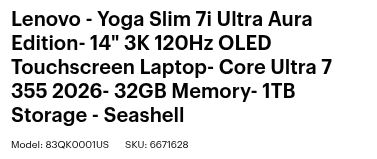
Is “3K” a better screen than “2.8K” here? I’d skip straight to the pixel count. Best Buy lists 2880 × 1800 under Screen Resolution. Lenovo calls that same resolution 2.8K and lists a maximum 120 Hz refresh rate. The Yoga accepts finger touch. For annotating a floor plan with an active pen, see the MSI Prestige 14 Flip. Lenovo’s display and pen specifications.
Would a cheaper 16 GB listing do? This US listing pairs 32 GB of memory with a 1 TB SSD. Lenovo solders the memory to the board and provides no spare slot. Lenovo’s memory specification.
ThinkPad X1 Carbon Gen 14 — which screen earned 23 hours?
On the German listing, look for Herstellernummer, the manufacturer’s number. 21V70075GE identifies the Core Ultra 5 325, 32 GB RAM, 512 GB SSD and 14-inch, 1920 × 1200 low-power IPS touchscreen. The shorter number 52860 is the shop’s own item number. Notebookcampus listing · Lenovo’s sheet for this exact model.
In Notebookcheck’s Wi-Fi test at 150 nits, that IPS configuration ran for 23 hours 13 minutes. The same review compares an X1 Carbon Gen 14 with OLED and a Core Ultra 7 355 at about 13½ hours. Both have a 58 Wh battery, but the processor changes along with the screen. Notebookcheck’s test and comparison.
LG gram Pro 16 — one character changes what you’re buying
Both versions below have the same 16-inch, 2560 × 1600 matte IPS screen for side-by-side documents. The model suffix tells you how much memory and storage you get.
| Full LG model | Processor | Memory | Storage |
|---|---|---|---|
| 16Z90TS-G.AU89G | Core Ultra 7 256V | 16 GB | 1 TB |
| 16Z90TS-G.AU8CG | Core Ultra 7 258V | 32 GB | 2 TB |
If my trip is mostly spreadsheets and proposals and those already run comfortably in 16 GB, I’d stick with AU89G. That’s the one Notebookcheck measured at 19 hours 36 minutes of Wi-Fi browsing. If I also need a large offline sample library or my current projects already push past 16 GB, I’d ask for the price of AU8CG. Notebookcheck’s tested LG configuration.
How much does each configuration cost?
The first $450 upgrade doubles the Zenbook A14’s memory and storage. The next $450, from the 32 GB A14 to the Yoga, buys a touchscreen and a different processor at the same capacity.
| US model and listing | Processor | Memory / storage | Price |
|---|---|---|---|
| MacBook Air 13 · MDHE4LL/A | Apple M5, 8-core GPU | 16 GB / 512 GB | $1,149.00 |
| Zenbook A14 · UX3407NA-ZB/A14_E0 | Snapdragon X2 Elite | 16 GB / 512 GB | $1,349.99 |
| Zenbook A14 · UX3407NA-PS77 | Snapdragon X2 Elite | 32 GB / 1 TB | $1,799.99 |
| Yoga Slim 7i Ultra · 83QK0001US | Core Ultra 7 355 | 32 GB / 1 TB | $2,249.99 |
When is 16 GB enough?
If I already use a Mac for client calls, spreadsheets and presentations, I’d take the $1,149 MacBook Air and use my own work files to judge whether 512 GB is enough. If the team uses Windows and IT has cleared our VPN and peripherals for Arm, I’d pick the $1,349.99 A14 for the same trip. Its built-in HDMI port takes the cable in the meeting room, and a USB-A presentation clicker can stay plugged in at the same time. ASUS port specifications.
Before spending the first $450, I’d open a typical client project on my current laptop. Can I keep the video call, costing workbook and presentation open comfortably? How much space is left after I download everything I need for the trip? If 16 GB has been tight or the offline folder routinely fills a 512 GB drive, I’d buy the 32 GB / 1 TB A14. If both fit comfortably, the cheaper A14 already has the ports I came for.
What does the second $450 buy?
For someone who regularly sits beside a client to mark out a detail with a finger, the screen is the main difference. The Yoga has a 2880 × 1800, 120 Hz OLED touchscreen. The two A14s listed here have 1920 × 1200, 60 Hz OLED screens without touch. The independent reviews put the 32 GB A14 at 992 g and the Yoga at 978 g before chargers. There’s just 14 g between them. The other practical difference is whether your company’s equipment works on Windows on Arm. Lenovo display specifications · ASUS display specifications · A14 test unit · Yoga test unit.
If Intel compatibility is the only box I need to tick, I’d ask IT about the ThinkPad E14 Gen 7 first. CDW listed US model 21SX0039US below $1,550 with a Core Ultra 7 255H, 16 GB and a 512 GB drive. This E14 also has a spare memory slot. CDW’s US configuration and price · Lenovo’s sheet for 21SX0039US.
What if the room only has HDMI? Suppose there’s already an HDMI cable on the table and I don’t own an adapter. Best Buy’s Insignia USB-C to HDMI adapter was $19.99. The 32 GB A14 plugs straight in at $1,799.99. The Yoga and adapter come to $2,269.98, a $469.99 difference before tax. With a USB-C display or an adapter already in my bag, the difference goes back to $450.
Would I order the same laptop for five people on the road?
Four colleagues will be back at the office on Friday. The fifth flies out for six weeks. Before approving all five, I’d order one in the exact configuration on the quote and ask a colleague to take it through a real working day.
Can the first employee sign in the way IT expects?
At Best Buy, the US Yoga 83QK0001US ships with Windows 11 Home. Look under Compatibility in the full specifications. Lenovo’s sheet for the US ThinkPad E14 Gen 7, 21SX0039US, lists Windows 11 Pro. That detail matters if IT expects the employee to sign in to Windows with a company account on a device joined to Microsoft Entra. Home doesn’t support that kind of join. Yoga retail specifications · E14 model sheet · Microsoft’s Entra join requirements.
If a salesperson wants the Yoga touchscreen for demonstrations, I’d ask for a Pro-equipped quote or have IT price the Home-to-Pro upgrade. If Pro and a built-in Ethernet port cover the brief, I’d start with the less expensive E14. If IT uses Windows Autopilot, ask who will register the machines to your organization before shipping. I’d have the new starter try the first sign-in on the pilot unit before sending another box directly to a hotel. Microsoft’s edition upgrade guide · Autopilot registration for resellers.
What would I try on that first working day?
I’d give the traveler their usual VPN, presentation remote and a copy of the deck they’re taking. Have them connect from a mobile hotspot, open the shared proposal, then unplug from the network and present the downloaded copy on the meeting-room display. If the Snapdragon Zenbook A14 is on the shortlist, this is when I’d try the exact USB device and VPN the team uses. Microsoft explains that hardware and apps that need a driver depend on an Arm-compatible driver. Microsoft’s guidance on Windows on Arm.
Sharing one hotel socket with a phone? The Yoga needs at least 20 V at 2.25 A (45 W) to operate and start charging. Its fastest charging profile is 20 V at 3.25 A (65 W). Yoga user guide, under Specifications.
- Belkin WCH013. It supplies 20 V when the Yoga is plugged in alone. With a phone connected too, neither port lists the 20 V the Yoga needs. Belkin’s output chart.
- Insignia NS-PW31XC2W22. USB-C2 still offers 20 V at 3.25 A while USB-C1 powers a phone. Use C2 for the Yoga with a cable rated for at least 65 W. Insignia’s two-port specifications.
If the laptop fails in week two abroad, who takes it in?
Take the German X1 Carbon, 21V70075GE. Its model sheet lists three years of base courier or carry-in service and a Premier Support upgrade. The US E14 above lists one year of courier or carry-in service. Now picture the traveler in Singapore with a machine that won’t start. Neither figure tells them where to take it that afternoon. X1 service terms for the German model · E14 service terms for the US model.
Before the flight, I’d enter the machine type or serial number in Lenovo’s international warranty lookup, select the destination, and check what service is offered there. Lenovo says the delivery method can vary by country. I’d save the serial number, the local authorized service contact and our IT help-desk number on the traveler’s phone. If a repair means mailing the machine away, I’d agree with IT on a loaner before departure. Lenovo’s international warranty terms.
Which laptop fits your next business trip?
For client visits on foot, the Lenovo Yoga Slim 7i Ultra Aura Edition with 32 GB works well when the meeting rooms have USB-C displays. The laptop and charger weighed 1,155 g in Notebookcheck’s test. For a long train ride without a reliable outlet, the low-power IPS ThinkPad X1 Carbon Gen 14 has the longer tested runtime. For sites with HDMI projectors and wired networks, the Dynabook Portégé Z40L-N takes both cables directly. For evenings comparing invoices with a spreadsheet and no external monitor, the 16-inch LG gram Pro gives each document more room.
Sources for weights, battery life, ports and screens
- Yoga carry weight. the比較’s separate laptop and adapter measurements and Notebookcheck’s review unit and power supply.
- ThinkPad battery life. The X1 Carbon’s Wi-Fi test and the OLED comparison.
- Dynabook meeting-room ports. Dynabook’s connector specifications for the Z40L-N.
- LG hotel-desk screen. LG’s panel and dimensions for model 16Z90TS-G.AU89G.