Published · Updated
Compare devices in the configuration that actually completes your work. The Yoga Slim 7i Ultra starts at 975 g with its keyboard attached; the 686 g Surface Pro for Business 12-inch figure excludes a keyboard. Add the accessories your route requires, keep measured and assumed weights separate, and compare software capability before declaring either setup lighter. A small body-weight advantage can disappear when a second device or an extra charger becomes necessary.
The missing grams in a device-only comparison
A useful portable-computer comparison begins with a sentence such as: “I need to write reports on trains, present through HDMI twice a week, and join calls from a hotel.” That describes a working system. “I want the lightest device” describes one number, without establishing whether the device can do those jobs. The distinction matters because an attached keyboard, detachable keyboard, pen and display adapter contribute very different things to the finished setup.
Separate three quantities. Body weight is the published mass of the named device configuration. Working-kit weight adds everything necessary for the planned session. Departure-bag weight adds the bag itself and any accessories carried for the whole journey. These quantities answer different questions: holding a tablet while reading, typing away from an outlet, and walking between terminals. A fair comparison names the quantity before giving the number.
Next identify which jobs are essential and which are occasional. A university researcher might require desktop analysis software every afternoon but handwrite notes only once a month. A teacher might reverse those priorities. Removing the occasional accessory can reduce weight; removing an essential capability can create a more expensive problem. Our business-travel laptop guide applies this reasoning to mobile office work, while the teacher comparison examines pen-led presentations.
This article uses published specifications and transparent arithmetic. It does not report a physical weighing exercise, claim that sample accessories were tested, or assign ergonomic scores. The result is a repeatable shopping method that you can finish with your own kitchen scale and actual equipment.
Five starting points, with their exclusions visible
The following figures are useful starting inputs, not complete travel weights. The Yoga Slim specification, Yoga 7 convertible specification, MacBook Air specification, Surface business specification and MatePad Air specification identify different physical products. In particular, a tablet-only number cannot silently stand in for a typing setup.
| Device used in this comparison | Published body baseline | What that baseline means | What to add for your job |
|---|---|---|---|
| Yoga Slim 7i Ultra Aura Edition, 14-inch Gen 11 | Starting at 975 g | Clamshell laptop with integrated keyboard | Required charger, cable, adapters and protection |
| MacBook Air, 13-inch M5 | 1.23 kg | Clamshell laptop with integrated keyboard | Charging kit and any required display adapter |
| Yoga 7i 2-in-1, 14-inch Gen 11, aluminium | Starting at 1.38 kg | Convertible with keyboard permanently attached | Required pen, charging kit and protection |
| Surface Pro for Business, 12-inch, 2nd Edition, Wi-Fi | 686 g | Detachable device alone | Compatible keyboard for typing, plus required pen and power |
| HUAWEI MatePad Air, current global 12-inch model | Approximately 509 g | Tablet alone | Compatible keyboard, pen and charging kit as needed |
“Starting at” leaves room for configuration differences; it should survive into the buying spreadsheet. Regional product names also need attention. The Surface row is the second-edition business model, and the MatePad row is the global model linked above. Substituting an older device with a similar name can invalidate the calculation before any accessories are added.
For a specific example with an official accessory input, Huawei lists its matching Smart Magnetic Keyboard at approximately 308 g. Adding the two published nominal figures gives approximately 817 g before a pen, charger or additional case. That is arithmetic based on specifications, not a measured assembled kit, and says nothing by itself about desktop software equivalence.
Use the same accessory assumptions before changing them
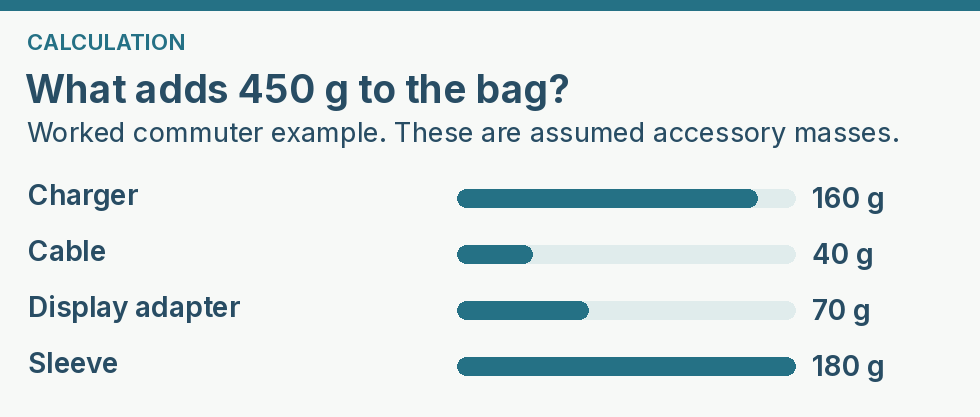
First hold accessories constant so that you can see the effect of device weight. Consider an entirely illustrative commuter kit containing a 160 g charger, a 40 g cable, a 70 g adapter and a 180 g sleeve. Those four numbers are hypothetical planning inputs. They are not weights of accessories supplied by Lenovo, Apple, Microsoft or Huawei. Together they add 450 g.
| Illustrative calculation | Body input | Assumed additions | Calculated total |
|---|---|---|---|
| Yoga Slim typing kit | 975 g starting figure | 450 g common accessories | 1,425 g |
| MacBook Air typing kit | 1,230 g | 450 g common accessories | 1,680 g |
| Yoga 7 convertible kit, pen omitted | 1,380 g starting figure | 450 g common accessories | 1,830 g |
| Surface typing-kit scenario | 686 g tablet | 450 g common accessories plus an assumed 300 g keyboard | 1,436 g |
The assumed 300 g Surface keyboard is also hypothetical, not a claim about the real accessory. This table demonstrates why adding a keyboard matters: under these inputs the detachable kit and the light clamshell are very close. It does not establish a real-world winner, because a different keyboard, case or charger changes the totals.
Only after this controlled comparison should you adjust for actual differences. A convertible may not need the hypothetical adapter if its built-in port matches the destination. A tablet used exclusively for reading may not need any keyboard. A traveler using a desk charger at both ends may carry neither charger nor cable. Record each change explicitly so that a convenience assumption never masquerades as a product specification.
Calculate the accessory budget rather than guessing
Subtraction provides a practical way to evaluate an uncertain accessory. Using the published body figures, the Surface Wi-Fi device leaves 289 g between its 686 g baseline and the Yoga Slim starting figure of 975 g. If all other carried items were identical, adding more than 289 g of keyboard and additional protection would erase that particular body-weight advantage. This is a break-even threshold, not a recommendation to buy an unusually light or inadequate keyboard.
The same method works in the other direction. The nominal difference between the 1,380 g aluminium Yoga 7 starting figure and the 975 g Yoga Slim starting figure is 405 g. For a teacher who would otherwise add a separate writing tablet, the convertible’s extra body weight can be justified by replacing a second device. The calculation needs the actual second-device kit, including its cover, cable and any connection accessory.
A close call on paper is worth one visit to a scale. With the example’s 289 g allowance, a hypothetical 250 g keyboard leaves 39 g for any extra protection. A 300 g keyboard already passes the threshold by 11 g before protection. A buyer with the actual keyboard can settle this small question far more reliably than another set of minimum chassis weights.
Mark every item once in the bag list. A keyboard cover serving as both keyboard and case gets one line. A charger that powers either candidate belongs in both kit totals. Mark anything borrowed from a colleague as borrowed, since it may be absent at the next meeting.
A lighter charger must still satisfy the power requirement
Chargers offer an obvious opportunity to consolidate a bag, but the USB-C connector alone does not establish sufficient output. Microsoft’s USB-C troubleshooting guide explains why the charger, cable and port must work together. Its separate slow-charging explanation also identifies inadequate power as a reason a plugged-in PC can charge slowly or continue discharging. Those are reasons to test a proposed travel charger with the actual workload.
Apple’s power-adapter guidance similarly distinguishes compatible USB Power Delivery charging from the output recommended for the Mac. A compact charger that replenishes a sleeping computer overnight may be less useful during a short connection between trains. Conversely, carrying a larger adapter solely for occasional fast charging may add weight without solving a problem that occurs on your route.
For a multi-device charger, record the laptop output while the phone is connected, not only the largest number printed on the box. Check the manufacturer’s port-allocation table and the cable rating. Then try the setup with the laptop, phone and any powered accessories attached. This is a verification procedure, not a claim that a particular unspecified charger splits power in a particular way.
Finally count all required pieces: wall adapter, detachable mains lead, USB cable and travel plug. The complete bundle belongs on the scale. Leave an adapter at the office only if doing so reflects your normal routine; an emergency or overnight scenario may require a different kit. Our battery-claim guide explains why advertised endurance cannot alone justify leaving power equipment behind.
Ports change the accessory list, not just the specification table
The Yoga Slim has three Thunderbolt 4 ports, whereas the Yoga 7 convertible includes HDMI and USB-A alongside Thunderbolt. The MacBook Air provides Thunderbolt and MagSafe charging; the Surface model here provides two USB-C ports with its documented display and data capabilities. Those differences matter when a classroom, client office or hotel desk has a known connector. A built-in matching port can remove a dongle from that route, but it cannot remove the cable needed to reach the screen.
Build a connection map for each recurring destination: charging, projector or monitor, wired network, removable storage and any specialist USB device. Mark the items available on site. If the meeting room already has a tested USB-C cable, counting a large hub in every kit can exaggerate the practical difference. If the room offers only HDMI, pretending that no adapter is necessary understates it.
Dock compatibility needs the same care as charging. Microsoft notes in its Surface USB-C support article that not every cable supports every feature. A familiar connector does not prove video capability or guarantee that an old dock exposes all of its ports on a different computer. Test the actual monitor, resolution, cable and peripherals together before removing the fallback adapter from the bag.
For a home-office Mac setup, Apple’s display-support article is more useful than a generic “dual-monitor compatible” label because limits depend on the Mac generation and display configuration. Keep the home dock out of travel totals when it stays at home, but include any adapter that must move with you.
Compare carrying, holding and typing as different activities
A convertible does not become as light in the hand as a detachable tablet when its keyboard is folded back. The keyboard remains part of the device. Conversely, a detachable can leave its keyboard on a desk during a reading session, although that accessory still belongs in the departure-bag total if it traveled with you. Both statements can be true without declaring one form universally superior.
Consider the available support surface. A conventional laptop combines display and keyboard in a single hinged unit. A detachable adds a stand arrangement and separate keyboard geometry. The most useful test is to reproduce the place where you work: a shallow tray, a lecture bench, a small café table or your lap. Check how far the stand extends and whether your chosen screen angle remains comfortable. Published diagonal screen sizes do not answer that question.
Typing quality also deserves a task-based test. Bring a paragraph containing numbers, punctuation and the shortcuts you use regularly. Try editing it for several minutes. Evaluate key placement, trackpad gestures and whether the keyboard moves on the intended surface. This establishes your preference without inventing a universal ranking from key-travel figures.
For handwriting, verify the exact pen and application together. The Yoga Slim product comparison explains why its touchscreen does not make it a pen-enabled convertible. If annotation is essential, solving the requirement with a different form factor can be more efficient than choosing the lightest clamshell and subsequently adding another device.
An incompatible app can create the largest extra item
Software can change the physical kit. If a small tablet handles reading but cannot run a required desktop application, the real travel setup may become tablet plus laptop. A nominally heavier computer that handles both jobs could then reduce the bag total. This is especially relevant when a browser version omits an essential feature, an institutional login requires a supported client, or a laboratory peripheral needs a particular driver.
The Surface in this comparison runs Windows on Arm. Microsoft’s Windows Arm FAQ distinguishes application compatibility from driver compatibility: many apps can run, but hardware and software that depend on drivers require appropriate support. That makes a specific application-and-peripheral check more valuable than either assuming everything works or rejecting the platform categorically.
For macOS or a tablet operating system, use the same practical standard. Open a representative document, run the required plug-in, export the final format and confirm that the recipient can use it. A successful demonstration of email and web browsing is not proof that a whole research or accounting workflow transfers. Keep licenses and offline access in the test, because a connection-dependent workaround may fail on the exact journey you are buying for.
Our portable-device comparison uses software requirements as the first decision gate. The tablet, keyboard and stylus guide then explores the setups in which detachable accessories serve the work directly.
Choose a kit for the route you repeat most often
For a short office commute, a lightweight clamshell can be the simplest arrangement when both desks already have power and the work is predominantly typed. The important comparison is the computer plus protection, with any occasional meeting-room adapter shown separately. Do not burden this scenario with an overnight charger merely because another traveler would need one.
For a graduate student moving between seminars and a laboratory, compatibility and working position can outrank the smallest body. List the research software, data interface, library reading and note-taking requirements separately. If handwriting is central, compare a convertible against a laptop-plus-tablet combination. If handwriting is incidental, a clamshell with the right software may avoid the extra device entirely. The graduate-student comparison develops those tradeoffs.
For a teacher visiting several classrooms, the kit includes presentation connections and a tested fallback for the room that differs from the others. A convertible’s integrated ports and pen workflow may justify its mass. A detachable may suit walking annotation, but the desk typing setup still needs its keyboard. Ask the school to confirm the projector inputs and any wireless presentation restrictions before treating a wireless option as a replacement for cables.
For an overnight business trip, add the items actually needed away from your desks: charging, travel plug, headset, backup presentation copy and perhaps an adapter. Recalculate the whole bag rather than multiplying the laptop difference into a dramatic claim. The preferred device is the one that completes the repeated route with the fewest necessary compromises, not simply the row with the lowest isolated number.
Keep the comparison honest when equipment is shared
A common accounting mistake is to count an accessory against only one candidate even though it would travel with both. If you always carry the same headset, it belongs in both complete-kit totals. If a phone charger is already in the bag, replacing it with a compatible shared charger should be evaluated as a change to the whole charging set, not as an unexplained zero-weight laptop charger.
The reverse mistake is counting every possible accessory in every scenario. A reader who never types during a particular journey does not need a hypothetical keyboard added to that trip merely to make the tablet look like a laptop. State the task and calculate its kit. Keep a separate scenario for days when typing is necessary. Two honest scenarios are more useful than one supposedly universal total.
Protection needs the same discipline. A keyboard cover may serve as the intended travel protection for one buyer, while another uses an additional sleeve. Neither choice is inherently the standard configuration. Specify the choice, verify the fit and avoid counting the same cover twice. Include a pen only when the task uses it, then include its storage or charging accessory when that accessory must travel.
Finally, label uncertainty next to the item rather than hiding it in a final disclaimer. “Keyboard weight awaiting measurement” is clearer than giving a precise total assembled from an unknown input. A small range can be used for planning when its assumptions are explicit, but it should remain a scenario rather than a claimed product measurement. This makes the comparison useful even before every accessory has been purchased.
Finish the comparison with one real packing rehearsal
Before committing, assemble the proposed kit on a table and assign every item a purpose. Weigh the complete set, then weigh its components if you want to identify the largest opportunity. Mark which values are measured, which remain manufacturer figures and which are assumptions awaiting confirmation. A photograph of the contents and a saved checklist make later comparisons reproducible.
Run through one ordinary work session using only the packed equipment. Join the expected call, connect the intended screen, charge the device and open the documents you will need offline. This rehearsal can expose a missing cable more efficiently than a long specification comparison. It also prevents “weight savings” that merely shift an uncounted accessory to another pocket.
Keep two totals if your routine changes: everyday carry and overnight carry. Prefer the setup that works well for the route you repeat, while making the exceptional route explicit. Review the sheet after changing a case, keyboard or charger. The calculation is only as accurate as its item list, and your own finished kit is more informative than an unqualified claim that laptops or tablets are always lighter.
Does the kit still fit on a flight?
The scales settle one question. The open laptop and charger can still compete for room on the seat tray. For that part of the packing rehearsal, see Best Lightweight Laptops for Business Travelers: Flight-Day Choices.
Common questions
Is a 686 g Surface necessarily lighter to travel with than a 975 g laptop?
No. For a walk through the station, weigh the packed bag, including the bag itself. For reading while standing, compare what will actually be in your hands. A keyboard in the bag still matters to your shoulder even after it has disappeared from the handheld weight.
Can I compare the Huawei tablet-plus-keyboard total with a laptop?
Yes, as a clearly labelled weight calculation: the linked global tablet and matching keyboard nominally total approximately 817 g. Compare application support, pen requirements, charging and protection separately before treating the two setups as substitutes.
Should I remove the charger to make the kit lighter?
Only after checking your actual unplugged workload and access to reliable power. Keep separate everyday and overnight kit totals if the answer differs between those routes. Manufacturer maximum battery claims do not establish your personal reserve.
Official sources & verification
Manufacturer documentation checked 23 October 2026. Availability, bundles and specifications vary by region and configuration.
- Lenovo PSREF — Yoga Slim 7 Ultra 14IPH11
Manufacturer specification dated 14 October 2026; weights are starting values and configurations vary. - Lenovo PSREF — Yoga 7 2-in-1 14IPH11
Manufacturer specification dated 21 October 2026; 1.38 kg is the aluminium starting configuration, and pen bundles vary. - Apple — MacBook Air technical specifications
Use the 13-inch M5 column, not the separate 15-inch configuration. - Microsoft Learn — Surface Pro for Business, 12-inch, 2nd Edition, Snapdragon
Wi-Fi weight is the device alone; keyboard, pen and regional charger inclusion must be checked separately. - HUAWEI — MatePad Air global specifications
Current global 12-inch model; approximately 509 g. Do not merge with older or regional models. - HUAWEI — Smart Magnetic Keyboard compatible with MatePad Air
Named matching keyboard is approximately 308 g; accessory weights and bundles vary. - Microsoft Support — Fix USB-C problems in Windows
Cable, charger, port and alternate-mode capabilities must match; connector shape alone does not establish compatibility. - Microsoft Support — PC is charging slowly or discharging while plugged in
Insufficient charging requirements can cause slow charging or discharge while connected. - Apple Support — Use a power adapter with your Mac
USB Power Delivery compatibility and recommended adapter output are separate from having a USB-C connector. - Microsoft Support — Troubleshoot problems with USB-C on Surface
USB-C cables do not universally support every feature; isolate hubs during troubleshooting. - Apple Support — How many displays can be connected to MacBook Air
M5 supports up to two external displays with the built-in screen, subject to display resolution and refresh rate. - Microsoft Support — Windows Arm-based PCs FAQ
Windows 11 app emulation and the separate requirement for compatible Arm drivers; do not apply older Windows 10 limitations to current Windows 11.