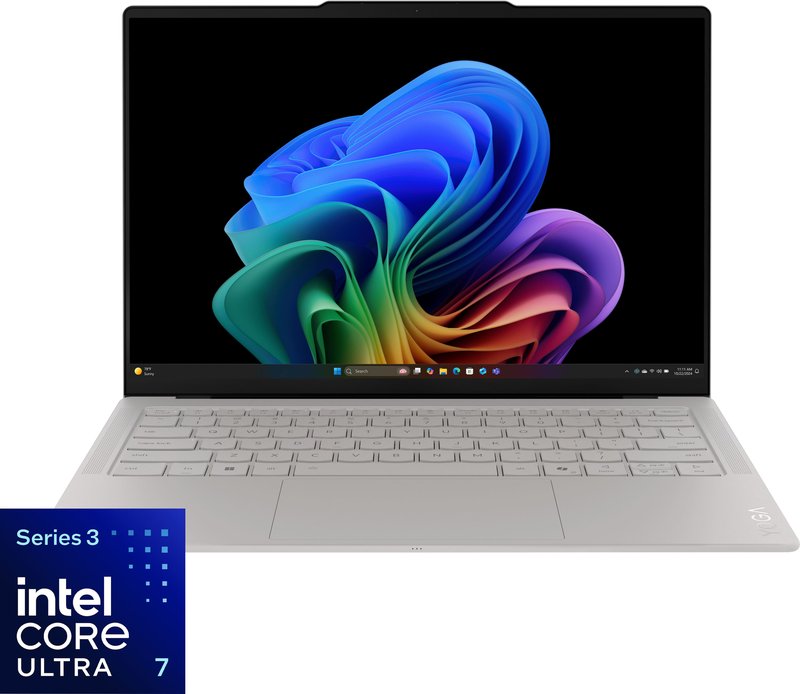
The Lenovo Yoga Slim 7i Ultra Aura Edition is the first candidate I would quote for a Windows-based close carried between home and a client site. The 14-inch Gen 11 US 83QK0000US gives you 32GB, 1TB and a 975 g starting body. Match its USB-C dock to the home displays and buy the correct travel adapter. A ThinkPad X1 Carbon or an existing business fleet device can take priority when the client’s software, support and device access requirements define which computer can connect. Lenovo product specifications · US configuration page.
Treat the last three hours of a period like a sequence of deliverables. A report should be reconciled, reviewed and saved to an approved location. A workstation should stay useful during that process, even if the dual-screen desk or the client office network stops being available temporarily.
The shortlist at a glance
Confirm company access, the actual app and all its compulsory add-ins first. Test local performance independent of the connection, then repeat with a real remote desk and the agreed data route. If a charger or dock has to work in both configurations, keep the mode and test result with the quote. That is a better comparison basis than counting advertised capabilities.
| US reference | Device mass | Screen | Battery | Best fit in this comparison |
|---|---|---|---|---|
| Yoga Slim 7i Ultra | 975 g starting | 14-inch 2880 × 1800 OLED touch | 75 Wh | A 32GB x86 close workflow in the lightest daily pack on the list |
| ThinkPad X1 Carbon Gen 14 | under 1 kg at family start | 14-inch WUXGA touch on this reference | 58 Wh | A named client or employer-managed configuration |
| Zenbook S 14 | about 1.2 kg listed for UX5406SA | 14-inch 2880 × 1800 OLED touch on the reference | 72 Wh | Direct HDMI with a 32GB Intel configuration |
| Framework Laptop 13 | 1.30 kg listed | 13.5-inch 2256 × 1504 matte option | 61 Wh | Making storage or ports adjustable over the expected purchase life |
| LG gram 14 | 2.47 lb listed, about 1.12 kg | 14-inch 1920 × 1200 IPS on the US model | 72 Wh | Regular review with modest local requirements |
| MacBook Air 13 M5 | 1.23 kg listed | 13.6-inch 2560 × 1664 Liquid Retina | 53.8 Wh | A close that already passes the Mac eligibility test |
Consider US laptop bodies with a reference or starting mass around 1.50 kg or below, then weigh the complete travel or teaching kit separately. For detachable models, measure the tablet alone and again with every accessory needed for the day. This comparison uses the manufacturer’s stated figures where available. Panel, finish and component changes can move the weight. Battery capacity in watt-hours describes stored energy, and runtime depends on the workload and the configuration tested.
For the broader shortlist, compare the same order with the battery, calls and recovery comparison. Keep the preferred candidate’s order code beside the review so any difference in screen or connectors is easy to recognise.
Pick a small version of the hardest file
Ask the workbook owner for a cleaned example with the same formulas, connections, add-ins and export steps. Time the part that changes while running your normal review window and browser. Put the expected output beside a current reference and check the totals and page breaks. Try it in the intended release of each app and operating system. The task must be possible under your actual work licence and permissions.
Some roles mainly review PDFs and enter a handful of controlled changes. Other roles pull sources, update multiple tabs, compare a chart and submit a signed result in a compressed window. If your 16GB trial stays comfortable for the first task, that capacity can be a reasonable choice. Repeated spill to disk and slow switching under your standard load may justify a 32GB quote. Obtain the exact SKU and an app-support decision before using a benchmark to compare.
Design a one-screen setup for the client seat
At home, practice with one monitor for the workbook and a second for the reference report. Then close the second screen and repeat the steps using the built-in display. Choose a useful zoom level for the important cells and record what needs to stay visible. A dense 14-inch panel promises a lot of pixels, but text scaling and the position of the work window determine its practical space.
If a client screen is available, verify the specific cable and whether using it is allowed. Try the machine with the required charging and display route, bring a checked adapter when appropriate and have a clean PDF ready for review. A report issued after your coworker checks the right file is more important than preserving a preferred window layout.
The decision changes when your work centers on a 4K and QHD Desk You Can Leave Behind. Check which part of the kit can carry over into that routine.
Keep active copies unambiguous
Consider a close at 16:00 with a 50-minute draft block, 30 minutes for review and 20 minutes for making the agreed changes. Decide which file to edit at each step and who will get the final version. When the document must stay in an approved location, do the mock update from there. If a local sample can be used during travel, make the reconnect and conflict-resolution process part of the rehearsal.
An additional drive will not decide which of two copies the reviewer should trust. Document the publish or handoff step before comparing storage. Check the laptop under the company’s approved sign-in and network, and keep the responsible support contact reachable through the official method during close.
Price the known workaround for the bottleneck
If a sample system is quoted at $1,780 and you need a $95 desk dock and $45 travel converter, the working quote is $1,920 before taxes and support. Compare with your real $1,950 working target and the alternative direct HDMI layout. A spare or a support contract can be a better use of the remaining budget when the same issue delays the close from more than one location.
See which part of the close still works without the home dock
Work from a single screen through one complete reviewer cycle. In a test workbook, show the relevant exception amounts, clear one flagged line and prepare the output with the same print settings. Ask the reviewer to confirm the intended period and version without using prior knowledge. The laptop’s panel and keyboard should allow the corrections to be made without hiding the formula or the review status. Try your actual application zoom on the Lenovo, the Zenbook and the existing office machine.
Compare the startup from a fresh session as well as from sleep. Time the steps to approved access, the relevant tools and the display layout. A workable laptop for month end does not have to duplicate two large home screens. It needs a route to open the key materials and issue the correct report on a smaller screen or a known room display. Put any delay caused by a mandatory application on its own line.
Plan what to do when the last change comes in after you pack. A portable computer with the right apps may help correct it from another approved location. If the account or remote service prohibits that, identify a named delegate and send the status through the supported route while the machine still works. The value of carrying a faster device varies with that procedure.
Choose a second mock workbook with a common instance of the slowest calculation or missing extension. Reopen it using the same permissions and working location as the original. Check the cost of supporting that stage on both road and home configurations. When the legitimate desktop platform requirement is clear, compare the two Windows alternatives with similar storage and suitable display connection. If final review occurs elsewhere every time, include the cost of approved access and the deadline risk. This is the evidence that distinguishes a light everyday computer from the reliable endpoint for the busiest closing day.
6 models and the configuration to price
1. Yoga Slim 7i Ultra — Best for a 32GB x86 close workflow in the lightest daily pack on the list
Configuration and connections. 14-inch Gen 11, US 83QK0000US: Core Ultra 7 355, integrated Intel Graphics, 32GB LPDDR5X and 1TB SSD. Three Thunderbolt 4 USB-C ports. HDMI, USB-A and wired audio require a suitable adapter. Specifications · US buying information.
The Yoga earns first attention when you must carry the actual work system to both locations. Use its documented port layout to plan data, power and screen connections. Run the final approval steps under the authorized Windows app set before fitting it into the close schedule.
In Notebookcheck’s review the 32GB Core Ultra 7 355 review unit weighed 978 g and ran for 10 hours 36 minutes in the site’s Wi-Fi web-browsing test. Use that as a reference for light browsing; video meetings, tethering and sustained work have different demands. Confirm the full order code. The adjacent Yoga Slim 7i without Ultra is a separate product and may have a different port layout. Notebookcheck Yoga Slim 7 Ultra review.
2. ThinkPad X1 Carbon Gen 14 — Best for a named client or employer-managed configuration
Configuration and connections. US 21V700AQUS reference: Core Ultra 7 355, Intel Graphics, 32GB LPDDR5X and 1TB SSD. Three Thunderbolt 4, USB-A, HDMI and a headset jack on the family. Specifications · US buying information.
Bring the precise ThinkPad build into the first quote when device enrollment, support and local display access already exist for it. HDMI and USB-A make certain client desk connections straightforward. Keep the security or ordering decision with the actual administrator.
Native HDMI and USB-A give this platform a route to a wired display and a legacy USB peripheral while a USB-C port supplies power. The quoted panel and support term are separate buying decisions. Require the written quote to identify the display, operating-system edition and support entitlement. Fleet eligibility depends on the order the employer approves. Model documentation.
3. Zenbook S 14 — Best for direct HDMI with a 32GB Intel configuration
Configuration and connections. US UX5406SA-PS79T: Core Ultra 7 258V with Intel Arc graphics, 32GB and 1TB SSD. Two Thunderbolt 4, USB-A, HDMI and headphone audio on the reference. Specifications · US buying information.
The S 14 is worth pricing if the client screen is wired and your work feels more comfortable with a 14-inch panel. Run the exact workbook, launcher and required sign-in. Use the display trial to see whether direct HDMI reduces the carried hardware materially.
The reference keeps a direct HDMI path and pairs 32GB memory with an x86 Windows platform. Its OLED panel is glossy, so check readability with bright windows in the positions you normally use. Match the US suffix and the touchscreen line. ASUS lists the later UX5406AA on the same product page, with its own processor choices. Model documentation.
4. Framework Laptop 13 — Best for making storage or ports adjustable over the expected purchase life
Configuration and connections. US DIY Ryzen AI 5 340 with Radeon 840M, configure with 32GB DDR5, 1TB NVMe and a licensed OS. Four modular bays. Choose USB-C, USB-A, HDMI or other Expansion Cards and check their supported bay positions. Specifications · US buying information.
A planned Framework build is an option for a self-managed professional when the client approves it. Keep a spreadsheet of the parts and operating system in the order and the desk routes they enable. Rebuild the close test after changing any expansion card.
Replaceable memory and configurable ports can matter across several years of use. A purchased set of modules still requires the buyer to allocate bays for power, the screen and each attached device. Quote memory, SSD, OS, power adapter and selected cards explicitly for a DIY order. Price the prebuilt option separately if setup time matters. Model documentation.
5. LG gram 14 — Best for regular review with modest local requirements
Configuration and connections. US 14Z90T-G.AAB2U1, Core Ultra 5 226V, Intel Arc graphics, 16GB RAM and 512GB SSD. Two Thunderbolt 4, two USB-A, HDMI and a headphone jack. Specifications · US buying information.
If the role is mostly review and consolidation of smaller files, work through the whole timed example on the gram’s 16GB configuration. Direct connections help at the temporary desk. Consider the storage and memory boundaries if daily work will keep larger records available locally.
The large list of native connectors suits ordinary office or research peripherals. The chosen 16GB/512GB combination is best evaluated with the simultaneous documents and applications that stay open during a busy session. Compare a 16GB configuration with your actual peak workspace and how much of the 512GB disk must be kept free. Read the full 14Z90T suffix on the quote. Model documentation.
6. MacBook Air 13 M5 — Best for a close that already passes the Mac eligibility test
Configuration and connections. US 13-inch M5, choose 24GB unified memory and 1TB SSD for this comparison. MagSafe 3, two Thunderbolt 4 USB-C ports and a headphone jack. An HDMI display needs the appropriate cable or adapter. Specifications · US buying information.
The 24GB MacBook Air makes a strong office candidate when all workbooks, extensions, exports and access requirements are tested on Mac. Verify the review outcome and the next person’s file before depending on it for the full close.
Apple documents up to two external displays alongside the built-in display, within the supported resolution and refresh limits. MagSafe can handle power without occupying a Thunderbolt port. Confirm the Mac version of the mandatory application, add-in or endpoint tool with its vendor or your administrator before ordering. Model documentation.
A short acceptance test for both workplaces
Try one representative reconciliation and reviewer handoff. Prepare a clean add-in-dependent workbook, the expected totals and the review-format export. Use the same source materials on each system and ask the same person to check the end result. Start with the charger, network and version of the software you expect to have at the destination. Record what needs permission or an approved alternative before counting any device as eligible. Put the results for Yoga Slim 7i Ultra and ThinkPad X1 Carbon Gen 14 beside one another so the acceptance decision follows the actual scenario.
For the second pass, rebuild the work from a single screen and confirm the authorized recipient sees the corrected version. Use an ordinary supported way to recover the work so you can repeat it later without assistance. Note the time spent restoring the accessory or software and the time left to finish the job. The useful benchmark is that the exact workbook, account and export pass under real time limits at both desks. Keep a copy of the settings for the configuration that passes, including changes to display scaling, input and power.
Have the approved alternate device and the current controlled workbook ready during the test. Change only one part of the setup at a time after a problem. A device trial should tell you whether replacing the computer would solve it, or whether a different cable, application setting or room arrangement would do the job. Consider the practical consequence when comparing candidates: a client-managed image or unsupported spreadsheet extension can narrow the shortlist before weight is compared. Keep the published capability beside your observation so a future purchase can reproduce the working setup.
Charging, software and support in the purchase quote
Use a planning ceiling of $1,950 before tax for this example. If the line for the supported home dock and the exact travel screen cable reserves $155, the laptop has $1,795 of room. Compare the retailer or school quotes using the same storage, included equipment and support assumptions. These amounts illustrate the arithmetic of a purchase decision. The linked US listings and written offers provide the actual pricing and availability.
For every quote, record the exact model code, OS edition, panel, installed memory and size of the SSD. List any equipment your institution or employer supplies separately. For an older generation still offered by a reseller, ask how much time remains on the coverage you are buying and how you would replace a bundled accessory. Use the documented requirements of one representative reconciliation and reviewer handoff to decide which configuration can drop an accessory or start with less local capacity.
Documentation for the actual setup
Microsoft’s monitor troubleshooting guide explains the Windows Extend setting and the limits of ordinary splitters. Set up the display in the mode used for the job, record the path that works and verify that behavior after unplugging. When a particular room has fixed display equipment, ask its operator which input modes have been checked. Microsoft Windows external-monitor guide.
Microsoft lists native Microsoft 365 apps for Windows on Arm and explains how applications and drivers differ. Write the versions of the work applications and the peripherals you need on the same page as the laptop’s processor. Confirm an architecture-specific driver with the vendor before using a general compatibility result to approve the system. Microsoft’s Windows on Arm app and peripheral FAQ.
The Teams network documentation describes the relationship between meeting layout, sharing and bandwidth. Use the actual combination of camera and application sharing for your trial. Compare the receiving person’s experience with the laptop’s local view when deciding where a connection, input or hardware upgrade helps. Microsoft Teams network preparation guidance.
For a second comparison of a full working day, see a Reliable Interview Setup on Hotel Wi-Fi. Use the same quote when the equipment requirements overlap.
Frequently asked questions
Is 32GB always necessary for accounting?
Select using your local working set. Open the actual mix of workbooks and approval software, record responsiveness in the difficult step, and compare that result on both capacities.
Can I use a personal computer at the client’s desk?
Ask the client and your employer which device and access path they approve. Fit the device shortlist to the reply and use a clean, representative workbook for performance comparisons.
Can I keep my home monitor setup when traveling?
Keep a simpler single-screen profile ready with the key checks and file locations memorized. Use the second monitor when a verified and permitted room setup provides one.
Sources
- Lenovo Yoga Slim 7i Ultra Aura Edition specifications
- Yoga Slim 7i Ultra US product and purchase details
- Lenovo ThinkPad X1 Carbon Gen 14 Aura Edition specifications
- ThinkPad X1 Carbon Gen 14 US product and purchase details
- ASUS Zenbook S 14 UX5406SA specifications
- Zenbook S 14 US product and purchase details
- Framework Laptop 13 AMD Ryzen AI 300 specifications
- Framework Laptop 13 US product and purchase details
- LG gram 14 14Z90T-G.AAB2U1 specifications
- Apple MacBook Air 13-inch M5 specifications
- MacBook Air 13 M5 US product and purchase details
- Microsoft Windows external-monitor guide
- Microsoft’s Windows on Arm app and peripheral FAQ
- Microsoft Teams network preparation guidance