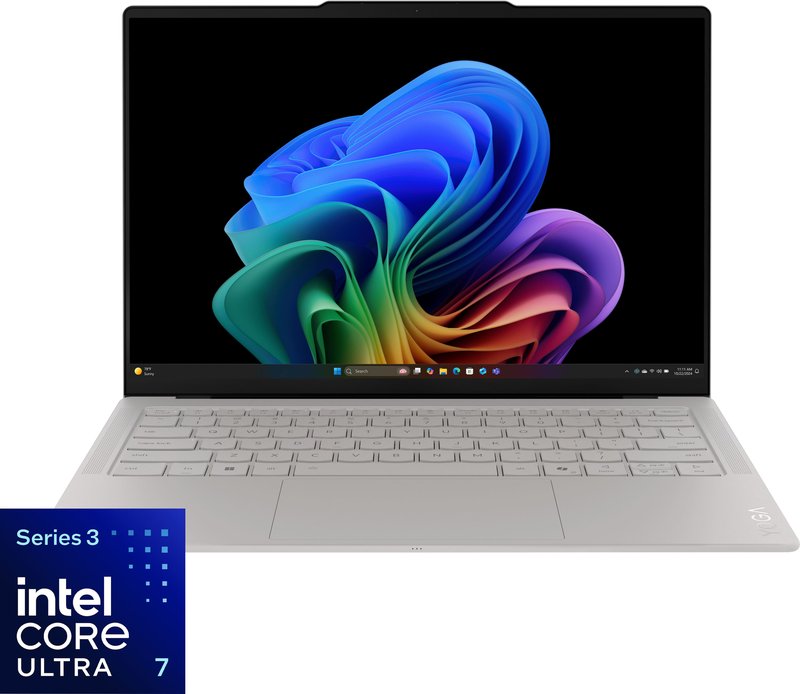
Start with the Lenovo Yoga Slim 7i Ultra Aura Edition when you conduct interviews in desktop Windows and need a light machine for travel. Its Gen 11 US 32GB configuration lets you prepare a shared presentation, notes and call controls together. Test your own audio connection through USB-C. The ThinkPad X1 Carbon is worth pricing in parallel for its direct headset and USB-A routes, and the MacBook Air belongs on the list when your company supports the full Mac workflow. Lenovo product specifications · US configuration page.
A successful remote interview means the other person can hear your questions, see the one window you intended to share and stay in the meeting if your connection changes. Set your shopping test around that outcome. A faster laptop is useful when it solves an observed problem in the local workload.
The shortlist at a glance
Confirm company access, the actual app and all its compulsory add-ins first. Test local performance independent of the connection, then repeat with a real remote desk and the agreed data route. If a charger or dock has to work in both configurations, keep the mode and test result with the quote. That is a better comparison basis than counting advertised capabilities.
| US reference | Device mass | Screen | Battery | Best fit in this comparison |
|---|---|---|---|---|
| Yoga Slim 7i Ultra | 975 g starting | 14-inch 2880 × 1800 OLED touch | 75 Wh | A lighter Windows interview laptop and a known headset |
| ThinkPad X1 Carbon Gen 14 | under 1 kg at family start | 14-inch WUXGA touch on this reference | 58 Wh | Direct headset and USB-A connections on an approved device |
| MacBook Air 13 M5 | 1.23 kg listed | 13.6-inch 2560 × 1664 Liquid Retina | 53.8 Wh | A Mac-managed call setup with fanless hardware |
| Zenbook A14 | about 980 g at family start | 14-inch 1920 × 1200 OLED on reference family | 70 Wh | A light browser-led itinerary after compatibility approval |
| Zenbook S 14 | about 1.2 kg listed for UX5406SA | 14-inch 2880 × 1800 OLED touch on the reference | 72 Wh | An Intel Windows setup with more built-in connector options |
| Dell XPS 13 9350 | about 1.18 kg at family start | 13.4-inch, compare the 1920 × 1200 non-touch option | 55 Wh | A small desk or cramped hotel workspace |
Consider US laptop bodies with a reference or starting mass around 1.50 kg or below, then weigh the complete travel or teaching kit separately. For detachable models, measure the tablet alone and again with every accessory needed for the day. This comparison uses the manufacturer’s stated figures where available. Panel, finish and component changes can move the weight. Battery capacity in watt-hours describes stored energy, and runtime depends on the workload and the configuration tested.
For the broader shortlist, compare the same order with the battery, calls and recovery comparison. Keep the preferred candidate’s order code beside the review so any difference in screen or connectors is easy to recognise.
Give yourself a private, workable place to call
The picture from a laptop camera depends on light and position. A window from the front or side is a better starting point than a bright backdrop. Put the travel laptop where it can charge and leave enough room for your notes. If you use a mouselike control, see whether there is space for it after the cable runs along the desk.
Take a sample call with a colleague and ask them to confirm audio at the beginning, then again after screen sharing. Plug the same headset into the route on the buying list. Test whether it is selected after reconnecting when you move from the quiet room to a smaller working space. Check that background noise and microphone placement do not force you to talk loudly if others can hear.
Test upload and the backup plan under the meeting account
Microsoft’s Teams networking guidance describes how media demand varies with video layout, resolution and content. Conduct a call in the real account with a compatible browser or app you are permitted to use. Measure a realistic trial from the hotel or a similarly shared network and watch what colleagues experience, including screen-share legibility and call stability.
Suppose three candidates have 35-minute sessions with 10-minute gaps. Treat the first gap as the time to connect to the approved backup network and rejoin a rehearsal. Print or save the schedule if policy allows. Put the fallback phone number or reconnect action in your own notes, and decide which part of the meeting can move to audio if the video stalls. A stronger GPU cannot clear a local network bottleneck.
The decision changes when your work centers on a 4K and QHD Desk You Can Leave Behind. Check which part of the kit can carry over into that routine.
Share one window and prepare a no-share option
Make a fake exercise with the same file type as a real interview and show only its application window. Keep interviewer notes beside it where possible and do a second pass on the single built-in screen. Verify while sharing which window a notification appears in. On a low-bandwidth route, reduce optional video activity and ask the interviewee to open the approved file locally if that is part of the interview procedure.
A quieter laptop can help with nearby microphones, but the sound on the call belongs to a larger setup. The quality of the included camera and audio depends on the reference unit and environment. Choose a portable headset and cable route once the device passes the mock interview rather than once a feature list looks complete.
Reserve money for the two small things you use every time
In a sample $1,800 plan, a $1,625 laptop and $65 adapter leave $110 for power or a headset. If the employer supplies a mandated headset that uses USB-A, verify it on the exact laptop. Account for taxes and the actual retailer’s offer before comparing with an alternate that has more native ports. A camera upgrade belongs on the list only when the ordinary lighting and angle trial show a repeatable limitation.
Compare the time saved at setup with the time saved in a call
Invite a colleague to help rehearse the moment you most need clear audio. Ask them to rate intelligibility and to say which window was visible during each segment. Collect an ordinary spoken question and a short response, with consent if recording is permitted. Use the call account and headset the team already recognizes. A check only through your local preview can miss a problem experienced by the other person.
Test a backup location if the hotel desk does not work. Check a quieter room with an approved connection, or plan a time interval when another approach is available. With the C-side-only Yoga, measure whether the chosen hub makes the power or audio connection cumbersome. A ThinkPad with a direct wired input may still require matching the headset or selecting the right audio output. Follow what passes rather than expecting all hardware in a family to behave the same.
Set the device to use the meeting schedule safely. Leave the mock candidate materials visible only where expected, and rehearse replacing them with the next exercise. A one-minute repeatable setup is useful over several calls. During the buying decision, set aside which benefits remain after better desk placement, cable selection and lighting, then make the laptop comparison based on those remaining needs.
Test one late interruption with the colleague still on the call. Rejoin through the supported second route, pick the correct audio and make sure the intended window can be shown without opening private materials. Decide precisely which cable or device would make that recovery more reliable. If an existing machine can handle the scenario after a headset or connection change, use the new purchase to solve the remaining carry or software limitation. If the missed words recur with a good network and audio path, compare the local load on each candidate with the same app and sharing settings.
6 models and the configuration to price
1. Yoga Slim 7i Ultra — Best for a lighter Windows interview laptop and a known headset
Configuration and connections. 14-inch Gen 11, US 83QK0000US: Core Ultra 7 355, integrated Intel Graphics, 32GB LPDDR5X and 1TB SSD. Three Thunderbolt 4 USB-C ports. HDMI, USB-A and wired audio require a suitable adapter. Specifications · US buying information.
The Yoga can put the meeting app, notes and approved shared window on its 14-inch display. Use the headset with a verified USB-C connection and keep the correct adapter in the case. Work through a representative call while plugged in and once on the travel kit.
In Notebookcheck’s review the 32GB Core Ultra 7 355 review unit weighed 978 g and ran for 10 hours 36 minutes in the site’s Wi-Fi web-browsing test. Use that as a reference for light browsing; video meetings, tethering and sustained work have different demands. Confirm the full order code. The adjacent Yoga Slim 7i without Ultra is a separate product and may have a different port layout. Notebookcheck Yoga Slim 7 Ultra review.
2. ThinkPad X1 Carbon Gen 14 — Best for direct headset and USB-A connections on an approved device
Configuration and connections. US 21V700AQUS reference: Core Ultra 7 355, Intel Graphics, 32GB LPDDR5X and 1TB SSD. Three Thunderbolt 4, USB-A, HDMI and a headset jack on the family. Specifications · US buying information.
This ThinkPad makes sense if the employer supplies a receiver or wired headset and you also need a travel-ready Windows image. Stay current on the audio settings after plugging and unplugging. Get the precise configuration in the quote before comparing weight and display.
Native HDMI and USB-A give this platform a route to a wired display and a legacy USB peripheral while a USB-C port supplies power. The quoted panel and support term are separate buying decisions. Require the written quote to identify the display, operating-system edition and support entitlement. Fleet eligibility depends on the order the employer approves. Model documentation.
3. MacBook Air 13 M5 — Best for a Mac-managed call setup with fanless hardware
Configuration and connections. US 13-inch M5, choose 24GB unified memory and 1TB SSD for this comparison. MagSafe 3, two Thunderbolt 4 USB-C ports and a headphone jack. An HDMI display needs the appropriate cable or adapter. Specifications · US buying information.
An Air is a useful comparison for teams that approve the local call app and the organization’s access path on Mac. Try the actual headset and the application-window sharing permission. Keep the support copy available for the next interviewer in the required file format.
Apple documents up to two external displays alongside the built-in display, within the supported resolution and refresh limits. MagSafe can handle power without occupying a Thunderbolt port. Confirm the Mac version of the mandatory application, add-in or endpoint tool with its vendor or your administrator before ordering. Model documentation.
4. Zenbook A14 — Best for a light browser-led itinerary after compatibility approval
Configuration and connections. US UX3407QA reference: Snapdragon X X1-26-100, Adreno graphics, 16GB and 512GB SSD. Two USB4 Type-C with display and charging, USB-A, HDMI and headset audio. Specifications · US buying information.
Use the A14 if the employer has verified the app and its headphones or other peripherals on Arm. Rehearse with the role, browser and access client you will use away from the office. The native HDMI may be helpful at a desk where the room screen is promised.
It combines a low starting mass with native HDMI. Its Arm processor still makes software and peripheral approval a separate gate for work that relies on a driver or company-issued security client. Separate this original Snapdragon X reference from the newer X2 Elite variants on the ASUS page. Verify the installed memory and the app and driver list for Windows on Arm. Model documentation.
5. Zenbook S 14 — Best for an Intel Windows setup with more built-in connector options
Configuration and connections. US UX5406SA-PS79T: Core Ultra 7 258V with Intel Arc graphics, 32GB and 1TB SSD. Two Thunderbolt 4, USB-A, HDMI and headphone audio on the reference. Specifications · US buying information.
The UX5406SA reference gives you 32GB, USB-A and direct HDMI in a slightly heavier kit. Test the same call workload and adapter arrangement beside the Yoga. The connector set earns its place when it makes the switch to a borrowed desk noticeably simpler.
The reference keeps a direct HDMI path and pairs 32GB memory with an x86 Windows platform. Its OLED panel is glossy, so check readability with bright windows in the positions you normally use. Match the US suffix and the touchscreen line. ASUS lists the later UX5406AA on the same product page, with its own processor choices. Model documentation.
6. Dell XPS 13 9350 — Best for a small desk or cramped hotel workspace
Configuration and connections. US Lunar Lake configuration, Core Ultra 7 258V with Arc graphics, 32GB and 1TB SSD when available. Two Thunderbolt 4 USB-C ports on the 9350 Series 2 configuration. Specifications · US buying information.
Try the compact 9350 when you need room for paper notes and the same call can run from a smaller screen. Two USB-C ports call for a verified dock or headset route when the charger is attached. Check that the intended order is the correct Series 2 configuration.
A smaller footprint can help when elbow room is the limiting factor. On a two-port machine, map the charger and the display first, then decide whether a third device changes the kit. Confirm the 9350 Core Ultra Series 2 order and the panel line. Dell has reused similar model naming across generations. Model documentation.
A short acceptance test for both workplaces
Try a mock interview with an approved fallback connection. Prepare a candidate-safe exercise, private interviewer notes and a checked headset. Use the same source materials on each system and ask the same person to check the end result. Start with the charger, network and version of the software you expect to have at the destination. Record what needs permission or an approved alternative before counting any device as eligible. Put the results for Yoga Slim 7i Ultra and ThinkPad X1 Carbon Gen 14 beside one another so the acceptance decision follows the actual scenario.
For the second pass, share the permitted window, switch the connection during a short break and ask an observer what remained audible. Use an ordinary supported way to recover the work so you can repeat it later without assistance. Note the time spent restoring the accessory or software and the time left to finish the job. The useful benchmark is that the observer can hear the question, see the exercise and stay or rejoin without seeing private prompts. Keep a copy of the settings for the configuration that passes, including changes to display scaling, input and power.
Have a supported audio-only mode and a local copy the candidate is allowed to open ready during the test. Change only one part of the setup at a time after a problem. A device trial should tell you whether replacing the computer would solve it, or whether a different cable, application setting or room arrangement would do the job. Consider the practical consequence when comparing candidates: a better headset or reliable uplink may solve more of the session than a pricier local GPU. Keep the published capability beside your observation so a future purchase can reproduce the working setup.
Charging, software and support in the purchase quote
Use a planning ceiling of $1,800 before tax for this example. If the line for the headset, its actual adapter and a job-approved mobile connection reserves $155, the laptop has $1,645 of room. Compare the retailer or school quotes using the same storage, included equipment and support assumptions. These amounts illustrate the arithmetic of a purchase decision. The linked US listings and written offers provide the actual pricing and availability.
For every quote, record the exact model code, OS edition, panel, installed memory and size of the SSD. List any equipment your institution or employer supplies separately. For an older generation still offered by a reseller, ask how much time remains on the coverage you are buying and how you would replace a bundled accessory. Use the documented requirements of a mock interview with an approved fallback connection to decide which configuration can drop an accessory or start with less local capacity.
Documentation for the actual setup
The Teams network documentation describes the relationship between meeting layout, sharing and bandwidth. Use the actual combination of camera and application sharing for your trial. Compare the receiving person’s experience with the laptop’s local view when deciding where a connection, input or hardware upgrade helps. Microsoft Teams network preparation guidance.
Microsoft’s low-bandwidth guidance suggests adjusting media and avoiding unnecessary full-screen sharing. Confirm which windows and readers work in the approved meeting environment. A live rehearsal with a colleague shows what remains clear to the remote audience when the preferred connection is unavailable. Microsoft’s low-bandwidth Teams guidance.
Microsoft’s monitor troubleshooting guide explains the Windows Extend setting and the limits of ordinary splitters. Set up the display in the mode used for the job, record the path that works and verify that behavior after unplugging. When a particular room has fixed display equipment, ask its operator which input modes have been checked. Microsoft Windows external-monitor guide.
For a second comparison of a full working day, see month-End Close Between Home and Client Site. Use the same quote when the equipment requirements overlap.
Frequently asked questions
Can a laptop upgrade fix a choppy call?
Test the connection and app sharing first. A local upgrade can help if the device is overloaded, while upload congestion or a failing audio path needs a different fix. Run the same short call on the actual network.
Is an external webcam a must for interviews?
Try the built-in camera with deliberate light and height first. Price an external device when the framing or quality still fails the representative meeting. Check how it connects while charging.
Should I rely on a hotspot as the only backup?
Confirm that the policy, data plan and destination coverage allow it. Arrange an additional approved continuation method for sessions that cannot be rescheduled easily.
Sources
- Lenovo Yoga Slim 7i Ultra Aura Edition specifications
- Yoga Slim 7i Ultra US product and purchase details
- Lenovo ThinkPad X1 Carbon Gen 14 Aura Edition specifications
- ThinkPad X1 Carbon Gen 14 US product and purchase details
- Apple MacBook Air 13-inch M5 specifications
- MacBook Air 13 M5 US product and purchase details
- ASUS Zenbook A14 UX3407QA specifications
- Zenbook A14 US product and purchase details
- ASUS Zenbook S 14 UX5406SA specifications
- Zenbook S 14 US product and purchase details
- Dell XPS 13 9350 (Core Ultra Series 2) specifications
- Microsoft Teams network preparation guidance
- Microsoft’s low-bandwidth Teams guidance
- Microsoft Windows external-monitor guide