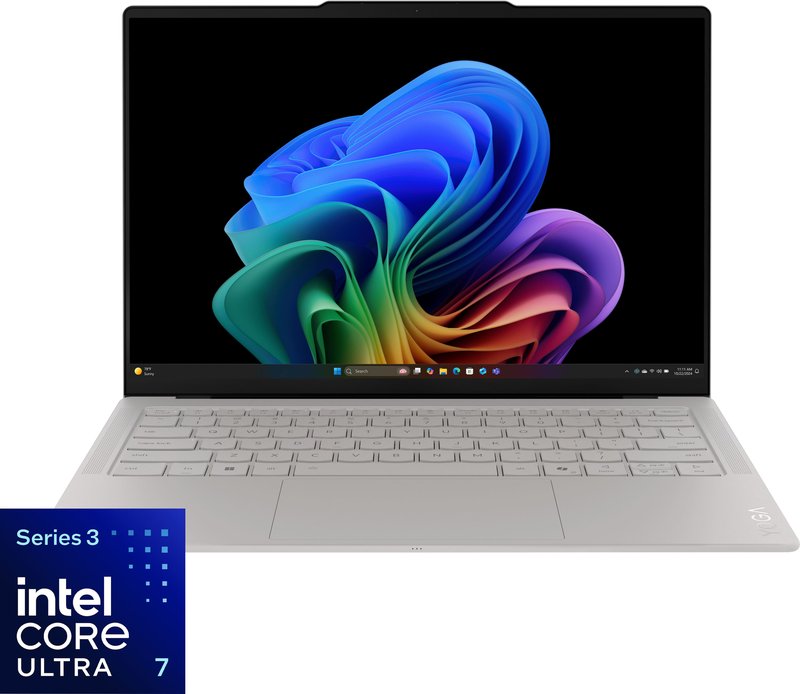
Start with the Lenovo Yoga Slim 7i Ultra Aura Edition if you need a lightweight Windows laptop to prepare code, inspect smaller extracts and connect to university computing. The 32GB/1TB US Gen 11 build offers local headroom and a 975 g starting chassis. Keep a Framework Laptop 13 quote beside it if upgradeable memory would help during a long degree, and consider an institution-approved ThinkPad when support and enrolment control eligibility. Lenovo product specifications · US configuration page.
A project can require a managed compute environment, a particular licence or access to a dataset you cannot copy onto a personal machine. Find that boundary before choosing storage or a processor. The right campus laptop prepares work locally on permitted samples, submits it through the institution’s approved path and handles the returned outputs in the right format.
The shortlist at a glance
Start with the department’s indication about required software, classroom hardware and data storage. Then use sample materials to reproduce one representative working session. Compare local capacity while a reference and the actual editing tool stay open. Finish by deciding where you will read, where you will type and which work can move to an approved shared machine. Fit the order to those stages.
| US reference | Device mass | Screen | Battery | Best fit in this comparison |
|---|---|---|---|---|
| Yoga Slim 7i Ultra | 975 g starting | 14-inch 2880 × 1800 OLED touch | 75 Wh | Frequent walking with an x86 Windows development client |
| ThinkPad X1 Carbon Gen 14 | under 1 kg at family start | 14-inch WUXGA touch on this reference | 58 Wh | A specific device image and connecting at shared desks |
| Framework Laptop 13 | 1.30 kg listed | 13.5-inch 2256 × 1504 matte option | 61 Wh | Extending a personally owned machine as work changes |
| MacBook Air 13 M5 | 1.23 kg listed | 13.6-inch 2560 × 1664 Liquid Retina | 53.8 Wh | Open-source tools with a verified native Mac environment |
| LG gram 14 | 2.47 lb listed, about 1.12 kg | 14-inch 1920 × 1200 IPS on the US model | 72 Wh | Modest local work with lab-based heavy computation |
| Zenbook A14 | about 980 g at family start | 14-inch 1920 × 1200 OLED on reference family | 70 Wh | A browser and native tools after explicit tests |
Consider US laptop bodies with a reference or starting mass around 1.50 kg or below, then weigh the complete travel or teaching kit separately. For detachable models, measure the tablet alone and again with every accessory needed for the day. This comparison uses the manufacturer’s stated figures where available. Panel, finish and component changes can move the weight. Battery capacity in watt-hours describes stored energy, and runtime depends on the workload and the configuration tested.
For the broader shortlist, compare the same order with the graduate research software and memory comparison. Keep the preferred candidate’s order code beside the review so any difference in screen or connectors is easy to recognise.
Name what will run at each location
Divide the project into local editing, approved compute and clean review. Suppose an applied statistics class lets students use small sample tables on a laptop, while a lab processes the full dataset on campus. A laptop trial should use one small script and a documented environment, then submit it using the same approved method as a normal account. Note which files are read locally, which outputs you can retrieve and which have to remain in the approved environment.
Establish how to read the report without a complete local rerun. A Quarto project, for example, can use execution settings or profiles to coordinate editing and a planned render. Check who owns the environment setup and whether package installation is allowed. A rendered statement or figure should identify which input version was used, so that a reviewer can recover it even if the program runs on another machine.
Compare local memory against simultaneous work
Start with your largest permitted data extract, the editor, reference documents and video software if you are likely to meet while the job runs. Record the peak memory and where the application reads or writes temporary data. If a measured 16GB test leaves regular pauses or prevents another program from staying open, price the 32GB machine. A constraint set by the remote compute quota is a different issue, and needs an answer from the university.
For illustration, four 1.5 GB local extracts total 6 GB on disk. Their in-memory representation and temporary joins may take much more, depending on file format and code. Run the exact work you expect to keep local and plan for the results visible from your laptop. If the most demanding simulation has to stay on campus, prioritize a screen and keyboard you can use during a long review over a speculative upgrade for that simulation.
The decision changes when your work centers on field Interviews and Transcript Work. Check which part of the kit can carry over into that routine.
Run one work session when you cannot connect
Try reading the approved documentation and editing a synthetic example on a disconnected laptop. Save the edit and resume it using the campus workflow. That exercise exposes missing local documentation, package cache or software version assumptions. Respect the institution’s rules on what can leave the approved system. Local compatibility is easiest to test using artificial input with the same structure so the laptop purchase stays separate from the data decision.
A machine can be exempt from part of the exercise if the department provides a loaner for lab sessions. Ask whether it is available at the times you do additional work and whether your home laptop can collaborate with the output. The final decision should specify which device you will use for each task when the lab is busy.
Estimate total cost without buying compute you cannot use
Use a rough $1,850 buying target to ask for quotes, then put memory, storage, support and required dock on distinct lines. Suppose a machine is $1,650 and a necessary dock is $85. That leaves $115 before tax or optional upgrades. Use those figures as allocations for an example, and replace them with the genuine offer. An external desktop unit or more campus hours can be worth pricing when the institution supports it and your main constraint is local throughput.
Take the approval and resume exercise seriously
Plan one local or remote interruption in the test project. Save the synthetic script, break the ordinary connection and return through the system the university supports. Have the comparator reconstruct the active input and re-open the report. Use a permitted example to check that package setup and remembered filenames are enough to recreate the environment. Ask the lab to show you the intended alternative if a deadline falls outside the staffed hours.
Through that exercise, note where the laptop’s screen and responsiveness matter. The commuter may interact with the lab mostly to view output or make a small code change on campus. An entirely local workflow may need more installed memory or a larger SSD. Review the balance ahead of any upgrade. The comparison matters most when it tells you which part can be made portable while preserving the restrictions on the main experiment.
Take the small local workflow to a typical campus desk with the approved login, charger and documentation available. Ask which settings were saved in your project and which belonged to that one machine. Recover the same intended result in a supported second session, then decide if a lighter default configuration would cover the weekly work.
6 models and the configuration to price
1. Yoga Slim 7i Ultra — Best for frequent walking with an x86 Windows development client
Configuration and connections. 14-inch Gen 11, US 83QK0000US: Core Ultra 7 355, integrated Intel Graphics, 32GB LPDDR5X and 1TB SSD. Three Thunderbolt 4 USB-C ports. HDMI, USB-A and wired audio require a suitable adapter. Specifications · US buying information.
The 32GB Yoga is especially useful when a student moves between rooms and wants one familiar setup to run editor, local extracts and reviewed output. Give it a full round-trip test under the real account. The all-USB-C port arrangement should be part of any shared lab dock check.
In Notebookcheck’s review the 32GB Core Ultra 7 355 review unit weighed 978 g and ran for 10 hours 36 minutes in the site’s Wi-Fi web-browsing test. Use that as a reference for light browsing; video meetings, tethering and sustained work have different demands. Confirm the full order code. The adjacent Yoga Slim 7i without Ultra is a separate product and may have a different port layout. Notebookcheck Yoga Slim 7 Ultra review.
2. ThinkPad X1 Carbon Gen 14 — Best for a specific device image and connecting at shared desks
Configuration and connections. US 21V700AQUS reference: Core Ultra 7 355, Intel Graphics, 32GB LPDDR5X and 1TB SSD. Three Thunderbolt 4, USB-A, HDMI and a headset jack on the family. Specifications · US buying information.
If the university specifies the system or the support queue, get the exact X1 Carbon listed by procurement. Native ports are useful in a lab where your allotted desk might have HDMI and a borrowed input device. See whether the approved image meets the candidate’s display and memory configuration.
Native HDMI and USB-A give this platform a route to a wired display and a legacy USB peripheral while a USB-C port supplies power. The quoted panel and support term are separate buying decisions. Require the written quote to identify the display, operating-system edition and support entitlement. Fleet eligibility depends on the order the employer approves. Model documentation.
3. Framework Laptop 13 — Best for extending a personally owned machine as work changes
Configuration and connections. US DIY Ryzen AI 5 340 with Radeon 840M, configure with 32GB DDR5, 1TB NVMe and a licensed OS. Four modular bays. Choose USB-C, USB-A, HDMI or other Expansion Cards and check their supported bay positions. Specifications · US buying information.
The Framework quote can show the price of replaceable memory and SSD parts plainly. Select compatible modules and a distinct repair or upgrade interval rather than buying capacity based on a future guess. Verify that any Linux or Windows build you plan to use is supported by the department application.
Replaceable memory and configurable ports can matter across several years of use. A purchased set of modules still requires the buyer to allocate bays for power, the screen and each attached device. Quote memory, SSD, OS, power adapter and selected cards explicitly for a DIY order. Price the prebuilt option separately if setup time matters. Model documentation.
4. MacBook Air 13 M5 — Best for open-source tools with a verified native Mac environment
Configuration and connections. US 13-inch M5, choose 24GB unified memory and 1TB SSD for this comparison. MagSafe 3, two Thunderbolt 4 USB-C ports and a headphone jack. An HDMI display needs the appropriate cable or adapter. Specifications · US buying information.
A current MacBook Air can fit the student whose local tools and connection method are established on macOS. Trial the exact package versions and any report fonts. A class assignment that works on the student’s Mac should still be deliverable in the form the grader expects.
Apple documents up to two external displays alongside the built-in display, within the supported resolution and refresh limits. MagSafe can handle power without occupying a Thunderbolt port. Confirm the Mac version of the mandatory application, add-in or endpoint tool with its vendor or your administrator before ordering. Model documentation.
5. LG gram 14 — Best for modest local work with lab-based heavy computation
Configuration and connections. US 14Z90T-G.AAB2U1, Core Ultra 5 226V, Intel Arc graphics, 16GB RAM and 512GB SSD. Two Thunderbolt 4, two USB-A, HDMI and a headphone jack. Specifications · US buying information.
A gram quote with 16GB may cover editing, a browser and smaller previews. Load a real local sample while the lab dashboard and a reference PDF are open. If the persistent local load is light and the screen connections are useful, compare the lower memory budget with the 32GB Yoga.
The large list of native connectors suits ordinary office or research peripherals. The chosen 16GB/512GB combination is best evaluated with the simultaneous documents and applications that stay open during a busy session. Compare a 16GB configuration with your actual peak workspace and how much of the 512GB disk must be kept free. Read the full 14Z90T suffix on the quote. Model documentation.
6. Zenbook A14 — Best for a browser and native tools after explicit tests
Configuration and connections. US UX3407QA reference: Snapdragon X X1-26-100, Adreno graphics, 16GB and 512GB SSD. Two USB4 Type-C with display and charging, USB-A, HDMI and headset audio. Specifications · US buying information.
The A14 makes a case when the permitted journals, editor and access software already work on Windows on Arm. Check any VPN, specialist package and local peripheral through the university’s support route. A student who must borrow another laptop each lab day faces a meaningful trade-off for the low starting mass.
It combines a low starting mass with native HDMI. Its Arm processor still makes software and peripheral approval a separate gate for work that relies on a driver or company-issued security client. Separate this original Snapdragon X reference from the newer X2 Elite variants on the ASUS page. Verify the installed memory and the app and driver list for Windows on Arm. Model documentation.
A purchase trial that ends in usable academic work
Try one complete local-to-campus workflow. Prepare a synthetic extract, an environment description and a report skeleton with a small figure. Use the same source materials on each system and ask the same person to check the end result. Start with the charger, network and version of the software you expect to have at the destination. Record what needs permission or an approved alternative before counting any device as eligible. Put the results for Yoga Slim 7i Ultra and ThinkPad X1 Carbon Gen 14 beside one another so the acceptance decision follows the actual scenario.
For the second pass, try the local part offline, then submit to the permitted test environment and retrieve the output you may keep. Use an ordinary supported way to recover the work so you can repeat it later without assistance. Note the time spent restoring the accessory or software and the time left to finish the job. The useful benchmark is that a reviewer can link the local edit to the correct remote job and the checked output without needing a second platform. Keep a copy of the settings for the configuration that passes, including changes to display scaling, input and power.
Have a campus loaner or project workstation authorized for the job ready during the test. Change only one part of the setup at a time after a problem. A device trial should tell you whether replacing the computer would solve it, or whether a different cable, application setting or room arrangement would do the job. Consider the practical consequence when comparing candidates: an approved fleet setup changes the shortlist if access tools or a campus device identity are mandatory. Keep the published capability beside your observation so a future purchase can reproduce the working setup.
Where to set the budget for this program
Use a planning ceiling of $1,850 before tax for this example. If the line for the approved desk connection and support tier reserves $100, the laptop has $1,750 of room. Compare the retailer or school quotes using the same storage, included equipment and support assumptions. These amounts illustrate the arithmetic of a purchase decision. The linked US listings and written offers provide the actual pricing and availability.
For every quote, record the exact model code, OS edition, panel, installed memory and size of the SSD. List any equipment your institution or employer supplies separately. For an older generation still offered by a reseller, ask how much time remains on the coverage you are buying and how you would replace a bundled accessory. Use the documented requirements of one complete local-to-campus workflow to decide which configuration can drop an accessory or start with less local capacity.
Documentation for the actual setup
Quarto project profiles let the same project use different settings in different contexts. Agree what the laptop must render and what the course or research group will render in its other environment. Include the required formats and package versions in the notebook comparison. Quarto project profiles.
Quarto describes the difference between global project rendering with freeze and rendering an individual document. A preview can use earlier output by design. Record the chosen workflow and check the output after changing a known input, so the author and the reviewer can tell which results have actually been regenerated. Quarto code execution and freeze documentation.
Microsoft lists native Microsoft 365 apps for Windows on Arm and explains how applications and drivers differ. Write the versions of the work applications and the peripherals you need on the same page as the laptop’s processor. Confirm an architecture-specific driver with the vendor before using a general compatibility result to approve the system. Microsoft’s Windows on Arm app and peripheral FAQ.
For a second comparison of a full working day, see theses Built from Large Scanned Sources. Use the same quote when the equipment requirements overlap.
Frequently asked questions
Does local memory increase the remote allocation?
Treat local RAM and the approved system’s resource allocation as different purchase inputs. The laptop has to handle local applications and file previews. Ask the system owner about memory or runtime limits for the remote job.
Can I buy for one operating system and submit from another?
Check the approved tools and package assumptions with a synthetic sample. Your code and output may be portable, and drivers, GUI settings or fonts can still require an exact build.
When is 64GB worth asking about?
When representative local jobs regularly exceed the useful headroom of a 32GB unit and they must run locally. Compare exact 64GB builds or an upgradeable machine, include the price difference and check the school’s approved alternative.
Sources
- Lenovo Yoga Slim 7i Ultra Aura Edition specifications
- Yoga Slim 7i Ultra US product and purchase details
- Lenovo ThinkPad X1 Carbon Gen 14 Aura Edition specifications
- ThinkPad X1 Carbon Gen 14 US product and purchase details
- Framework Laptop 13 AMD Ryzen AI 300 specifications
- Framework Laptop 13 US product and purchase details
- Apple MacBook Air 13-inch M5 specifications
- MacBook Air 13 M5 US product and purchase details
- LG gram 14 14Z90T-G.AAB2U1 specifications
- ASUS Zenbook A14 UX3407QA specifications
- Zenbook A14 US product and purchase details
- Quarto project profiles
- Quarto code execution and freeze documentation
- Microsoft’s Windows on Arm app and peripheral FAQ