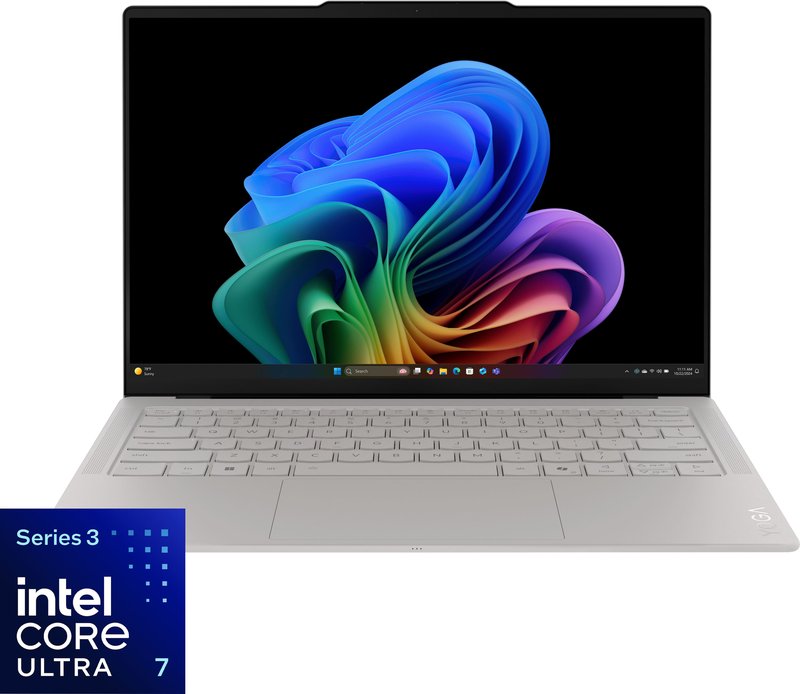
The Lenovo Yoga Slim 7i Ultra earns the first carry slot for a traveler who takes their own laptop on every leg and can reconstruct the necessary files and apps on an approved spare. Review the 14-inch Gen 11 US reference with the 32GB/1TB configuration and the charging kit you can use for the whole route. Ask for a ThinkPad X1 Carbon Gen 14 quote first if your travel policy depends on the enterprise support agreement or standard image being accepted at every office. Lenovo product specifications · US configuration page.
For a multi-city itinerary, compare how long the work would stop if a display cracked or a charger was left at the first location. Consider a three-stop tour where the only local IT desk is at HQ, and an appointment on the first afternoon uses a client workbook plus Office sign-in. Support only helps if your arrangement includes the place, your serial number and the particular problem.
The shortlist at a glance
The first gate is the deliverable and any employer requirements. Open the client’s file format and attach the essential hardware using a checked sample. Then compare the packed dimensions and weight. Finally put the price and regional support for the exact U.S. order beside the itinerary. A model should stay on the list only when the travel work has a reliable route through each of those checks.
| US reference | Device mass | Screen | Battery | Best fit in this comparison |
|---|---|---|---|---|
| Yoga Slim 7i Ultra | 975 g starting | 14-inch 2880 × 1800 OLED touch | 75 Wh | Personal carry with an employer-approved spare at headquarters |
| ThinkPad X1 Carbon Gen 14 | under 1 kg at family start | 14-inch WUXGA touch on this reference | 58 Wh | A fleet that recognizes the exact machine at branch offices |
| Framework Laptop 13 | 1.30 kg listed | 13.5-inch 2256 × 1504 matte option | 61 Wh | Replacing a known module or bay between trips |
| LG gram 14 | 2.47 lb listed, about 1.12 kg | 14-inch 1920 × 1200 IPS on the US model | 72 Wh | A lightweight traveler that can borrow familiar meeting cables |
| Zenbook S 14 | about 1.2 kg listed for UX5406SA | 14-inch 2880 × 1800 OLED touch on the reference | 72 Wh | A second Windows machine able to replay the same customer job |
| MacBook Air 13 M5 | 1.23 kg listed | 13.6-inch 2560 × 1664 Liquid Retina | 53.8 Wh | An Apple managed fleet with Mac-native client deliverables |
Consider US laptop bodies with a reference or starting mass around 1.50 kg or below, then weigh the complete travel or teaching kit separately. For detachable models, measure the tablet alone and again with every accessory needed for the day. This comparison uses the manufacturer’s stated figures where available. Panel, finish and component changes can move the weight. Battery capacity in watt-hours describes stored energy, and runtime depends on the workload and the configuration tested.
For the broader shortlist, compare the same order with the business-travel size and weight comparison. Keep the preferred candidate’s order code beside the review so any difference in screen or connectors is easy to recognise.
Estimate the recovery time you can actually afford
Write the next three jobs in a timeline. There is a 30-minute arrival window on day one, a pricing revision before an evening train on day two, and a two-hour presentation on day three. For each job, identify the usual laptop, the quickest approved alternative and the time required to make the data and application available. The one with a short interval and a slow fallback is the useful stress test.
Suppose losing a full appointment would cost four billable hours and you have a 45-minute transfer between offices. A replacement sent overnight is helpful for the next morning and has little bearing on the immediate meeting. A confirmed branch-office loaner with an approved viewer may keep a planned presentation going, while a cloud sign-in and a temporary local account could still leave the revision job waiting. Rehearse the smallest complete fallback for both tasks so the distinction appears before the quote closes.
Get a regional service answer in writing
Ask the reseller or employer for the warranty and support terms on the specific US model. List the cities you actually visit, the response method after business hours, whether accidental damage is included and where a substitute unit could be collected. Read a device replacement and a claim for a damaged screen as different events. The brand name on the lid alone cannot tell you which dates, countries or local repair shops the order covers.
Put the administrative time into your comparison. A business-class option can justify a higher purchase quote if an existing support queue recognizes the exact model and common charger. A consumer-light configuration makes sense when your work is portable, a spare is already at the destination and its setup time is small. Confirm the company activation and device enrollment arrangements with the responsible person before a trip that leaves little time.
The decision changes when your work centers on regional Flights with a 7 kg Carry-On. Check which part of the kit can carry over into that routine.
Carry a deliberate recovery package
Use an employer-approved place for the final deck, a static view of the agenda and the contact who can grant access after a device loss. Test the access under the real fallback account in advance, including the authentication method the company provides. Think separately about the offline copy and the file the team will also update back at the office. Clearly name the copy a colleague should open to prevent two versions becoming the basis for the same meeting.
The laptop’s mass helps the traveler who takes it on every stop. A 100 g add-on has a second cost if it is one more thing to forget while leaving an unfamiliar room. Pack the adapter inside the presentation sleeve at the end of each meeting. Standardize the power adapter and cable across your kit if both the computer and employer have cleared the substitute. Such habits remove failure points that a spec sheet has no reason to list.
Price planned years of service and the replacement sequence
Separate the cost of the purchase, the optional coverage and the accessories that stay behind at each office. A planning case with a $2,100 cap might allocate $1,850 to the laptop, $125 to the required desk adapter and $125 to first-line coverage. If the quoted fleet term costs $220 more, decide which prior cost you can release and which interruption the service agreement would actually cover. Ask for distinct quantities when part of the kit is shared among several travelers.
Framework’s replaceable parts belong here when the team has a supplier and someone with time to perform a repair. The detachable pieces can also add complexity to a trip if the selected card is removed at the first desk. Choose the bare minimum number of parts that resolves both tomorrow’s trip and the equipment planned for later months.
6 models and the configuration to price
1. Yoga Slim 7i Ultra — Best for personal carry with an employer-approved spare at headquarters
Configuration and connections. 14-inch Gen 11, US 83QK0000US: Core Ultra 7 355, integrated Intel Graphics, 32GB LPDDR5X and 1TB SSD. Three Thunderbolt 4 USB-C ports. HDMI, USB-A and wired audio require a suitable adapter. Specifications · US buying information.
Choose the Yoga when most of the route depends on the machine on your shoulder, and your team already has an emergency package for the next presentation. The 32GB US reference can remain in a daily editing role alongside several work files. Ensure the display adapter travels with the bag, because a loaner and the familiar Yoga may need different connectors in the same room.
In Notebookcheck’s review the 32GB Core Ultra 7 355 review unit weighed 978 g and ran for 10 hours 36 minutes in the site’s Wi-Fi web-browsing test. Use that as a reference for light browsing; video meetings, tethering and sustained work have different demands. Confirm the full order code. The adjacent Yoga Slim 7i without Ultra is a separate product and may have a different port layout. Notebookcheck Yoga Slim 7 Ultra review.
2. ThinkPad X1 Carbon Gen 14 — Best for a fleet that recognizes the exact machine at branch offices
Configuration and connections. US 21V700AQUS reference: Core Ultra 7 355, Intel Graphics, 32GB LPDDR5X and 1TB SSD. Three Thunderbolt 4, USB-A, HDMI and a headset jack on the family. Specifications · US buying information.
This ThinkPad is a strong candidate when the selected build is covered by the company’s current imaging and support arrangement. Ask about the coverage using the 21V7 order on the quote. The available direct ports also let a branch office use a readily available USB-A receiver or HDMI cable during a swap.
Native HDMI and USB-A give this platform a route to a wired display and a legacy USB peripheral while a USB-C port supplies power. The quoted panel and support term are separate buying decisions. Require the written quote to identify the display, operating-system edition and support entitlement. Fleet eligibility depends on the order the employer approves. Model documentation.
3. Framework Laptop 13 — Best for replacing a known module or bay between trips
Configuration and connections. US DIY Ryzen AI 5 340 with Radeon 840M, configure with 32GB DDR5, 1TB NVMe and a licensed OS. Four modular bays. Choose USB-C, USB-A, HDMI or other Expansion Cards and check their supported bay positions. Specifications · US buying information.
A DIY Framework can be rational if the traveler controls the device and the group can keep compatible spare parts at a regular office. Treat assembly and setup as part of the time budget, then check the path for replacing the part that is most likely to interrupt the next appointment. This design has its greatest advantage when the repair can be planned around real obligations.
Replaceable memory and configurable ports can matter across several years of use. A purchased set of modules still requires the buyer to allocate bays for power, the screen and each attached device. Quote memory, SSD, OS, power adapter and selected cards explicitly for a DIY order. Price the prebuilt option separately if setup time matters. Model documentation.
4. LG gram 14 — Best for a lightweight traveler that can borrow familiar meeting cables
Configuration and connections. US 14Z90T-G.AAB2U1, Core Ultra 5 226V, Intel Arc graphics, 16GB RAM and 512GB SSD. Two Thunderbolt 4, two USB-A, HDMI and a headphone jack. Specifications · US buying information.
The US gram has enough direct ports to rebuild many basic room connections from equipment an office already has. Use the 16GB/512GB quote for a modest workflow and decide where the group will store the bigger shared material. Ask what gets excluded if a lower-cost US consumer warranty is cheaper than the business alternatives.
The large list of native connectors suits ordinary office or research peripherals. The chosen 16GB/512GB combination is best evaluated with the simultaneous documents and applications that stay open during a busy session. Compare a 16GB configuration with your actual peak workspace and how much of the 512GB disk must be kept free. Read the full 14Z90T suffix on the quote. Model documentation.
5. Zenbook S 14 — Best for a second Windows machine able to replay the same customer job
Configuration and connections. US UX5406SA-PS79T: Core Ultra 7 258V with Intel Arc graphics, 32GB and 1TB SSD. Two Thunderbolt 4, USB-A, HDMI and headphone audio on the reference. Specifications · US buying information.
An x86 Zenbook configuration can serve a traveling owner who prioritizes the same Windows app mix as the Slim and prefers built-in HDMI. The value lies in reproducing that job with fewer packed video pieces. Price the model as a complete system and identify the local care arrangement before counting on it mid-trip.
The reference keeps a direct HDMI path and pairs 32GB memory with an x86 Windows platform. Its OLED panel is glossy, so check readability with bright windows in the positions you normally use. Match the US suffix and the touchscreen line. ASUS lists the later UX5406AA on the same product page, with its own processor choices. Model documentation.
6. MacBook Air 13 M5 — Best for an Apple managed fleet with Mac-native client deliverables
Configuration and connections. US 13-inch M5, choose 24GB unified memory and 1TB SSD for this comparison. MagSafe 3, two Thunderbolt 4 USB-C ports and a headphone jack. An HDMI display needs the appropriate cable or adapter. Specifications · US buying information.
The MacBook Air makes sense when the employer has a familiar Mac replacement setup and the client work has already passed its cross-platform checks. Confirm the spare’s charging and video path before the itinerary begins. The alternative depends on the Mac fleet’s own enrollment, support and exact-version software rather than presumed equivalence with the Windows kit.
Apple documents up to two external displays alongside the built-in display, within the supported resolution and refresh limits. MagSafe can handle power without occupying a Thunderbolt port. Confirm the Mac version of the mandatory application, add-in or endpoint tool with its vendor or your administrator before ordering. Model documentation.
What to reproduce before the next trip
Try a timed swap at the smallest branch office. Prepare a mock meeting file, a controlled spreadsheet and the contact list approved for the trip. Use the same source materials on each system and ask the same person to check the end result. Start with the charger, network and version of the software you expect to have at the destination. Record what needs permission or an approved alternative before counting any device as eligible. Put the results for Yoga Slim 7i Ultra and ThinkPad X1 Carbon Gen 14 beside one another so the acceptance decision follows the actual scenario.
For the second pass, replace the test laptop with the nominated branch unit and run the session using the approved login. Use an ordinary supported way to recover the work so you can repeat it later without assistance. Note the time spent restoring the accessory or software and the time left to finish the job. The useful benchmark is that the next meeting can begin from the backup within the actual available transfer window. Keep a copy of the settings for the configuration that passes, including changes to display scaling, input and power.
Have the agreed loaner and the public-safe copy of the presentation ready during the test. Change only one part of the setup at a time after a problem. A device trial should tell you whether replacing the computer would solve it, or whether a different cable, application setting or room arrangement would do the job. Consider the practical consequence when comparing candidates: a device with faster response terms can be worth more than a lower body mass when a shared spare must arrive from another city. Keep the published capability beside your observation so a future purchase can reproduce the working setup.
Buying around the trip you actually book
Use a planning ceiling of $2,100 before tax for this example. If the line for the spare-charger allocation and the exact service term reserves $125, the laptop has $1,975 of room. Compare the retailer or school quotes using the same storage, included equipment and support assumptions. These amounts illustrate the arithmetic of a purchase decision. The linked US listings and written offers provide the actual pricing and availability.
For every quote, record the exact model code, OS edition, panel, installed memory and size of the SSD. List any equipment your institution or employer supplies separately. For an older generation still offered by a reseller, ask how much time remains on the coverage you are buying and how you would replace a bundled accessory. Use the documented requirements of a timed swap at the smallest branch office to decide which configuration can drop an accessory or start with less local capacity.
Documentation for the actual setup
Framework documents the module and mainboard options offered for its Ryzen AI 300 Laptop 13. Check the promised part supply and the valid bay choices for your build. For a DIY quote, count the memory, storage, power and operating system setup before comparing the delivered laptop cost. Framework Laptop 13 AMD platform and upgrade announcement.
Microsoft lists native Microsoft 365 apps for Windows on Arm and explains how applications and drivers differ. Write the versions of the work applications and the peripherals you need on the same page as the laptop’s processor. Confirm an architecture-specific driver with the vendor before using a general compatibility result to approve the system. Microsoft’s Windows on Arm app and peripheral FAQ.
Notebookcheck measured 978 g on its Lenovo Yoga Slim 7 Ultra 14IPH11 review unit, with a Core Ultra 7 355 and 32GB of memory. The publication’s Wi-Fi browsing test lasted 10 hours 36 minutes. Read the brightness and workload context before applying the number to travel. An export, an external screen and a long call can draw energy differently. Notebookcheck Yoga Slim 7 Ultra review.
For a second comparison of a full working day, see preparing a Tender Presentation Away from the Office. Use the same quote when the equipment requirements overlap.
Frequently asked questions
Which matters more on a three-city route, body weight or warranty?
Define what happens while you are waiting on a repair or shipment. If an eligible spare already covers the schedule, a light body has daily value. If a lost day would cause several missed appointments, a service arrangement or site loaner can be the bigger purchase decision.
Will an external drive solve recovery by itself?
It can carry permitted files, but the replacement still needs the application, account and permissions to open and submit them. Confirm the data handling rules with your employer, then rehearse the approved recovery on another device with a sample file.
Should I budget a spare adapter?
Check which equipment is promised at each stop. If a particular adapter is essential at the venue and you cannot replace it locally before the meeting, a checked spare can be worth the small mass. Put both pieces on the scale before using the cabin baggage allowance.
Sources
- Lenovo Yoga Slim 7i Ultra Aura Edition specifications
- Yoga Slim 7i Ultra US product and purchase details
- Lenovo ThinkPad X1 Carbon Gen 14 Aura Edition specifications
- ThinkPad X1 Carbon Gen 14 US product and purchase details
- Framework Laptop 13 AMD Ryzen AI 300 specifications
- Framework Laptop 13 US product and purchase details
- LG gram 14 14Z90T-G.AAB2U1 specifications
- ASUS Zenbook S 14 UX5406SA specifications
- Zenbook S 14 US product and purchase details
- Apple MacBook Air 13-inch M5 specifications
- MacBook Air 13 M5 US product and purchase details
- Framework Laptop 13 AMD platform and upgrade announcement
- Microsoft’s Windows on Arm app and peripheral FAQ
- Notebookcheck Yoga Slim 7 Ultra review