Start with the Lenovo Yoga Slim 7i Ultra Aura Edition when your team builds bid documents in desktop Windows and you want a 14-inch machine you can carry all day. Its 32GB/1TB US reference gives you a useful baseline for editing spreadsheets and slides together. Keep a wired display adapter with the laptop. The ThinkPad X1 Carbon Gen 14 moves ahead when the client has confirmed HDMI and the whole trip depends on a fast, direct setup. Lenovo product specifications · US configuration page.
In a tender meeting, the difficult step is keeping the price schedule, the submitted PDF and the slides in agreement after a late clarification. A polished OLED panel or a new processor badge has limited value if the pricing add-in is unavailable. This comparison treats the approved workbook and the presented result as the documents a buyer has to carry through the day.
The shortlist at a glance
The first gate is the deliverable and any employer requirements. Open the client’s file format and attach the essential hardware using a checked sample. Then compare the packed dimensions and weight. Finally put the price and regional support for the exact U.S. order beside the itinerary. A model should stay on the list only when the travel work has a reliable route through each of those checks.
| US reference | Device mass | Screen | Battery | Best fit in this comparison |
|---|---|---|---|---|
| Yoga Slim 7i Ultra | 975 g starting | 14-inch 2880 × 1800 OLED touch | 75 Wh | Drafting and proofing a Windows bid on a light laptop |
| ThinkPad X1 Carbon Gen 14 | under 1 kg at family start | 14-inch WUXGA touch on this reference | 58 Wh | Moving from a wired meeting table to the presenter position |
| Zenbook S 14 | about 1.2 kg listed for UX5406SA | 14-inch 2880 × 1800 OLED touch on the reference | 72 Wh | Native HDMI with an OLED work surface for proofing |
| LG gram 14 | 2.47 lb listed, about 1.12 kg | 14-inch 1920 × 1200 IPS on the US model | 72 Wh | Template work with conventional cable and peripheral needs |
| MacBook Air 13 M5 | 1.23 kg listed | 13.6-inch 2560 × 1664 Liquid Retina | 53.8 Wh | A tested Mac-native bid team with verified exports |
| Framework Laptop 13 | 1.30 kg listed | 13.5-inch 2256 × 1504 matte option | 61 Wh | Maintaining a travel machine through several bid cycles |
Consider US laptop bodies with a reference or starting mass around 1.50 kg or below, then weigh the complete travel or teaching kit separately. For detachable models, measure the tablet alone and again with every accessory needed for the day. This comparison uses the manufacturer’s stated figures where available. Panel, finish and component changes can move the weight. Battery capacity in watt-hours describes stored energy, and runtime depends on the workload and the configuration tested.
For the broader shortlist, compare the same order with the business-travel size and weight comparison. Keep the preferred candidate’s order code beside the review so any difference in screen or connectors is easy to recognise.
Find the workbook feature that makes the purchase decision
Ask the bid lead for a clean sample that contains the same queries, add-ins and print settings as the live bid. Fill in one change, refresh the relevant totals and check the outputs with the person who owns the template. A standard worksheet can open correctly on a different platform even when the last mile requires a specialized add-in, a certificate or a vendor service that has to be approved separately.
Put the document workflow in order. At the hotel desk, revise the cost model and export the price schedule. Next compare its total and version with the slide that uses the number. Before leaving for the client, test the calculation and export while offline if the submission rules permit local copies. A laptop earns its position after it can reproduce the chain under the account and connection you will have on the trip.
Keep the submission and the rehearsal separate
Suppose the organizer allows 20 minutes for the presentation. Use 12 minutes to show the decision slides and set aside eight for questions and playback surprises in your rehearsal. The organizer’s submission deadline is a separate constraint. Write the final filenames in the checklist beside the revision date and designate who sends the file. A complete pass from editing the workbook to verifying the sent PDF is more valuable than a rapid run from opening the deck to starting the show.
Export a stable PDF of the submitted version. A PDF can preserve layout for a reviewer, while the presenter may need animation, video, or speaker notes from the original presentation. Open both copies on the meeting machine and decide which version to use if the organizer’s setup gives you a mirrored display instead of an extended one. This is also a good point to check any instruction the organizer provides about filename size, submission permissions or USB drives.
The decision changes when your work centers on regional Flights with a 7 kg Carry-On. Check which part of the kit can carry over into that routine.
Verify the visible slide and the speaker notes
Use a dummy presentation that has the same visual structure as the bid, including one slide with dense figures and another with private presenter notes. On Windows, connect the planned HDMI route and choose Extend to practice Presenter View. Ask someone at the far side of the room to read the numbers that matter and check which screen shows the notes. In a meeting with no rehearsal period, choose a static slide view you can run confidently on a mirrored screen.
A direct HDMI socket reduces the number of items to pack when that is the room’s confirmed input. A USB-C-to-HDMI adapter can work well with the Slim if you know the exact hardware path. Keep the power supply on a different suitable port when possible. Run the rehearsal with the power, clicker and display all connected, including a quick stop and restart of the show after reconnecting.
Spend the remainder of the quote on the failure you can prevent
Use the U.S. purchase offers as separate order lines for laptop, power, video and support. A laptop quoted at $1,850 and an approved $75 adapter put a sample $1,900 pre-tax target over by $25. An imaginary $1,875 alternate with direct HDMI leaves $25 under the same target before support. These are budget examples, so reprice both comparisons from the linked offers and ask how long the quote is valid.
A regional sales office may already have a spare USB-C supply or a wired room kit. That matters only if someone can put the exact piece in your hands during the rehearsal. An insured loaner or stronger service term can be a better use of the budget when the meeting is hard to reschedule. Coordinate file access and the spare machine with the team while there is time to restore the required add-in.
Run the mock tender on the quoted computer with the same screen setting and time limit as the booked room. Rehearse how a teammate would find the submitted version if you step away. Confirm that your company’s system permits the handoff. Better workstation performance is valuable after the file, deadline and screen output agree in this trial.
6 models and the configuration to price
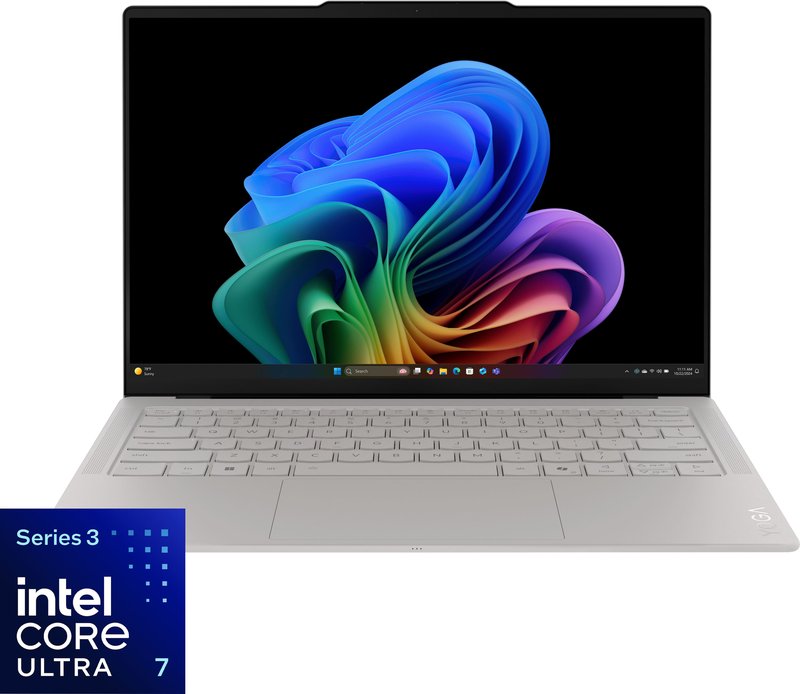
1. Yoga Slim 7i Ultra — Best for drafting and proofing a Windows bid on a light laptop
Configuration and connections. 14-inch Gen 11, US 83QK0000US: Core Ultra 7 355, integrated Intel Graphics, 32GB LPDDR5X and 1TB SSD. Three Thunderbolt 4 USB-C ports. HDMI, USB-A and wired audio require a suitable adapter. Specifications · US buying information.
Run the representative bid workbook with the PDF and deck open side by side. The Yoga combines the 32GB order with a 14-inch 16:10 display, and the three Thunderbolt ports gives several ways to connect one planned video cable. Use the display adapter in rehearsal, and check the exact U.S. order includes the operating-system edition the bid team expects.
In Notebookcheck’s review the 32GB Core Ultra 7 355 review unit weighed 978 g and ran for 10 hours 36 minutes in the site’s Wi-Fi web-browsing test. Use that as a reference for light browsing; video meetings, tethering and sustained work have different demands. Confirm the full order code. The adjacent Yoga Slim 7i without Ultra is a separate product and may have a different port layout. Notebookcheck Yoga Slim 7 Ultra review.
2. ThinkPad X1 Carbon Gen 14 — Best for moving from a wired meeting table to the presenter position
Configuration and connections. US 21V700AQUS reference: Core Ultra 7 355, Intel Graphics, 32GB LPDDR5X and 1TB SSD. Three Thunderbolt 4, USB-A, HDMI and a headset jack on the family. Specifications · US buying information.
If the buyer has an HDMI lead already laid out, the ThinkPad can put that lead and a USB receiver on the chassis while power stays on Thunderbolt. A U.S. quote with a WUXGA panel can be appropriate when a crisp external image matters more than the built-in panel resolution. Verify the exact availability of the enterprise build before setting the team’s delivery date.
Native HDMI and USB-A give this platform a route to a wired display and a legacy USB peripheral while a USB-C port supplies power. The quoted panel and support term are separate buying decisions. Require the written quote to identify the display, operating-system edition and support entitlement. Fleet eligibility depends on the order the employer approves. Model documentation.
3. Zenbook S 14 — Best for native HDMI with an OLED work surface for proofing
Configuration and connections. US UX5406SA-PS79T: Core Ultra 7 258V with Intel Arc graphics, 32GB and 1TB SSD. Two Thunderbolt 4, USB-A, HDMI and headphone audio on the reference. Specifications · US buying information.
The reference S 14 is useful when someone spends the evening reviewing charts on the laptop and then plugs straight into the venue. Its Windows architecture and 32GB establish an alternate to compare with the Slim. Check the presentation under room light if the glossy panel sits in the view of a window during the dressing rehearsal.
The reference keeps a direct HDMI path and pairs 32GB memory with an x86 Windows platform. Its OLED panel is glossy, so check readability with bright windows in the positions you normally use. Match the US suffix and the touchscreen line. ASUS lists the later UX5406AA on the same product page, with its own processor choices. Model documentation.
4. LG gram 14 — Best for template work with conventional cable and peripheral needs
Configuration and connections. US 14Z90T-G.AAB2U1, Core Ultra 5 226V, Intel Arc graphics, 16GB RAM and 512GB SSD. Two Thunderbolt 4, two USB-A, HDMI and a headphone jack. Specifications · US buying information.
For a bid with modest workbooks and a direct HDMI room, the gram is a simpler configuration worth testing. Let the actual workbook exercise decide whether 16GB supports the review, query refresh, PDF export and slideshow together. This is a reasonable quote to request when you can re-run the largest file during the retailer’s return window.
The large list of native connectors suits ordinary office or research peripherals. The chosen 16GB/512GB combination is best evaluated with the simultaneous documents and applications that stay open during a busy session. Compare a 16GB configuration with your actual peak workspace and how much of the 512GB disk must be kept free. Read the full 14Z90T suffix on the quote. Model documentation.
5. MacBook Air 13 M5 — Best for a tested Mac-native bid team with verified exports
Configuration and connections. US 13-inch M5, choose 24GB unified memory and 1TB SSD for this comparison. MagSafe 3, two Thunderbolt 4 USB-C ports and a headphone jack. An HDMI display needs the appropriate cable or adapter. Specifications · US buying information.
The Air suits a team that already uses desktop Office on macOS or a Mac-native tools stack whose submitted workbook behaves as required. Demonstrate the complete edit-and-export round under that platform. Use the HDMI setup you brought, and compare the bidder’s file with the client’s Windows copy before a tender with strict formatting requirements.
Apple documents up to two external displays alongside the built-in display, within the supported resolution and refresh limits. MagSafe can handle power without occupying a Thunderbolt port. Confirm the Mac version of the mandatory application, add-in or endpoint tool with its vendor or your administrator before ordering. Model documentation.
6. Framework Laptop 13 — Best for maintaining a travel machine through several bid cycles
Configuration and connections. US DIY Ryzen AI 5 340 with Radeon 840M, configure with 32GB DDR5, 1TB NVMe and a licensed OS. Four modular bays. Choose USB-C, USB-A, HDMI or other Expansion Cards and check their supported bay positions. Specifications · US buying information.
Request an assembled quote with the correct memory, SSD, HDMI card and the remaining cards the team uses. This helps a buyer who expects to change office equipment in the next contract period. A field replacement plan is useful when it names the spare component and who will carry it. Practice with the actual chosen port layout.
Replaceable memory and configurable ports can matter across several years of use. A purchased set of modules still requires the buyer to allocate bays for power, the screen and each attached device. Quote memory, SSD, OS, power adapter and selected cards explicitly for a DIY order. Price the prebuilt option separately if setup time matters. Model documentation.
What to reproduce before the next trip
Try a private tender rehearsal. Prepare a synthetic price schedule, an editable presentation with private notes and the submitted-format PDF. Use the same source materials on each system and ask the same person to check the end result. Start with the charger, network and version of the software you expect to have at the destination. Record what needs permission or an approved alternative before counting any device as eligible. Put the results for Yoga Slim 7i Ultra and ThinkPad X1 Carbon Gen 14 beside one another so the acceptance decision follows the actual scenario.
For the second pass, hand the organiser the PDF proof, then mirror the laptop and try the live deck again from the audience view. Use an ordinary supported way to recover the work so you can repeat it later without assistance. Note the time spent restoring the accessory or software and the time left to finish the job. The useful benchmark is that the figures match across documents and the file approved for submission can be opened during a venue change. Keep a copy of the settings for the configuration that passes, including changes to display scaling, input and power.
Have the organiser’s approved static PDF and prearranged display input ready during the test. Change only one part of the setup at a time after a problem. A device trial should tell you whether replacing the computer would solve it, or whether a different cable, application setting or room arrangement would do the job. Consider the practical consequence when comparing candidates: a changed print area or missing add-in makes a more expensive screen immaterial. Keep the published capability beside your observation so a future purchase can reproduce the working setup.
Buying around the trip you actually book
Use a planning ceiling of $1,900 before tax for this example. If the line for an approved video adapter and a clicker if needed reserves $125, the laptop has $1,775 of room. Compare the retailer or school quotes using the same storage, included equipment and support assumptions. These amounts illustrate the arithmetic of a purchase decision. The linked US listings and written offers provide the actual pricing and availability.
For every quote, record the exact model code, OS edition, panel, installed memory and size of the SSD. List any equipment your institution or employer supplies separately. For an older generation still offered by a reseller, ask how much time remains on the coverage you are buying and how you would replace a bundled accessory. Use the documented requirements of a private tender rehearsal to decide which configuration can drop an accessory or start with less local capacity.
Documentation for the actual setup
Microsoft’s Presenter View documentation distinguishes the speaker’s tools from the slide the audience sees and describes how presentations can use annotation. Try a short deck with an observer on both screens. If the room is wired to mirror, rehearse a version you can present from the audience view. Microsoft PowerPoint Presenter View instructions.
Microsoft’s PowerPoint export guidance describes saving a static version in PDF. Compare the exported document with the source where notes, media and fine text matter. A page-by-page viewing check helps establish if that file can serve as the agreed fallback or handoff copy. Microsoft PowerPoint PDF export guide.
Microsoft’s monitor troubleshooting guide explains the Windows Extend setting and the limits of ordinary splitters. Set up the display in the mode used for the job, record the path that works and verify that behavior after unplugging. When a particular room has fixed display equipment, ask its operator which input modes have been checked. Microsoft Windows external-monitor guide.
For a second comparison of a full working day, see multi-City Trips with a Loaner Plan. Use the same quote when the equipment requirements overlap.
Frequently asked questions
Can a browser spreadsheet replace desktop Excel for this visit?
Use a dummy copy and check the specific template’s add-ins, links, sign-off steps and exported page breaks. Browser access can be enough for viewing or entering a simple change. Quote the device against the actual desktop dependency if the bid requires it.
Is Presenter View crucial in every tender meeting?
It is valuable when a speaker uses detailed notes and the venue offers separate displays. For a mirrored screen, prepare a version you can deliver from the audience view. Rehearsing that version gives you a known option in a room you only see on the day.
Would a 16GB model be adequate?
Run the largest pricing workbook with the review browser, deck and PDF open. If that stays responsive on the provider’s configuration, a 16GB quote can be justified. Pay for 32GB when the real working set or a measured lack of headroom shows why it matters.
Sources
- Lenovo Yoga Slim 7i Ultra Aura Edition specifications
- Yoga Slim 7i Ultra US product and purchase details
- Lenovo ThinkPad X1 Carbon Gen 14 Aura Edition specifications
- ThinkPad X1 Carbon Gen 14 US product and purchase details
- ASUS Zenbook S 14 UX5406SA specifications
- Zenbook S 14 US product and purchase details
- LG gram 14 14Z90T-G.AAB2U1 specifications
- Apple MacBook Air 13-inch M5 specifications
- MacBook Air 13 M5 US product and purchase details
- Framework Laptop 13 AMD Ryzen AI 300 specifications
- Framework Laptop 13 US product and purchase details
- Microsoft PowerPoint Presenter View instructions
- Microsoft PowerPoint PDF export guide
- Microsoft Windows external-monitor guide